Building a Microsoft Teams App for Caller ID and Texting Alongside Teams Phone Direct Routing
Teams gives apps no live event for incoming Direct Routing calls. Here is how we hooked the call at the carrier instead, then added texting, tabs and a bot, and the traps along the way.
Our staff live in Microsoft Teams. Their phones ring in Teams (Teams Phone with Direct Routing through our own SBC), their chats are in Teams, and until recently the only thing they could not do in Teams was see who was calling and text customers from their own business number.
So we built a small Teams app that does two things:
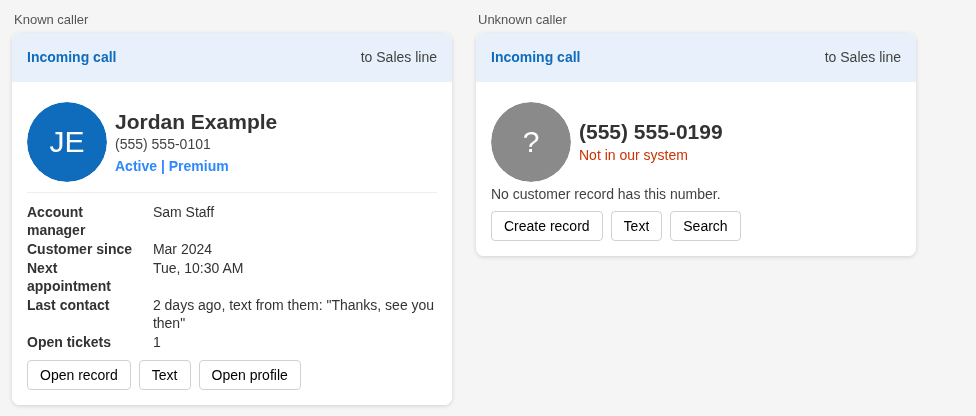
- Caller ID card on ring. While a call is ringing on a staff line or a ring group, everyone it rings gets a card in Teams (plus an activity feed toast) that says who is calling, pulled from our own customer database. Unknown numbers get "Not in our system" with Text, Search and Create record buttons.
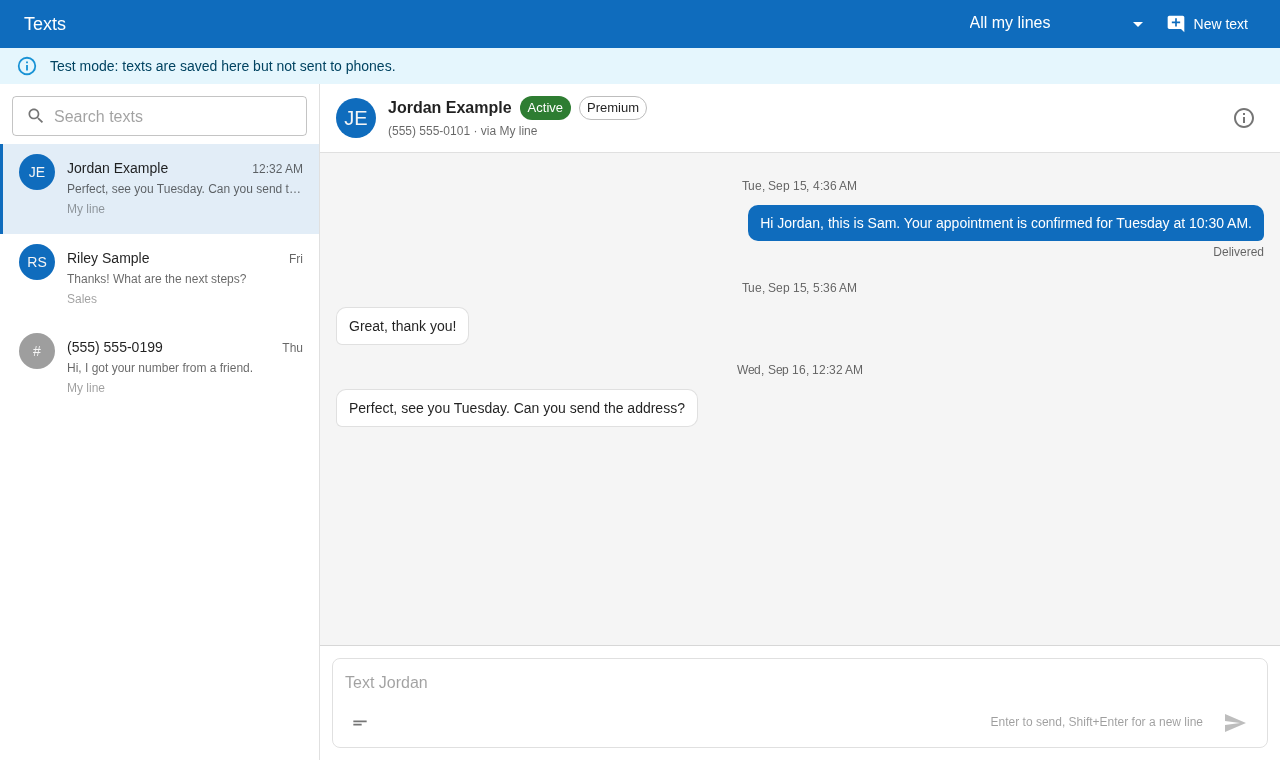
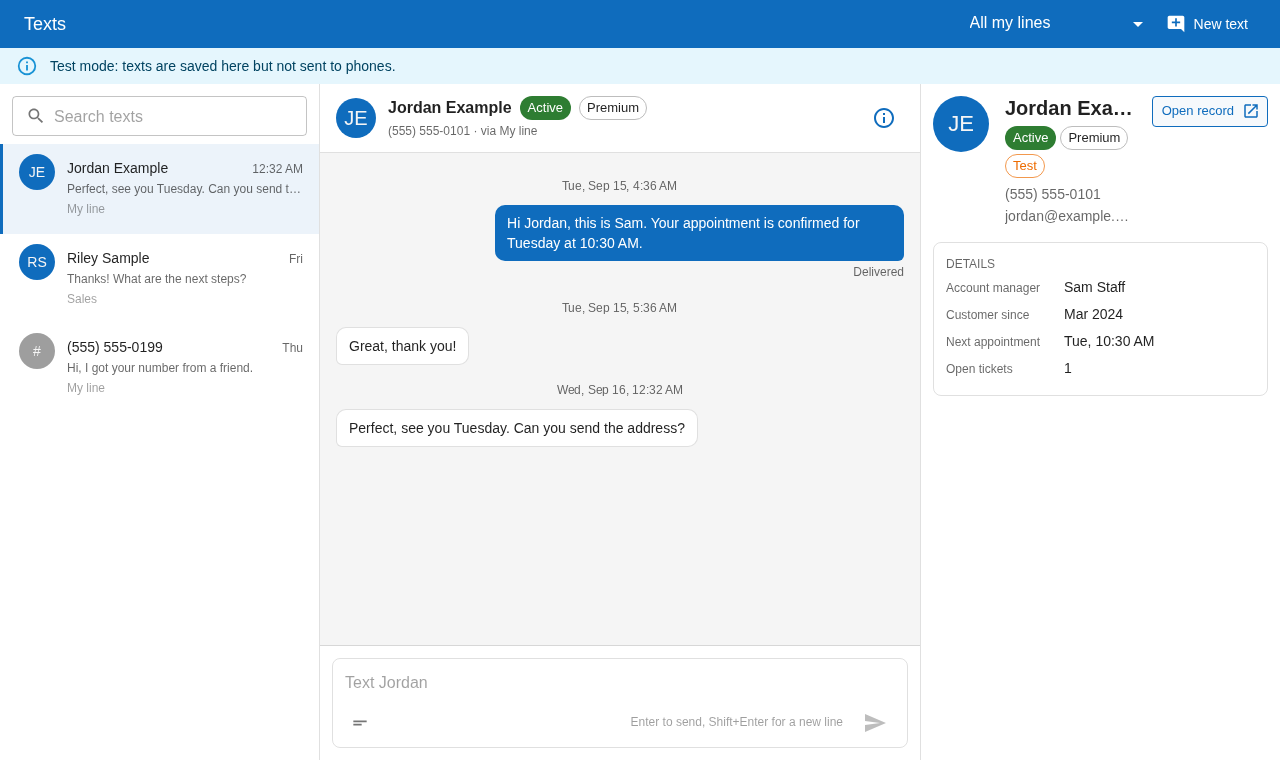
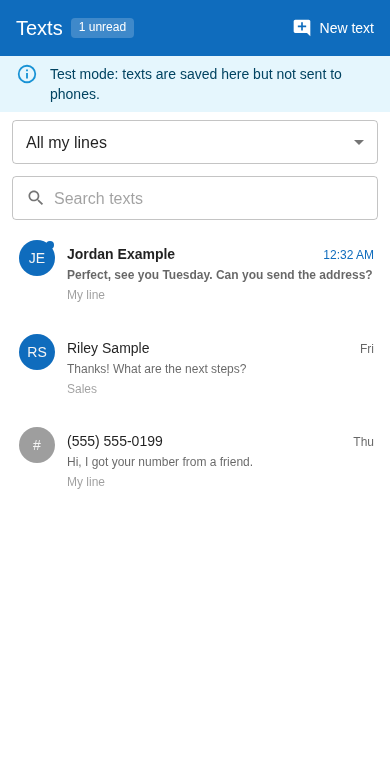
- Texting from each person's own number. Staff send and receive SMS and MMS from their own business line inside Teams, in a Texts tab that works on desktop and on the Teams mobile app. A shared inbox tab covers the team line.
This article is the how-to we wish we had. It is practical and step by step, with the code that mattered and the traps we hit. It is written for a developer who knows a little ASP.NET or Node and has admin access to a Microsoft 365 tenant, an Azure subscription and a carrier account.
What this article is not: it does not cover the SBC itself. Getting a Session Border Controller paired with Teams and your SIP carrier is its own project, and we wrote it up separately in our SBC guide (Ribbon SBC in Azure for Teams Direct Routing and Twilio). Here we assume calls already reach Teams through Direct Routing and focus on what sits next to that call path.
Contents
- What you end up with
- 1. Architecture
- 2. Entra app, Azure Bot, Graph permissions and SSO
- 3. The app manifest, and how updates really reach people
- 4. Proactive messaging
- 5. The caller ID card
- 6. SMS and MMS
- 7. The tabs
- 8. CI/CD to Azure Container Apps
- 9. Testing without touching real customers
- 10. Lessons learned
- Appendix: checklist
What you end up with
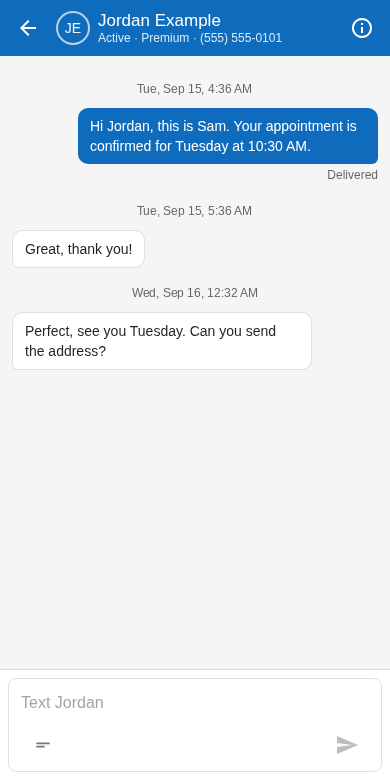
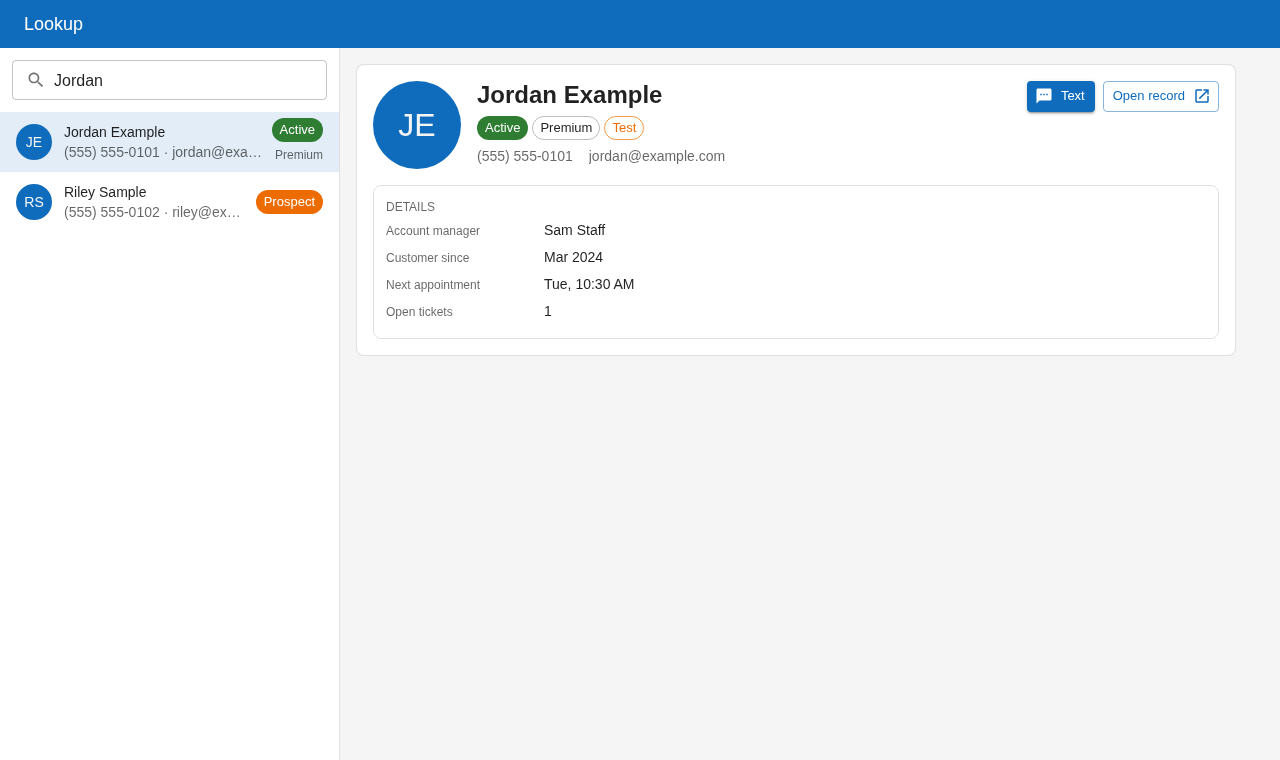
The stack we used:
- Backend: ASP.NET Core on .NET 9, the Microsoft Teams SDK for .NET (
Microsoft.Teams.Apps) for the bot, plainHttpClientcalls to Microsoft Graph and the carrier. One container, hosted on Azure Container Apps. - Tabs: React, MUI and Vite, with
@microsoft/teams-jsfor SSO, theme and navigation. Built into the backend'swwwrootand served by the same container. - Data: Postgres. Our customer data already lived there; the app adds a handful of tables for lines, ring groups, conversation references and texts.
- Carrier: Twilio for both voice and SMS. The same design works with Telnyx or any carrier that can call a webhook on an inbound call; we note the differences where they matter.
None of the choices are special. If your team writes Node or Python, the same design works; only the SDK names change.
1. Architecture
The one constraint that shapes everything
Teams gives apps no live incoming call event for PSTN calls that arrive by Direct Routing. There is no "call is ringing for user X" webhook you can subscribe to. Graph call records arrive after the call ends. A real-time media bot would have to own the call, which is not what you want for ordinary phone calls.
So the only place to learn "a call is ringing, from this number, to that number" while it is still ringing is before Teams: at the carrier, or at the SBC. We use the carrier, because carrier webhooks are easy to receive and sign, and because it gives us one path for every inbound call.
The rule that follows: routing must never wait for the lookup. The webhook answers the carrier immediately with "forward this call to the SBC", and the lookup runs in the background.
The picture
 Caller ──► Carrier number ──► voice webhook ──► YOUR BACKEND
                                   ▲                  │  (answers in ms)
                                   └── TwiML <Dial><Sip>sip:+1555...@sbc.contoso.com
                                                      │
 Carrier ──SIP/TLS──► SBC ──► Teams Phone ──► staff phone rings
                                                      │
               YOUR BACKEND (background) ──► lookup in your DB
                         │                    ──► bot card in 1:1 chat  (Bot Framework)
                         │                    ──► activity feed toast   (Graph)
                         │
 Customer SMS ──► carrier messaging webhook ──► YOUR BACKEND ──► DB ──► Teams tab / toast
 Staff reply  ◄── carrier Messages API (From = staff line) ◄── YOUR BACKEND ◄── Teams tab
The call, step by step
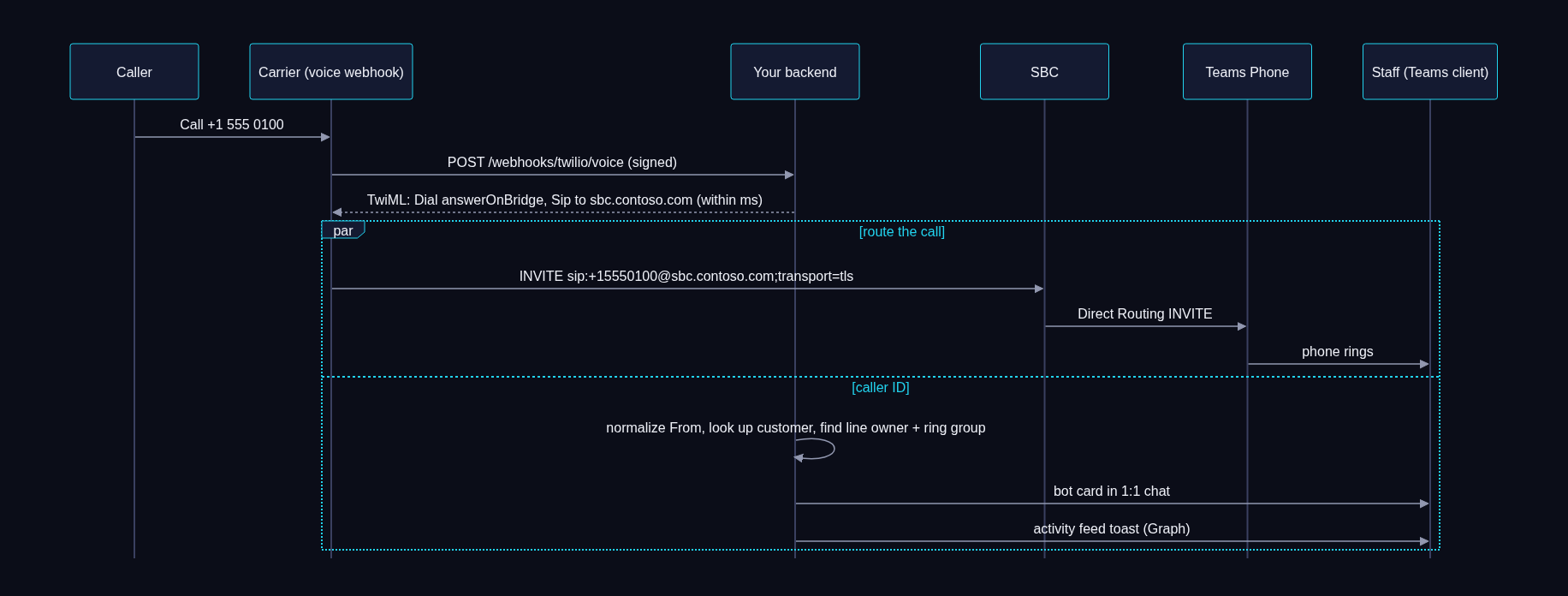
What this changes on the carrier side: numbers that get live caller ID are pointed at a voice webhook (Twilio Programmable Voice, a Telnyx Call Control or TeXML application) instead of plain SIP trunk origination. Outbound calls from Teams still leave through the trunk as before. Three consequences to plan for:
- The SBC sees a new source. A
<Dial><Sip>from Programmable Voice comes from the carrier's Programmable Voice signaling addresses, which are not always the same as your SIP trunk's. Allow every documented signaling range for your region on the SBC and its firewall, not just the IP you saw in your first test. Carriers fail over between edges, and a call from an unlisted edge is rejected as "source IP does not match". - Encryption parameters differ. Check how your carrier asks for TLS and SRTP on a
<Sip>URI (atransport=tlsURI parameter, and for SRTP on Twilio asecure=trueparameter). Our SBC guide has the SBC side. - Cost. A webhook-routed call is a voice leg plus a SIP leg. On Twilio this came to a fraction of a cent per minute more than trunk only. Check your own pricing.
If you would rather not touch routing at all, some carriers can send call events for numbers on a plain SIP connection (Telnyx connections have a webhook URL for this). If your carrier does, you can run in "observe only" mode: routing stays exactly as it is and the app only listens. Test that the event arrives in real time with both numbers before you rely on it.
If your Teams calling uses Operator Connect (no SBC of your own), there is probably no hook at all. Your fallbacks are after the fact caller ID from Graph call records, or moving the numbers that need live caller ID to Direct Routing.
Where the data lives
We keep the app's own data in a few small tables next to the customer data. The app never copies customer master data; texts and threads only hold a customer id.
| Table | What it holds |
|---|---|
phone_lines | Every number the app knows: label, kind (staff, sales, ring group, shared inbox, test), optional owner, optional ring group, active flag |
ring_group_members | Which staff are in each ring group |
teams_conversation_refs | Each staff member's 1:1 bot conversation, so proactive cards survive restarts |
staff_sms_threads, staff_sms_messages | One thread per (our line, their phone), and its messages |
sms_opt_outs | STOP and START per (line, phone) |
staff_sms_templates | Text templates |
teams_notice_log | Unique keys for "this notification was sent", so several replicas never double notify |
One design decision worth copying: staff texting got its own tables instead of reusing the conversation tables our existing support inbox used. The existing inbox had triggers (priority alerts, an auto responder, unread counts) keyed on its tables. Putting staff threads there would have set those off. Separate tables meant nothing about the existing inbox could change.
2. Entra app, Azure Bot, Graph permissions and SSO
One Entra app registration does four jobs: it is the bot's identity, the Graph client, the SSO audience for the tabs, and the Teams app id. Create one per environment (dev and prod), so you can break dev freely.
2.1 App registration
TENANT=<TENANT_ID>
APP_ID=$(az ad app create --display-name "Contoso Connect (dev)" \
  --sign-in-audience AzureADMyOrg --query appId -o tsv)
az ad sp create --id $APP_ID

# Client secret straight into Key Vault. Use --value, never --file /dev/stdin:
# piping stores a trailing newline and auth then fails in confusing ways.
SECRET=$(az ad app credential reset --id $APP_ID --display-name bot --years 1 --query password -o tsv)
az keyvault secret set --vault-name <KEY_VAULT> --name teams-app-client-secret --value "$SECRET" >/dev/null
unset SECRET
Put the secret's expiry date in a calendar. The bot stops working the day it expires.
2.2 Azure Bot
Single tenant, pointing at the same app id, with the Teams channel enabled. The messaging endpoint is your backend's /api/messages.
az bot create -g <RESOURCE_GROUP> -n <BOT_NAME> --app-type SingleTenant \
  --appid $APP_ID --tenant-id $TENANT \
  --endpoint "https://teams.contoso.com/api/messages" --sku F0
az bot msteams create -g <RESOURCE_GROUP> -n <BOT_NAME>
If the backend is not deployed yet, use a placeholder endpoint and update it later with az bot update --endpoint. The F0 tier is enough for this kind of traffic.
2.3 Microsoft Graph application permissions
These are application permissions on the same app, and they need admin consent:
| Permission | Why |
|---|---|
TeamsActivity.Send | Activity feed notifications (the toast that goes with each card) |
User.Read.All | Map Teams users to your staff table by email or UPN, and get the Entra object id to create 1:1 chats |
TeamsAppInstallation.ReadWriteSelfForUser.All | Install or upgrade your own app for a user from code (useful when clients sit on an old version) |
CallRecords.Read.All, CallRecord-PstnCalls.Read.All | Optional: call logs after the fact |
GRAPH=00000003-0000-0000-c000-000000000000
for P in TeamsActivity.Send User.Read.All TeamsAppInstallation.ReadWriteSelfForUser.All; do
  ID=$(az ad sp show --id $GRAPH --query "appRoles[?value=='$P'].id | [0]" -o tsv)
  az ad app permission add --id $APP_ID --api $GRAPH --api-permissions "$ID=Role"
done
az ad app permission admin-consent --id $APP_ID   # Global Admin or Privileged Role Admin
The backend gets a Graph token with the client credentials flow (scope=https://graph.microsoft.com/.default) and caches it until a few minutes before expiry.
2.4 Tab SSO
Teams SSO lets a tab call authentication.getAuthToken() and receive a token for your API, silently, as the signed-in user. It needs four things on the app registration:
- An Application ID URI of exactly
api://<tab host>/<APP_ID>. The host must be the host your tabs load from. - A delegated scope named
access_as_user. - The Teams clients pre-authorized for that scope. These two client ids are Microsoft's, the same in every tenant:
1fec8e78-bce4-4aaf-ab1b-5451cc387264(Teams desktop and mobile) and5e3ce6c0-2b1f-4285-8d4b-75ee78787346(Teams web). - v2 access tokens (
requestedAccessTokenVersion: 2).
OBJ=$(az ad app show --id $APP_ID --query id -o tsv)
SCOPE_ID=$(uuidgen)
cat > sso.json <<EOF
{
  "identifierUris": ["api://teams.contoso.com/$APP_ID"],
  "api": {
    "requestedAccessTokenVersion": 2,
    "oauth2PermissionScopes": [{
      "id": "$SCOPE_ID", "value": "access_as_user", "type": "User", "isEnabled": true,
      "adminConsentDisplayName": "Access the app as the user",
      "adminConsentDescription": "Lets Teams call the app's API as the signed-in user.",
      "userConsentDisplayName": "Access the app as you",
      "userConsentDescription": "Lets Teams call the app's API as you."
    }]
  }
}
EOF
az rest --method PATCH --uri https://graph.microsoft.com/v1.0/applications/$OBJ \
  --headers Content-Type=application/json --body @sso.json

cat > preauth.json <<EOF
{ "api": { "preAuthorizedApplications": [
  { "appId": "1fec8e78-bce4-4aaf-ab1b-5451cc387264", "delegatedPermissionIds": ["$SCOPE_ID"] },
  { "appId": "5e3ce6c0-2b1f-4285-8d4b-75ee78787346", "delegatedPermissionIds": ["$SCOPE_ID"] }
] } }
EOF
az rest --method PATCH --uri https://graph.microsoft.com/v1.0/applications/$OBJ \
  --headers Content-Type=application/json --body @preauth.json
The scope has to exist before you can pre-authorize it, which is why this is two PATCH calls.
In the manifest, webApplicationInfo.resource must be the same Application ID URI. If you later move to a custom domain, change the Application ID URI, the bot endpoint, the manifest host and your PUBLIC_BASE_URL setting together, then ship a new package version.
On the backend, validate the token properly: signature against your tenant's OpenID keys, issuer, audience (your client id or the api:// URI), lifetime, and that scp contains access_as_user. Then map the user (preferred_username or oid) to a row in your staff table. Anyone valid in the tenant but not in your staff table gets a 403.
var result = await handler.ValidateTokenAsync(token, new TokenValidationParameters
{
    ValidIssuers = [$"https://login.microsoftonline.com/{tenantId}/v2.0"],
    ValidAudiences = [clientId, $"api://{publicHost}/{clientId}"],
    IssuerSigningKeys = (await oidc.GetConfigurationAsync(ct)).SigningKeys,
    ValidateLifetime = true,
    ClockSkew = TimeSpan.FromMinutes(2),
});
if (!result.IsValid) return Unauthorized();
var scopes = (result.ClaimsIdentity.FindFirst("scp")?.Value ?? "").Split(' ');
if (!scopes.Contains("access_as_user")) return Unauthorized();
var staff = await directory.FindByEmailAsync(result.ClaimsIdentity.FindFirst("preferred_username")?.Value, ct)
         ?? await directory.FindByAadAsync(result.ClaimsIdentity.FindFirst("oid")?.Value, ct);
if (staff is null) return Forbidden();
Matching by email has one trap: Graph mail, the UPN, and the address in your staff table can differ (aliases, a second domain). Store the Entra object id the first time a match succeeds, and match on that afterwards.
3. The app manifest, and how updates really reach people
A Teams app package is a zip with manifest.json, a 192x192 color icon and a 32x32 white-on-transparent outline icon. Here is the shape of ours, trimmed to what matters:
{
  "$schema": "https://developer.microsoft.com/json-schemas/teams/v1.24/MicrosoftTeams.schema.json",
  "manifestVersion": "1.24",
  "version": "0.4.0",
  "id": "<APP_ID>",
  "name": { "short": "Contoso Connect", "full": "Contoso Connect" },
  "staticTabs": [
    { "entityId": "conversations", "scopes": ["personal"] },
    { "entityId": "texts",  "name": "Texts",  "contentUrl": "https://teams.contoso.com/tab/texts",
      "websiteUrl": "https://teams.contoso.com/tab/texts", "scopes": ["personal"] },
    { "entityId": "lookup", "name": "Lookup", "contentUrl": "https://teams.contoso.com/tab/lookup",
      "websiteUrl": "https://teams.contoso.com/tab/lookup", "scopes": ["personal"] },
    { "entityId": "inbox",  "name": "Inbox",  "contentUrl": "https://teams.contoso.com/tab/inbox",
      "websiteUrl": "https://teams.contoso.com/tab/inbox", "scopes": ["personal"] }
  ],
  "bots": [
    { "botId": "<APP_ID>", "scopes": ["personal"], "supportsFiles": false, "isNotificationOnly": false }
  ],
  "permissions": ["identity", "messageTeamMembers"],
  "validDomains": ["teams.contoso.com"],
  "webApplicationInfo": {
    "id": "<APP_ID>",
    "resource": "api://teams.contoso.com/<APP_ID>"
  },
  "activities": {
    "activityTypes": [
      { "type": "incomingCall", "description": "A call is ringing on your line or ring group",
        "templateText": "{caller} is calling {line}" },
      { "type": "newText", "description": "A new text arrived on your line",
        "templateText": "New text from {sender} on {line}" },
      { "type": "inboxText", "description": "A customer texted the team inbox",
        "templateText": "{customer} texted the team line" }
    ]
  }
}
The details that cost us time:
- The reserved
conversationstab must have noname, and it should be listed first.conversationsis the bot chat. Give it a name and the upload is rejected with "Reserved tab Name property should not be specified". Put it anywhere but first and Teams may not show the tab row (Chat, Texts, Lookup) the way you expect. activities.activityTypesandwebApplicationInfoare required for activity feed notifications. Without them in the installed version of the manifest,sendActivityNotificationreturns 403 even withTeamsActivity.Sendconsented. The template parameters you send must match the{placeholders}intemplateText.validDomainsmust include every host the tabs load from or link into inside Teams.- Bump
versionon every upload. Teams silently ignores a package whose version did not change. We bumped it even for an icon change.
Org catalog, not "Upload a custom app"
There are two ways to get a package into Teams, and they are not the same copy:
- Teams client, Apps, Manage your apps, Upload installs a personal sideloaded copy. Fine for your first test.
- Teams admin center, Teams apps, Manage apps holds the org catalog copy. This is the one your setup policies install and pin for everyone.
Updating one does not update the other. Our first "the new tabs don't show up" bug was exactly this: we updated the sideloaded copy, while everyone else had the catalog copy from policy.
Admin setup, once:
- Teams admin center, Teams apps, Manage apps, Org-wide app settings: allow custom apps.
- Upload the zip as a new app. If your tenant uses app-centric management, set the app's availability (specific users or groups for the pilot) on its page. Otherwise use a permission policy.
- Create a setup policy (for example "Connect pilot") with the app under Installed apps, pinned if you want. Assign it to the pilot users. Installing by policy matters: it means the bot can message people before they ever open the app (see section 4). Policy changes can take hours to reach users.
Publishing new versions from a script
After the first upload, we publish new manifest versions from a small PowerShell script instead of clicking through the admin center:
param([string]$Path = './dist/contoso-connect.zip')
$ErrorActionPreference = 'Stop'

# Read id and version out of the zip, so we update the right app.
Add-Type -AssemblyName System.IO.Compression.FileSystem
$zip = [System.IO.Compression.ZipFile]::OpenRead((Resolve-Path $Path))
try {
  $entry = $zip.Entries | Where-Object FullName -eq 'manifest.json' | Select-Object -First 1
  $reader = New-Object System.IO.StreamReader($entry.Open())
  $manifest = $reader.ReadToEnd() | ConvertFrom-Json
  $reader.Close()
} finally { $zip.Dispose() }

Import-Module MicrosoftTeams
Connect-MicrosoftTeams -UseDeviceAuthentication | Out-Null   # a Teams admin signs in

$app = Get-TeamsApp -ExternalId $manifest.id -DistributionMethod organization | Select-Object -First 1
if (-not $app) { throw "No org catalog app with id $($manifest.id). Upload it once in the admin center first." }
Set-TeamsApp -Id $app.Id -Path (Resolve-Path $Path) | Out-Null
"Published v$($manifest.version)"
Disconnect-MicrosoftTeams | Out-Null
Why device code and not the pipeline: updating an org catalog app needs a signed-in Teams admin (delegated permission). There is no application permission a CI service principal can hold to do it. So the pipeline deploys code, and a person runs this script when the manifest changes. Code changes (almost everything) need no new package at all, because the tabs and the bot are served by your backend.
Clients cache manifests
Even after the catalog has the new version and Graph shows the user's installation upgraded, clients hold on to the old manifest:
- Teams mobile tended to pick it up first.
- Teams desktop needed a full quit (tray icon, Quit), not just closing the window.
- Teams web needs a hard refresh.
If a user's installation is stuck on an old version, upgrade it with Graph: list GET /users/{id}/teamwork/installedApps?$expand=teamsAppDefinition, then POST /users/{id}/teamwork/installedApps/{installationId}/upgrade. That is what TeamsAppInstallation.ReadWriteSelfForUser.All is for.
4. Proactive messaging
A caller card is a proactive message: the bot writes first. Proactive messages need a conversation to write into, and Teams only hands you that conversation when the user interacts with the bot. Two things make this reliable.
4.1 Store conversation references in the database
On install and on every message, save the 1:1 conversation id, the service URL and the user's Entra object id, and link them to your staff row:
teams.OnInstall(async (context, ct) =>
{
    await RememberAsync(context, ct);
    await context.SendAsync("Connected. Caller ID cards and texts for your lines will show up here.", ct);
});
teams.OnMessage(async (context, ct) =>
{
    await RememberAsync(context, ct);
    await context.SendAsync("Connected. Caller ID cards and texts for your lines will show up here.", ct);
});

async Task RememberAsync<T>(Context<T> context, CancellationToken ct) where T : TeamsActivity
{
    var a = context.Activity;
    if (a.Conversation?.ConversationType is { } t && (string)t != "personal") return;   // 1:1 only
    var aad = a.From?.AadObjectId;
    if (aad is null || a.Conversation?.Id is null || a.ServiceUrl is null) return;
    var staff = await directory.FindByAadAsync(aad, ct);
    await refs.UpsertAsync(new StaffConversationReference(
        aad, a.From?.Name, a.Conversation.Id, a.ServiceUrl.ToString(),
        a.Conversation.TenantId, DateTimeOffset.UtcNow, staff?.Id), ct);
}
Keep them in the database, not in memory. In-memory references disappear on every deploy and are not shared between replicas.
4.2 Create the 1:1 chat for people who never messaged the bot
When the app is installed by a setup policy, most people never open the bot chat, so you never get their reference. You do not need to wait. Because the app is installed for them, the bot can create the 1:1 conversation itself from their Entra object id:
private async Task<StaffConversationReference?> CreateConversationAsync(Staff staff, CancellationToken ct)
{
    var user = await graph.GetUserAsync(staff.Email, ct);            // needs User.Read.All
    if (user is null) return null;

    // Region specific. For US tenants: https://smba.trafficmanager.net/amer/
    var serviceUrl = config["BOT_SERVICE_URL"] ?? "https://smba.trafficmanager.net/amer/";
    var created = await teams.Api.ForServiceUrl(new Uri(serviceUrl)).Conversations.CreateAsync(
        new ConversationParameters
        {
            IsGroup = false,
            TenantId = tenantId,
            Bot = new ChannelAccount { Id = $"28:{appId}" },
            Members = [new ChannelAccount { Id = user.Id }],
        }, null, ct);

    var reference = new StaffConversationReference(user.Id, user.DisplayName, created.Id,
        created.ServiceUrl?.ToString() ?? serviceUrl, tenantId, DateTimeOffset.UtcNow, staff.Id);
    await refs.UpsertAsync(reference, ct);
    return reference;
}
If this throws, the app is not installed for that user. Log it, remember the failure for an hour so you do not retry on every call, and move on.
4.3 Send the card, and the toast
A bot message in a chat does not always pop a notification the way people expect. The activity feed does. We send both for calls:
public async Task<DeliveryResult> SendAsync(Staff staff, string summary, JsonObject card, FeedNotice? feed,
    bool postCard, CancellationToken ct)
{
    var reference = await refs.GetByStaffAsync(staff.Id, ct) ?? await CreateConversationAsync(staff, ct);
    if (reference is null) return DeliveryResult.NotInstalled(staff.Id);

    if (postCard)
    {
        var message = new MessageActivityInput { Text = summary };   // Text shows in the chat list preview
        message.AddAdaptiveCardAttachment(card);
        await teams.SendAsync(reference.ConversationId, message, new Uri(reference.ServiceUrl), null, ct);
    }

    var feedSent = feed is not null && await graph.SendActivityNotificationAsync(
        reference.AadObjectId, feed.ActivityType, feed.TopicText, feed.WebUrl, feed.PreviewText, feed.TemplateParameters, ct);
    return new DeliveryResult(staff.Id, postCard, feedSent);
}
And the Graph call for the toast:
POST https://graph.microsoft.com/v1.0/users/{userObjectId}/teamwork/sendActivityNotification
Content-Type: application/json

{
  "topic": { "source": "text", "value": "Incoming call", "webUrl": "https://teams.microsoft.com/l/entity/<APP_ID>/lookup?context=..." },
  "activityType": "incomingCall",
  "previewText": { "content": "Incoming call: Jordan Example" },
  "templateParameters": [
    { "name": "caller", "value": "Jordan Example" },
    { "name": "line",   "value": "Sales line" }
  ]
}
webUrl should be a Teams deep link into your own app (a tab plus a sub page), so tapping the toast opens the right thing inside Teams.
5. The caller ID card
5.1 The voice webhook: answer first
This is the entire voice webhook. It validates the carrier signature, returns TwiML that forwards the call to the SBC, and starts caller ID in the background:
app.MapPost("/webhooks/twilio/voice", async (HttpRequest request, TwilioSignatureValidator validator,
    TwilioOptions options, CallerIdService callerId) =>
{
    var (valid, form) = await validator.ValidateAsync(request);
    if (!valid || form is null) return Results.StatusCode(403);

    var to = form["To"].ToString();
    var from = form["From"].ToString();
    if (!PhoneNumbers.IsE164(to))
        return Twiml("<Response><Say>Sorry, this call cannot be completed.</Say><Hangup/></Response>");

    // Forward immediately. answerOnBridge keeps the caller hearing real ringback from Teams,
    // and billing starts when someone answers.
    var sip = SecurityElement.Escape($"sip:{to}@{options.SbcHost};transport=tls");
    var twiml = "<?xml version=\"1.0\" encoding=\"UTF-8\"?>" +
                "<Response><Dial answerOnBridge=\"true\" record=\"record-from-answer-dual\">" +
                $"<Sip>{sip}</Sip></Dial></Response>";

    callerId.FireAndForget(form["CallSid"], from, to);   // never awaited
    return Twiml(twiml);
});

static IResult Twiml(string xml) => Results.Content(xml, "text/xml; charset=utf-8");
Notes:
answerOnBridge="true"means the caller hears Teams ringing, not the carrier's ringback, and the call is not "answered" until a person answers.- Recording on the
<Dial>is optional. If you record, say so in your greeting and check your state's consent rules. - The dialed number (
To) goes in the SIP URI user part, in+E.164. The SBC routes that to the Teams user or resource account that owns it. - On Telnyx Call Control the equivalent is a
transfercommand to the SIP URI. Setfromto the caller's number explicitly: the documented default is the original call'sto, which is your own number, and every call would show up in Teams as coming from your own line.
Keep at least one replica warm (minReplicas: 1). A scale-from-zero cold start takes longer than a phone rings, and the card would arrive after the call was answered or dropped.
5.2 Normalize every number to E.164, at every boundary
Most "customer not recognized" bugs are number format bugs. Normalize everything to +E.164 where it enters your system: carrier webhooks, user input, and customer data.
/// "(555) 555-0101", "555.555.0101", "15555550101", "+1 555 555 0101" -> "+15555550101"
public static string? ToE164(string? raw)
{
    if (string.IsNullOrWhiteSpace(raw)) return null;
    var trimmed = raw.Trim();
    var digits = Regex.Replace(trimmed, "[^0-9]", "");
    string candidate;
    if (trimmed.StartsWith('+')) candidate = "+" + digits;
    else if (digits.Length == 10) candidate = "+1" + digits;                    // NANP default
    else if (digits.Length == 11 && digits[0] == '1') candidate = "+" + digits;
    else if (trimmed.StartsWith("00") && digits.Length > 4) candidate = "+" + digits[2..];
    else return null;
    if (candidate.StartsWith("+1") && candidate.Length != 12) return null;      // NANP is exactly 10 digits
    return Regex.IsMatch(candidate, @"^\+[1-9]\d{6,14}$") ? candidate : null;
}
Customer data is usually free text ("(555) 555-0101 ext 2"). Do not try to clean it in the hot path. Match on a normalized key with an index:
create or replace function phone_key(p text) returns text language sql immutable as $$
  select case
    when length(d) = 11 and left(d, 1) = '1' then right(d, 10)   -- NANP: compare on 10 digits
    else d end
  from (select regexp_replace(coalesce(p, ''), '[^0-9]', '', 'g') as d) s
$$;

create index if not exists customers_phone_key_idx on customers (phone_key(mobile_phone));
Also check what your carrier and SBC send. We had a SIP connection that delivered the calling and called numbers without the leading +. Outbound worked, but every inbound call was rejected by the SBC's number rules. Setting the connection's number format to +E.164 fixed it.
5.3 The lookup
Our lookup is one SQL function, so it is one round trip while the phone rings. It returns a small JSON object: kind (customer, prospect, unknown), a profile with the fields the card needs, and a match count. Search the most specific source first (customers by mobile, then other phone fields, then open applications or leads). Give it a time budget (we use a few seconds) and send the "unknown" card if it runs out; a late card is worse than a plain one.
Business meaning goes into a list of label and value facts, so the card code stays generic:
{
  "kind": "customer",
  "matches": 1,
  "profile": {
    "id": "c-1001", "name": "Jordan Example", "status": "Active", "segment": "Premium",
    "avatar": null,
    "facts": [
      { "label": "Account manager", "value": "Sam Staff" },
      { "label": "Next appointment", "value": "Tue, 10:30 AM" },
      { "label": "Last contact", "value": "2 days ago, text from them" },
      { "label": "Open tickets", "value": "1" }
    ]
  }
}
If more than one record shares the number (families, shared office lines), show the first and add a "2 records share this number" note rather than guessing.
5.4 Who gets the card: lines and ring groups
phone_lines lists every number the app knows. A call to a line goes to its owner plus every member of its ring group, with duplicates removed and inactive staff skipped. We return that as one function, line_targets(line).
This table has to match how the numbers are really routed in Teams (user assignment, call queue, auto attendant). If it drifts, the card goes to people whose phone is not ringing. Two practical notes:
- For a call queue, the card goes to all ring group members at once, even if Teams is ringing them one at a time (round robin or serial). For small teams that is what you want anyway: everyone can see who is calling.
- For numbers that should never produce a card (a text-only line, a number handled by another system), simply leave them out of
phone_lines. The webhook still forwards the call; caller ID just finds no targets.
5.5 The card itself
Keep it to what someone needs in the two seconds before they answer: name, number, status, three to five facts, and actions.
{
  "type": "AdaptiveCard",
  "version": "1.5",
  "msteams": { "width": "Full" },
  "body": [
    { "type": "Container", "style": "accent", "bleed": true, "items": [
      { "type": "ColumnSet", "columns": [
        { "type": "Column", "width": "stretch", "items": [
          { "type": "TextBlock", "text": "Incoming call", "weight": "Bolder", "color": "Accent" } ] },
        { "type": "Column", "width": "auto", "items": [
          { "type": "TextBlock", "text": "to Sales line", "isSubtle": true } ] } ] } ] },
    { "type": "ColumnSet", "spacing": "Medium", "columns": [
      { "type": "Column", "width": "auto", "items": [
        { "type": "Image", "url": "https://teams.contoso.com/img/avatar.png", "size": "Medium", "style": "Person" } ] },
      { "type": "Column", "width": "stretch", "items": [
        { "type": "TextBlock", "text": "Jordan Example", "size": "Large", "weight": "Bolder", "wrap": true },
        { "type": "TextBlock", "text": "(555) 555-0101", "isSubtle": true, "spacing": "None" },
        { "type": "TextBlock", "text": "Active  |  Premium", "color": "Accent", "weight": "Bolder", "spacing": "Small" } ] } ] },
    { "type": "FactSet", "separator": true, "facts": [
      { "title": "Account manager", "value": "Sam Staff" },
      { "title": "Next appointment", "value": "Tue, 10:30 AM" } ] }
  ],
  "actions": [
    { "type": "Action.OpenUrl", "title": "Open record", "url": "https://crm.contoso.com/customers/c-1001" },
    { "type": "Action.OpenUrl", "title": "Text", "url": "https://teams.microsoft.com/l/entity/<APP_ID>/texts?context=..." },
    { "type": "Action.OpenUrl", "title": "Open profile", "url": "https://teams.microsoft.com/l/entity/<APP_ID>/lookup?context=..." }
  ]
}
Tips from building it:
- Test data should look like test data. If the caller is a test record, add a "Test" badge. It makes screenshots and demos safe, and nobody panics.
- Newer card features (like
Badge) are not supported on every Teams client. Give them afallback(a plain TextBlock) so older clients still show something. - Image URLs must be publicly reachable over HTTPS by Teams. Host a generic "unknown caller" avatar on your own backend.
- Deep links for the Text and Open profile buttons should open your tab inside Teams (
https://teams.microsoft.com/l/entity/<APP_ID>/<entityId>?context={"subEntityId":"..."}with the context JSON URL-encoded), and the tab reads the sub page fromapp.getContext(). - The chat message
Textnext to the card is what shows in the chat list preview and in some notifications. Make it a full sentence: "Incoming call: Jordan Example".
5.6 Timing
In our tests the card and the toast arrive within one to two seconds of the first ring, well before anyone answers. The biggest contributors, in order: a cold container (fix with a warm replica), a slow lookup (fix with an index and one round trip), and creating a 1:1 conversation for someone for the first time (only happens once per person).
Carriers retry webhooks that are slow or fail. Deduplicate caller ID on the call id so one call never sends two cards.
6. SMS and MMS
6.1 Sending from each person's own number
Each staff line is a carrier number that can send SMS. Sending is a single REST call with From set to the line:
var form = new List<KeyValuePair<string, string>>
{
    new("From", line),            // the staff member's own number, +E.164
    new("To", to),
    new("Body", body),
    new("StatusCallback", $"{publicBaseUrl}/webhooks/twilio/sms-status?mid={messageRowId}"),
};
foreach (var url in mediaUrls) form.Add(new("MediaUrl", url));   // MMS

using var req = new HttpRequestMessage(HttpMethod.Post,
    $"https://api.twilio.com/2010-04-01/Accounts/{accountSid}/Messages.json")
{ Content = new FormUrlEncodedContent(form) };
req.Headers.Authorization = new AuthenticationHeaderValue("Basic",
    Convert.ToBase64String(Encoding.ASCII.GetBytes($"{accountSid}:{authToken}")));
Note the ?mid= on the status callback. Section 6.6 explains why it is there.
Before a send, the backend checks three things, in this order: the user may use this line (they own it or are in its ring group), the recipient has not opted out on this line, and the environment allows this recipient (section 6.5). The UI hides the composer for opted-out threads, but the server enforces it; the UI is just a courtesy.
Some rules worth enforcing on the server too:
- A maximum body length (we use 1600 characters, which the carrier splits into segments).
- A short duplicate guard: the same line, recipient and body within ten seconds is refused. A held-down Enter key on a web composer once sent one of our customers seventeen identical texts in two seconds. Guard the client with a synchronous in-flight flag (a
useRef, not React state) and guard the server.
6.2 Receiving: validate the signature, answer fast, work in the background
app.MapPost("/webhooks/twilio/sms", async (HttpRequest request, TwilioSignatureValidator validator,
    IServiceScopeFactory scopes, ILogger<Program> log) =>
{
    var (valid, form) = await validator.ValidateAsync(request);
    if (!valid || form is null) return Results.StatusCode(403);

    var from = form["From"].ToString();
    var to = form["To"].ToString();
    var body = form["Body"].ToString();
    var sid = form["MessageSid"].ToString();
    var media = new List<string>();
    if (int.TryParse(form["NumMedia"], out var n))
        for (var i = 0; i < n && i < 10; i++) media.Add(form[$"MediaUrl{i}"].ToString());

    _ = Task.Run(async () =>
    {
        try
        {
            using var scope = scopes.CreateScope();
            await scope.ServiceProvider.GetRequiredService<TextingService>()
                .ReceiveAsync(from, to, body, media, sid, CancellationToken.None);
        }
        catch (Exception ex) { log.LogError(ex, "Inbound SMS {Sid} failed", sid); }
    });
    // Empty TwiML: no auto reply from us.
    return Results.Content("<?xml version=\"1.0\" encoding=\"UTF-8\"?><Response/>", "text/xml");
});
ReceiveAsync finds or creates the thread for (line, phone), links it to the customer by phone, skips duplicates by the carrier message id (carriers do retry), records STOP and START, stores the message, and notifies whoever the line rings.
Signature validation. Twilio signs each webhook with X-Twilio-Signature: base64 of HMAC-SHA1, keyed with your auth token, over the full URL followed by every POST parameter name and value, sorted by name.
public static string ComputeSignature(string authToken, string url, IEnumerable<KeyValuePair<string, string>> form)
{
    var sb = new StringBuilder(url);
    foreach (var kv in form.OrderBy(kv => kv.Key, StringComparer.Ordinal))
        sb.Append(kv.Key).Append(kv.Value);
    using var hmac = new HMACSHA1(Encoding.UTF8.GetBytes(authToken));
    return Convert.ToBase64String(hmac.ComputeHash(Encoding.UTF8.GetBytes(sb.ToString())));
}
// Compare with CryptographicOperations.FixedTimeEquals.
The trap: the URL must be exactly the public URL the carrier called, including the query string. Behind Azure Container Apps ingress your app sees http:// and an internal host, so building the URL from the request fails every signature. Build it from a configured PUBLIC_BASE_URL plus the path and query. (Telnyx signs with Ed25519 over timestamp|raw body instead; verify against the raw bytes and reject old timestamps.)
6.3 STOP, START and HELP
Carriers enforce opt-out themselves. On Twilio, a STOP to a number blocks further sends from that number to that person (with Advanced Opt-Out on a Messaging Service, from the whole service); a send to them fails with error 21610. Telnyx does the same per messaging profile, with error 40300. You still want your own record, for two reasons: the UI can show "this person opted out" instead of a mysterious failure, and you block the send before it costs anything.
public enum KeywordKind { None, OptOut, OptIn, Help }

public static KeywordKind Classify(string? body)
{
    var word = (body ?? "").Trim().TrimEnd('.', '!').Trim();
    if (word.Length == 0 || word.Contains(' ')) return KeywordKind.None;   // only a single keyword counts
    return word.ToUpperInvariant() switch
    {
        "STOP" or "STOPALL" or "UNSUBSCRIBE" or "CANCEL" or "END" or "QUIT" or "OPTOUT" or "REVOKE" => KeywordKind.OptOut,
        "START" or "YES" or "UNSTOP" or "SUBSCRIBE" => KeywordKind.OptIn,
        "HELP" or "INFO" => KeywordKind.Help,
        _ => KeywordKind.None,
    };
}- Record opt-outs per (line, phone), with the scope matching how your carrier enforces them. If all lines share one Messaging Service with Advanced Opt-Out, a STOP to one line is a STOP to all of them; record it that way.
- When a send fails with the carrier's opt-out error, record the opt-out too. The person may have opted out before your app existed.
- Do not send your own HELP reply if the carrier already auto-replies, or the customer gets two answers.
- Never "fix" an opt-out by sending from a different number. It is a compliance problem, not a bug.
6.4 A2P 10DLC registration
In the US, application-to-person texting from ordinary 10-digit numbers requires a registered brand and campaign, with the numbers attached to the campaign (on Twilio, through a Messaging Service). Unregistered traffic is filtered or blocked by the mobile carriers.
- Staff one-to-one texting that includes sales conversations usually needs a Mixed (or similar) use case. A Customer Care campaign alone does not cover it.
- Marketing content from a shared marketing number needs a Marketing or Mixed campaign of its own.
- Your opt-in wording (the checkbox on your web forms) has to cover the kind of texts you will send. Reviewers read it.
- Approval can take one to three weeks or more. File early, in parallel with the build. Until it is approved you can receive, but plan not to send.
6.5 Dry run and an allowlist: roll out without texting the world
All outbound SMS goes through one class, and that class enforces two settings:
public bool DryRun => !string.Equals(config["SMS_DRY_RUN"], "false", StringComparison.OrdinalIgnoreCase);   // default ON
public IReadOnlySet<string> Allowed => (config["SMS_ALLOWED_RECIPIENTS"] ?? "")
    .Split(',', StringSplitOptions.RemoveEmptyEntries | StringSplitOptions.TrimEntries).ToHashSet();

public async Task<SmsSendResult> SendAsync(string from, string to, string body, IReadOnlyList<string>? media, CancellationToken ct)
{
    if (Allowed.Count > 0 && !Allowed.Contains(to))
        return SmsSendResult.Failed("not_allowed", "This environment only texts allowed test numbers.");
    if (DryRun)
        return SmsSendResult.DryRunResult();          // stored with status "dry_run", nothing leaves the building
    return await SendToCarrierAsync(from, to, body, media, ct);
}- Dry run is the default. Forgetting to set a variable must fail safe. In dry run the message is stored with status
dry_runand the tab shows a "Test mode" banner (you can see it in the screenshots above). - The allowlist stays on after dry run is off, until you have tested with real phones you control. Then remove it deliberately.
- Separate flags per feature help when you add a second inbox later: one feature can be live while another is still in dry run.
6.6 Delivery status, and the race we did not expect
You pass a StatusCallback URL, and the carrier posts status changes to it: queued, sending, sent, delivered, undelivered, failed. The obvious implementation:
- POST the message to the carrier.
- Save the returned message SID on your row.
- In the status webhook,
update messages set status = $1 where sid = $2.
That loses updates. The status callback can arrive before step 2 has saved the SID. The webhook updates zero rows, returns 200, and the carrier never retries a 200. We found a few dozen texts a month stuck at "pending" that had in fact been delivered.
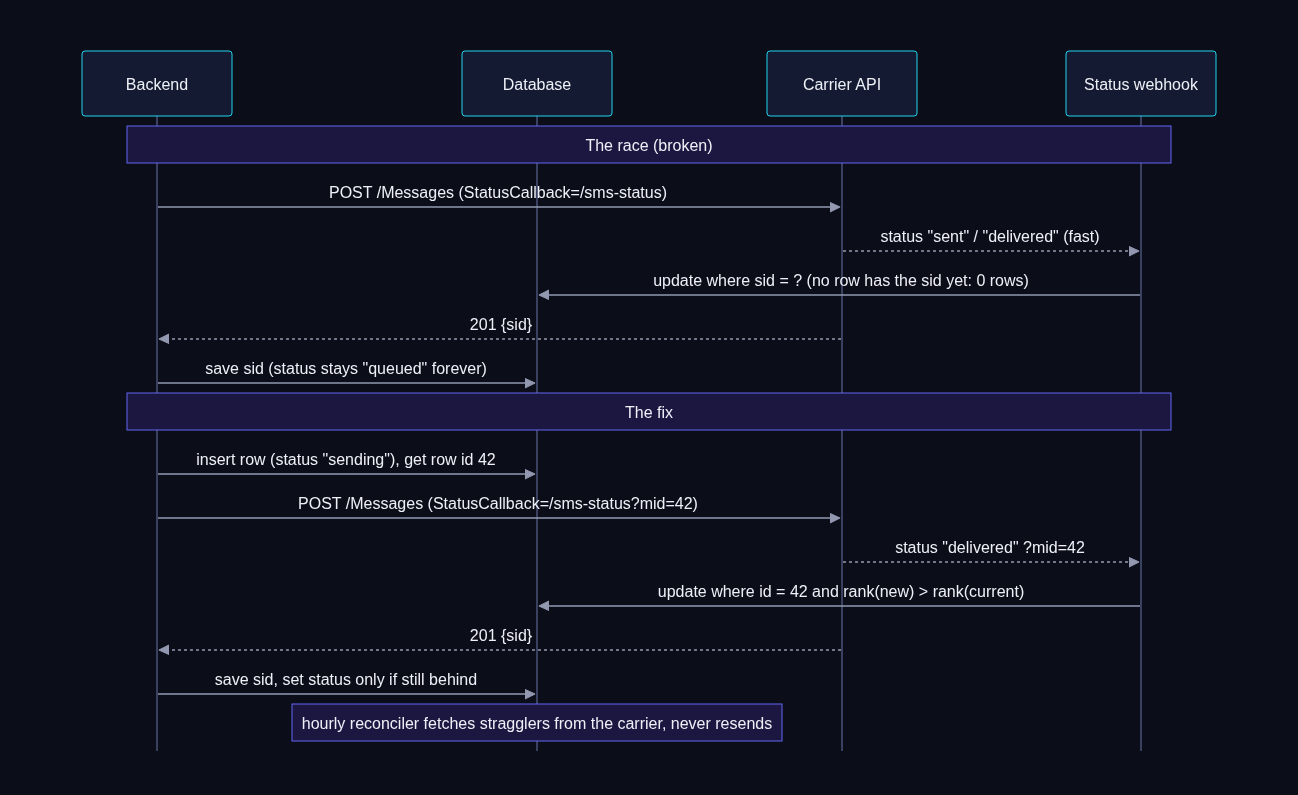
The fix has three parts.
1. Put your own row id in the callback URL. Insert the message row first, then send with StatusCallback=.../sms-status?mid=<row id>. The webhook no longer depends on the SID being saved. Remember that the query string is part of the signed URL (section 6.2).
2. Make status forward-only. Callbacks can arrive out of order, and your own "save the send result" step can arrive after a delivered callback. Rank the statuses and never move backwards:
create or replace function sms_status_rank(s text) returns int language sql immutable as $$
  select case s
    when 'sending'     then 1
    when 'queued'      then 1
    when 'accepted'    then 1
    when 'sent'        then 2
    when 'delivered'   then 3
    when 'undelivered' then 3
    when 'failed'      then 3
    else 0 end
$$;

-- Status webhook: by our row id when present, else by carrier SID. Forward only.
update staff_sms_messages
   set status        = $new_status,
       carrier_sid   = coalesce(carrier_sid, $sid),
       error_code    = coalesce($error_code, error_code),
       updated_at    = now()
 where (id = $mid or ($mid is null and carrier_sid = $sid))
   and sms_status_rank($new_status) > sms_status_rank(status);
Use the same rank check when you save the send result, so a fast delivered is not overwritten by queued.
3. Add an hourly reconciler. Some callbacks never arrive at all (a deploy, a network blip). Once an hour, find outbound rows still in sending, queued or sent that are older than 15 minutes and younger than 30 days, fetch each one from the carrier (GET /Messages/{sid}.json), and apply the same forward-only update. The reconciler never resends. A stuck status is a bookkeeping problem; resending turns it into a customer problem.
Surface the result in the UI: small status icons under outbound bubbles (sending, sent, delivered, failed with the carrier's reason on hover or tap). Staff trust the tool a lot more when they can see "Delivered".
Also: when the carrier rejects a send outright (invalid number, opted out, not SMS capable), mark it failed with the carrier's error code and message, and stop. If you use a queue, archive the message. We once had a queue that retried a permanently rejected text every two hours and paged someone each time.
6.7 MMS
- Inbound: the webhook carries
NumMediaandMediaUrl0..N. Those URLs are hosted by the carrier. Depending on your account settings they may require authentication to fetch, and you may want to delete them from the carrier later. If you need the images long term, copy them to your own storage in the background and store your own URLs. - Outbound: pass one or more public
MediaUrlvalues. Upload the staff member's photo to your own storage first (the tab sends it to your backend, your backend stores it and returns a URL), then send. Keep an allowlist of hosts you render images from in the tab, so a message cannot make the tab load arbitrary URLs. - MMS costs more per message than SMS. Some teams prefer "a link in the text" instead; decide on purpose.
- Test the file picker in the Teams mobile app on both iOS and Android early. Webview file inputs behave differently across devices.
7. The tabs
7.1 SSO in the tab
import { app, authentication } from '@microsoft/teams-js';

let initialized: Promise<boolean> | null = null;
export function initTeams(): Promise<boolean> {
  // Outside Teams, initialize never resolves; race it so local previews still load.
  initialized ??= Promise.race([
    app.initialize().then(() => true).catch(() => false),
    new Promise<boolean>((r) => setTimeout(() => r(false), 2500)),
  ]);
  return initialized;
}

export async function api<T>(method: string, path: string, body?: unknown): Promise<T> {
  await initTeams();
  const token = await authentication.getAuthToken();     // silent; audience = your Entra app
  const res = await fetch(`/api/tab${path}`, {
    method,
    headers: { Authorization: `Bearer ${token}`, 'Content-Type': 'application/json' },
    body: body ? JSON.stringify(body) : undefined,
  });
  if (!res.ok) throw new Error((await res.json().catch(() => null))?.error ?? `HTTP ${res.status}`);
  return res.json() as Promise<T>;
}
getAuthToken caches tokens itself; call it before each request rather than holding one. If it fails with "Teams could not sign you in" or your API returns 401, it is almost always one of: the Application ID URI does not match api://<tab host>/<APP_ID>, the scope is missing, the Teams clients are not pre-authorized, v1 tokens, or webApplicationInfo.resource differs from the Application ID URI.
For local work, a mock mode (the tab uses fictional data when it runs on localhost or with ?mock=1) makes UI work fast and gave us the screenshots in this article.
7.2 A per-employee database token, so row level security matches your admin app
For simple features (a staff member's own texts), the backend reads and writes with its own service credentials and checks access in code. That is fine for tables the app owns.
For our shared team inbox, the tab had to behave exactly like our existing admin web app, which talks to Postgres through PostgREST with a signed-in user's JWT. Row level security policies, an is_admin() check (which also enforced an admin user agreement), a created_by_id default auth.uid() column, and several triggers all keyed off that user token. Calling the same functions with a service key broke in two ways: some functions refused service calls, and inserts left created_by_id empty, which made a staff reply look like the customer wrote it.
The fix: the backend mints a short-lived database token for the signed-in employee, and calls PostgREST with it. The token never leaves the backend.
public static Dictionary<string, object> Claims(string projectUrl, string userId, string? email,
    JsonObject? appMetadata, DateTimeOffset now) => new()
{
    ["iss"] = projectUrl + "/auth/v1",
    ["sub"] = userId,                  // the employee's own auth user id, same as in the admin app
    ["aud"] = "authenticated",
    ["role"] = "authenticated",
    ["email"] = email ?? "",
    ["app_metadata"] = ToDictionary(appMetadata),   // the auth user's REAL app_metadata, not invented claims
    ["iat"] = now.ToUnixTimeSeconds(),
    ["exp"] = now.AddMinutes(5).ToUnixTimeSeconds(),
};

public static string Mint(byte[] secret, Dictionary<string, object> claims) =>
    new JsonWebTokenHandler { SetDefaultTimesOnTokenCreation = false }.CreateToken(new SecurityTokenDescriptor
    {
        Claims = claims,
        SigningCredentials = new SigningCredentials(new SymmetricSecurityKey(secret), SecurityAlgorithms.HmacSha256),
    });
The identity chain has to be airtight, because this token is as powerful as the employee's own admin session:
- Teams SSO token validated (section 2.4), mapped to an employee row.
- The employee's auth user is loaded with the admin API, and its email must match the employee's email. If it does not, refuse.
- The token carries the auth user's real
app_metadata(role and so on), so the database makes the same decision it would for that person in the admin app. - Five minute lifetime, cached per employee until a minute before expiry.
Trade-offs to accept consciously: the JWT signing secret now lives in your container (keep it in Key Vault, mint only for the features that need it). If your database platform moves to asymmetric signing keys, minting has to move to a signing key too. The payoff is that every policy, trigger and default behaves the same in Teams as in your admin app, with no wrapper functions to keep in sync.
7.3 Per-tab access gating
Static tabs belong to the app, not to a user. Everyone who has the app sees every tab. You can split into separate apps per audience and target them with policies, but for a dozen people that is three packages and three times the admin work.
We gate inside the tab instead:
GET /api/tab/mereturns the user, their lines, and afeaturesobject (for exampleinbox: { read: true, write: false }), resolved from the same role and permission tables the admin app uses.- A tab the user may not use shows one friendly line ("The team inbox is for the support team. Ask your admin for access.").
- Read-only users see the tab with no composer.
- Every API call re-checks the same permission on the server. The UI gating is presentation; the server is the gate.
Setup policies can still pin a different tab first for different groups.
7.4 Phone layout for Teams mobile
Teams mobile shows personal tabs in a webview on a narrow screen. What made our tabs feel native:
- One pane at a time below 800px: list, then thread, then profile as a full-screen sheet. Three columns on desktop.
- 44px touch targets and 16px input text (iOS zooms into anything smaller).
- The keyboard. iOS WKWebView does not shrink
100dvhwhen the keyboard opens, so the composer hides behind it. Trackwindow.visualViewport.heightinto a CSS variable and size the layout from that. - The Android back button. Register a back handler so back closes the thread instead of leaving the app:
import { pages } from '@microsoft/teams-js';

export function onTeamsBack(handler: () => boolean) {
  initTeams().then((inTeams) => {
    try {
      if (inTeams && pages.backStack.isSupported()) pages.backStack.registerBackButtonHandler(handler);
    } catch { /* host does not support it */ }
  });
}
// handler returns true when it closed a view, false to let Teams navigate away.- Follow the Teams theme (
app.getContext().app.themeandapp.registerOnThemeChangeHandler). Teams "contrast" can map to your dark palette.
7.5 Call from the tab
Staff want to call the person they are looking at. Teams can start a PSTN call from a tab, from the user's own Teams Phone line:
import { call } from '@microsoft/teams-js';

export async function callPhone(phone: string): Promise<void> {
  const e164 = toE164(phone);
  if (!e164) return;
  const target = `4:${e164}`;                       // "4:" marks a PSTN number
  if (await initTeams()) {
    try {
      if (call.isSupported()) {
        await call.startCall({ targets: [target], requestedModalities: [call.CallModalities.Audio] });
        return;
      }
    } catch { /* fall back to the deep link */ }
  }
  await app.openLink(`https://teams.microsoft.com/l/call/0/0?users=${encodeURIComponent(target)}`);
}
Teams usually asks the user to confirm before placing the call. The call leaves through Direct Routing like any other Teams call, with the caller ID policy that applies to the user.
7.6 Serving the tabs: the fallback route that caused blank tabs
The tab is a single page app served from /tab/* by the backend. Every route (/tab/texts, /tab/lookup) has to return index.html. Our first attempt:
app.MapFallbackToFile("/tab/{*path}", "tab/index.html"); // WRONGThat also matched /tab/assets/index-abc123.js. The browser asked for JavaScript and got HTML, the console said "Failed to load module script ... MIME type text/html", and the tab was a white page. The fix is one route constraint that excludes anything that looks like a file:
app.UseStaticFiles();                                                   // before the fallback
app.MapFallbackToFile("/tab/{*path:nonfile}", "tab/index.html");       // RIGHT
While you are there, allow Teams to frame the page. Send a CSP frame-ancestors that lists the Microsoft hosts, and never X-Frame-Options: DENY:
app.Use(async (http, next) =>
{
    http.Response.Headers.ContentSecurityPolicy =
        "frame-ancestors 'self' https://teams.microsoft.com https://*.teams.microsoft.com " +
        "https://*.teams.cloud.microsoft https://*.cloud.microsoft https://*.office.com " +
        "https://*.microsoft365.com https://*.skype.com https://outlook.office.com";
    await next();
});
7.7 Realtime: one backend subscription, fanned out over SSE
The shared inbox needed to update live: a new text should appear on every open tab within a second or two. The tempting approach is to give each tab its own database realtime subscription. We did not, for two reasons. Our database was already spending a large share of its time on realtime change decoding for the admin app, and every phone with the tab open would add another subscriber. And a database token would have had to live in the Teams webview.
Instead:
- The backend holds one realtime subscription per replica (service credentials, server side) on the tables that matter.
- On each change it invalidates its cached list and pushes a tiny event to open tabs over Server-Sent Events. Events carry only ids (
{"type":"changed","threads":["..."]}); the tab refetches through the normal API, so access checks stay in one place. - Changes are coalesced for about 400 ms, so a bulk "mark all read" is one event, not fifty.
- The server sends a comment ping every 20 seconds so proxies keep the stream open, and ends each stream after 15 minutes. The tab reconnects, which re-checks sign-in and access.
EventSource cannot send an Authorization header, so the tab reads SSE over fetch:
const res = await fetch('/api/tab/inbox/stream', {
  headers: { Authorization: `Bearer ${await getToken()}`, Accept: 'text/event-stream' },
  signal: controller.signal,
  cache: 'no-store',
});
const reader = res.body!.getReader();
const decoder = new TextDecoder();
let buffer = '';
for (;;) {
  const { value, done } = await reader.read();
  if (done) break;
  buffer += decoder.decode(value, { stream: true });
  let i: number;
  while ((i = buffer.indexOf('\n\n')) >= 0) {
    const block = buffer.slice(0, i);
    buffer = buffer.slice(i + 2);
    const data = block.split('\n').filter((l) => l.startsWith('data:')).map((l) => l.slice(5).trim()).join('\n');
    if (data) onEvent(JSON.parse(data));
  }
}
// on exit: back off (1 s, then 2, 4, 8 ... up to 60 s) and reconnect
On the server, disable response buffering and set Cache-Control: no-cache, no-transform (and X-Accel-Buffering: no if anything in front of you is nginx-like), or events arrive in bursts.
Two more pieces make it robust on phones:
- Teams mobile suspends webviews in the background. Refetch when the tab becomes visible again (
visibilitychange), and keep a slow poll (every 30 seconds) as a fallback when the stream is down. - After a realtime gap, catch up. When the backend's subscription drops and reconnects, it cannot know what it missed. It invalidates its caches and tells every tab to refetch once. For notifications (next section), query for messages newer than the last one you processed, within a short window, and run them through the same dedupe, so a reconnect neither drops notices nor replays old ones.
7.8 Notifications: one notice per event, not two
Early on, a new text produced both a bot chat card and an activity feed toast. People got two notifications for one text and complained, fairly. Our rule now:
- Calls: card plus toast. The card is useful in the chat history, and the toast is what gets attention while it rings.
- Texts: activity feed toast only. The toast deep links to the thread in the Texts tab, and the tab is where you reply. No chat card.
For the shared inbox, "notify everyone on every text" was far too noisy (well over a hundred inbound texts a day). Start conservative: only priority customers, only to people with write access to the inbox, collapsed per customer over a few minutes, and nothing if someone already replied. Tune from there.
With more than one replica, every replica sees the same realtime event. Decide who sends with a unique key insert:
create table if not exists teams_notice_log (key text primary key, created_at timestamptz default now());

-- The replica whose insert returns a row sends the notice; everyone else skips.
insert into teams_notice_log (key) values ('inbox:' || $message_id)
on conflict (key) do nothing
returning key;
8. CI/CD to Azure Container Apps
The whole app is one container: the .NET backend with the built tab in wwwroot. A multi-stage Dockerfile builds the tab with Node, then the backend with the .NET SDK, and runs on the ASP.NET runtime image.
Container app basics:
az containerapp create -n <APP_NAME> -g <RESOURCE_GROUP> --environment <CAE_NAME> \
  --image mcr.microsoft.com/k8se/quickstart:latest --ingress external --target-port 8080 \
  --min-replicas 1 --max-replicas 3 --system-assigned

PRINCIPAL=$(az containerapp show -n <APP_NAME> -g <RESOURCE_GROUP> --query identity.principalId -o tsv)
az role assignment create --assignee $PRINCIPAL --role AcrPull --scope <REGISTRY_RESOURCE_ID>
az containerapp registry set -n <APP_NAME> -g <RESOURCE_GROUP> --server <REGISTRY>.azurecr.io --identity system
az role assignment create --assignee $PRINCIPAL --role "Key Vault Secrets User" --scope <KEY_VAULT_RESOURCE_ID>

KV=https://<KEY_VAULT>.vault.azure.net/secrets
az containerapp secret set -n <APP_NAME> -g <RESOURCE_GROUP> --secrets \
  "client-secret=keyvaultref:$KV/teams-app-client-secret,identityref:system" \
  "carrier-auth-token=keyvaultref:$KV/carrier-auth-token,identityref:system" \
  "db-connection=keyvaultref:$KV/teams-app-db-connection,identityref:system"
Settings go in as environment variables that reference those secrets (secretref:client-secret). Secrets never go in the repo, the manifest or the app package.
The pipeline (Bitbucket Pipelines in our case; GitHub Actions is the same shape) runs tests, builds the image in the registry, and points the container app at the new tag:
image: mcr.microsoft.com/azure-cli:latest
pipelines:
  branches:
    dev:
      - step:
          name: Build and deploy to dev
          script:
            - |
              missing=""
              for v in TEAMSAPP_AZURE_CLIENT_ID TEAMSAPP_AZURE_CLIENT_SECRET TEAMSAPP_TENANT_ID TEAMSAPP_SUBSCRIPTION_ID; do
                if [ -z "$(eval echo \$$v)" ]; then missing="$missing $v"; fi
              done
              if [ -n "$missing" ]; then
                echo "Missing repository variables:$missing"
                exit 1            # fail loudly; never "skip" a deploy
              fi
              set -e
              TAG="dev-$(echo "$BITBUCKET_COMMIT" | cut -c1-7)"
              az login --service-principal -u "$TEAMSAPP_AZURE_CLIENT_ID" -p "$TEAMSAPP_AZURE_CLIENT_SECRET" \
                --tenant "$TEAMSAPP_TENANT_ID" >/dev/null
              az account set --subscription "$TEAMSAPP_SUBSCRIPTION_ID"
              az acr build --registry <REGISTRY> --image "teams-app:$TAG" .
              az containerapp update -n <APP_NAME> -g <RESOURCE_GROUP> \
                --image "<REGISTRY>.azurecr.io/teams-app:$TAG" --query properties.latestRevisionName -o tsv
Two lessons from this file:
- Fail loudly on missing variables. Our first version "skipped the deploy when variables were missing". The pipeline went green, nothing deployed, and we debugged the wrong thing for an hour. Fail, and print the names of what is missing.
- Use app-specific variable names. We first named them
AZURE_CLIENT_IDandAZURE_CLIENT_SECRET. The workspace already had variables with those names for another repo's deploy principal, and the workspace values won. The pipeline logged in as a principal with no rights on our container app. Prefixing every variable with the app name (TEAMSAPP_...) ends that class of bug.
Give the deploy principal the least it needs: Contributor (or narrower) on the registry and on the container app, nothing else.
And a local gotcha: if you test the pipeline's principal with az login --service-principal in your own shell, your CLI's default account switches to it. Afterwards, az logout --username <principal app id> and az account set back to your own subscription.
9. Testing without touching real customers
This app sits on real phone numbers and a real customer database. The worst bug is not a crash; it is a text to a real customer that said "test". Rules we follow:
- Use dedicated test records. Create a test customer with a phone number the team controls, flag it as test, and use only that record. Real product data (real services, real locations) is fine to look at; real people are not to be texted, edited or "marked read".
- The usual failure is the test plan, not the code. A script, a checklist or a brief to a colleague that names a real customer's record or number will eventually be run. Review every test plan for real names and numbers before running it.
- Dry run and allowlist everywhere except production, and in production until you have sent real texts to your own phones (section 6.5).
- Internal test hooks behind a key. We added endpoints that simulate the carrier without touching it:
var internalApi = app.MapGroup("/internal/test").AddEndpointFilter(async (ctx, next) =>
{
    var expected = config["INTERNAL_TEST_KEY"];
    var given = ctx.HttpContext.Request.Headers["X-Internal-Key"].ToString();
    if (string.IsNullOrEmpty(expected) ||
        !CryptographicOperations.FixedTimeEquals(Encoding.UTF8.GetBytes(given), Encoding.UTF8.GetBytes(expected)))
        return Results.NotFound();                      // disabled when the key is unset
    return await next(ctx);
});
internalApi.MapPost("/ring", ...);          // { "from": "+15555550101", "to": "+15555550100" } -> caller card
internalApi.MapPost("/sms-inbound", ...);   // { "from": ..., "to": ..., "body": "Hello" } -> stored + notice
internalApi.MapPost("/sms-send", ...);      // send through SmsSender (still honors dry run and allowlist)
K=$(az keyvault secret show --vault-name <KEY_VAULT> --name teams-app-test-key --query value -o tsv)
curl -X POST https://teams.contoso.com/internal/test/ring \
-H "X-Internal-Key: $K" -H "Content-Type: application/json" \
-d '{"from":"+15555550101","to":"+15555550100"}'These hooks run the real code paths (lookup, targets, card, toast, storage) with a fake carrier event. We limited the ones that touch shared data (the team inbox) to the test customer only, in code.
- A test line. One real carrier number, assigned to one developer in Teams and to a test ring group, with the webhooks pointed at dev. Real calls and texts from a team phone to that number are the final check.
- Smoke test list for each environment: health endpoint answers; greeting appears in the bot chat; tabs load in Teams desktop, web and mobile with the test banner; the ring hook delivers card and toast; the inbound hook delivers a notice and the reply is stored as dry run; a real call rings in Teams with the right caller number and the card arrives while it rings; a real text from a team phone arrives and a reply is delivered.
10. Lessons learned
The short version of everything above, plus a few that did not fit elsewhere.
Architecture
- Teams has no live incoming-call event for Direct Routing. Hook the call at the carrier (or SBC) before Teams, and never make routing wait for your lookup.
- A webhook-routed call comes from different carrier IPs than your trunk. Allow all of the carrier's documented signaling and media ranges on the SBC, not the one IP you saw in a test.
- Normalize every phone number to
+E.164at every boundary, and match customer data on an indexed normalized key. - Give new features their own tables when existing tables have triggers and inbox logic you do not want to set off.
- Keep one warm replica. Cold starts are longer than a ring.
Teams app and manifest
- The reserved
conversationstab has nonameand goes first. - Activity feed notifications need
webApplicationInfoandactivityTypesin the installed manifest, plusTeamsActivity.Sendconsent; otherwise 403. - Bump the version on every upload.
- The Teams client upload and the admin center catalog are different copies. Policies install the catalog copy.
- A CI principal cannot update an org catalog app. Publish manifest changes with a device-code script run by a Teams admin; deploy code through the pipeline.
- Clients cache manifests. Mobile updates first; desktop needs a full quit; web needs a hard refresh. Graph can upgrade a stuck installation.
Bot and notifications
- Store conversation references in the database. Create the 1:1 chat yourself for users who have the app from a policy but never opened it. The bot service URL is region specific.
- One notice per event. Calls get card plus toast; texts get the toast only.
- With several replicas, dedupe notifications with a unique key insert.
- After a realtime gap, catch up once from the database instead of silently dropping or replaying.
SMS
- Validate carrier signatures against the public URL, including the query string. Behind a proxy, build it from configuration.
- Answer carrier webhooks fast and do the work in the background; dedupe on the carrier's message id.
- Record STOP and START yourself, block before sending, and treat the carrier's opt-out error as an opt-out.
- File A2P 10DLC early, with a use case that matches what staff will really send.
- Dry run by default, plus an allowlist that stays on until you have tested with your own phones.
- Status callbacks can beat your "save the SID" step. Put your own row id in the callback URL, make status forward-only, and reconcile hourly without ever resending.
- Mark permanent carrier rejections as failed and stop retrying.
- Guard against double sends on the client (a synchronous ref, not state) and on the server (a short duplicate window).
Tabs
- Teams SSO fails for configuration reasons almost every time: Application ID URI, scope, pre-authorized Teams clients, v2 tokens,
webApplicationInfo.resource. - If your admin app relies on row level security and user-token defaults, mint a short-lived per-employee database token on the backend so the tab behaves the same. Guard the identity chain.
- Static tabs are per app. Gate inside the tab and enforce on the server.
- The SPA fallback route must exclude files (
{*path:nonfile}), or the tab is blank. - Allow Teams to frame you with CSP
frame-ancestors; neverX-Frame-Options: DENY. - One backend realtime subscription plus SSE beats a subscription per device. Refetch on resume; poll slowly as a fallback.
- Design for the phone: one pane, 44px targets, 16px inputs, visual viewport height for the keyboard, the Android back button.
- Start Teams calls with
call.startCalland a4:+1...target, with thel/calldeep link as a fallback.
Operations
- Fail the pipeline loudly when variables are missing.
- Prefix pipeline variables with the app name so workspace variables cannot shadow them.
- Store Key Vault secrets with
--value, not piped input (trailing newline). - Test only with test records, and review test plans for real names and numbers before running them.
Appendix: checklist
Tenant and Azure
- Entra app per environment; secret in Key Vault; expiry in a calendar
- Azure Bot (single tenant), Teams channel, endpoint
https://<host>/api/messages - Graph application permissions consented:
TeamsActivity.Send,User.Read.All,TeamsAppInstallation.ReadWriteSelfForUser.All - SSO:
api://<host>/<APP_ID>,access_as_user, both Teams clients pre-authorized, v2 tokens - Container app with min replicas 1, managed identity, AcrPull, Key Vault access
- Pipeline with app-prefixed variables that fails on anything missing
Teams
- Manifest:
conversationsfirst with no name,webApplicationInfo,activityTypes,validDomains - Custom apps allowed; app uploaded to the org catalog; availability set; setup policy for the pilot
- Publish script for manifest updates; version bumped every time
Carrier and SBC
- Voice webhook on the pilot number only; TwiML forwards to the SBC over TLS
- SBC allows the carrier's webhook-routed signaling and media ranges (see our SBC guide)
- Number formats are
+E.164end to end - Messaging webhook on the pilot number only; signature validation against the public URL
- A2P 10DLC brand and campaign filed, with a use case that fits
App
phone_linesand ring groups match Teams routing- Conversation references stored; 1:1 creation works for policy-installed users
- Dry run on, allowlist set, test records only
- Status callback carries your row id; forward-only status; hourly reconciler
- SPA fallback excludes files; CSP allows Teams framing
- Tabs tested on Teams desktop, web, iOS and Android
Outgrown your technology?
Tell me what's going on. I read every message personally and usually reply within a day.