Ribbon SBC in Azure for Teams Direct Routing and Twilio: The Steps the Guides Leave Out
The Ribbon and Twilio interop guide was written for AWS and leans on a wizard. This is every step we needed in Azure, with the values we used and the traps we hit.
We needed a Session Border Controller between Microsoft Teams Phone and Twilio Elastic SIP Trunking. We chose a Ribbon SBC SWe Edge (the "SWe Lite" image) running in Azure. It's certified for Teams Direct Routing, it's cheap to run, and Ribbon and Twilio publish an interop guide for exactly this combination.
The interop guide got us started but not finished. It was written for AWS, it leans on the Easy Config wizard, and it skips most of the things that actually decide whether the box connects in Azure. What finally got us to a connected SBC was comparing, setting by setting, against a working Ribbon config from 2023.
This article is that comparison, written down. It covers every step we needed, in order, with the values we used and the traps we hit.
Status, to be upfront: following these steps, both signaling groups come up green, OPTIONS pings flow both ways, Teams admin center shows the SBC as connected, and Twilio calls reach the SBC over TLS. We have not yet confirmed a full end to end call on this build. The SBC answers inbound Twilio calls with an instant 503 before it sends anything to Teams. Our lead suspect is licensing (see Step 12). We'll update this once it's resolved.
All names, IPs and IDs in this article are placeholders. The screenshots come from a live SBC, with our real values masked out.
Contents
- Architecture
- Prerequisites
- Step 1: Build the VM in Azure (two NICs)
- Step 2: DNS
- Step 3: Get a public certificate
- Step 4: Trusted CAs on the SBC
- Step 5: Azure NSG rules
- Step 6: SBC networking (routes, DNS, NAT)
- Step 7: The Teams side of the SBC
- Step 8: The Twilio side of the SBC
- Step 9: Number transformations and call routes
- Step 10: Pair the SBC in Teams
- Step 11: Check health the right way
- Step 12: Licensing and the known open issue
- Troubleshooting
- What the official guide covers, and what it doesn't
- Checklist
Architecture
  Teams (sip.pstnhub...)            Twilio (your-trunk.pstn.twilio.com)
         |  TLS 5061                    |  in: TLS 5062   out: TLS 5061
         |  SRTP                        |  SRTP
         v                              v
  +--------------------------------------------------+
  |  Ethernet 1  10.8.3.6   <->  203.0.113.37         |  sbc.example.com
  |      (all SIP and media, default route here)      |
  |                                                   |
  |  Admin IP    10.8.2.6   <->  203.0.113.58         |  sbc-admin.example.com
  |      (web UI and REST only, never SIP)            |
  +--------------------------------------------------+
         ^
         |  HTTPS 443 from 198.51.100.61 only
      your admin PC
Key ideas:
- Two NICs. Management on one, calls on the other. This is not optional on Ribbon (Step 1 explains why).
- Two listening ports. Teams connects on 5061 with mutual TLS. Twilio connects on 5062 with plain server-side TLS. They can't share a port (Step 8).
- SRTP on both legs, so audio is encrypted end to end. The SBC terminates and re-encrypts media in the middle.
Prerequisites
- An Azure subscription with rights to create VMs, NICs, public IPs, NSGs and (optionally) DNS records.
- A verified custom domain in your Microsoft 365 tenant (for example
example.com). The SBC FQDN must live under it.*.onmicrosoft.comdoes not work. - Teams Phone licenses for the users who will make and take calls, and Teams admin rights (Teams admin center plus the MicrosoftTeams PowerShell module).
- A Twilio account with an Elastic SIP Trunk, Secure Trunking turned on, and a credential list.
- A Ribbon SBC license for the number of calls you need (the built-in trial works for testing; see Step 12).
- A way to get a public certificate. We used Let's Encrypt with certbot and Azure DNS.
- A fixed public IP for your own admin PC, so you can lock the web UI down to it.
---
Step 1: Build the VM in Azure (two NICs)
1.1 Pick the image and accept the terms
Ribbon publishes the SBC in the Azure Marketplace. The image URN we used:
az vm image list --publisher ribboncommunications --offer ribbon_sbc_swe-lite_vm --all -o table

# publisher:offer:sku:version
# ribboncommunications:ribbon_sbc_swe-lite_vm:ribbon_sbc_swe-lite_vm_release:13.01.00043

az vm image terms accept \
  --publisher ribboncommunications \
  --offer ribbon_sbc_swe-lite_vm \
  --plan ribbon_sbc_swe-lite_vm_release
1.2 Pick a VM size
| What we learned | Why it matters |
|---|---|
| The image is Generation 1 | Newer VM series (the v6 sizes) are Gen2 only and won't boot it. |
| Standard_B2s runs about 10 sessions fine | Burstable and cheap. F2s_v2 is the steady CPU fallback if you see CPU credit exhaustion. |
| Some sizes had no capacity in our region, and some families had zero quota | Check az vm list-skus -l <region> --size <size> and your quota before you build. |
1.3 Networking: two subnets, two NICs, two public IPs
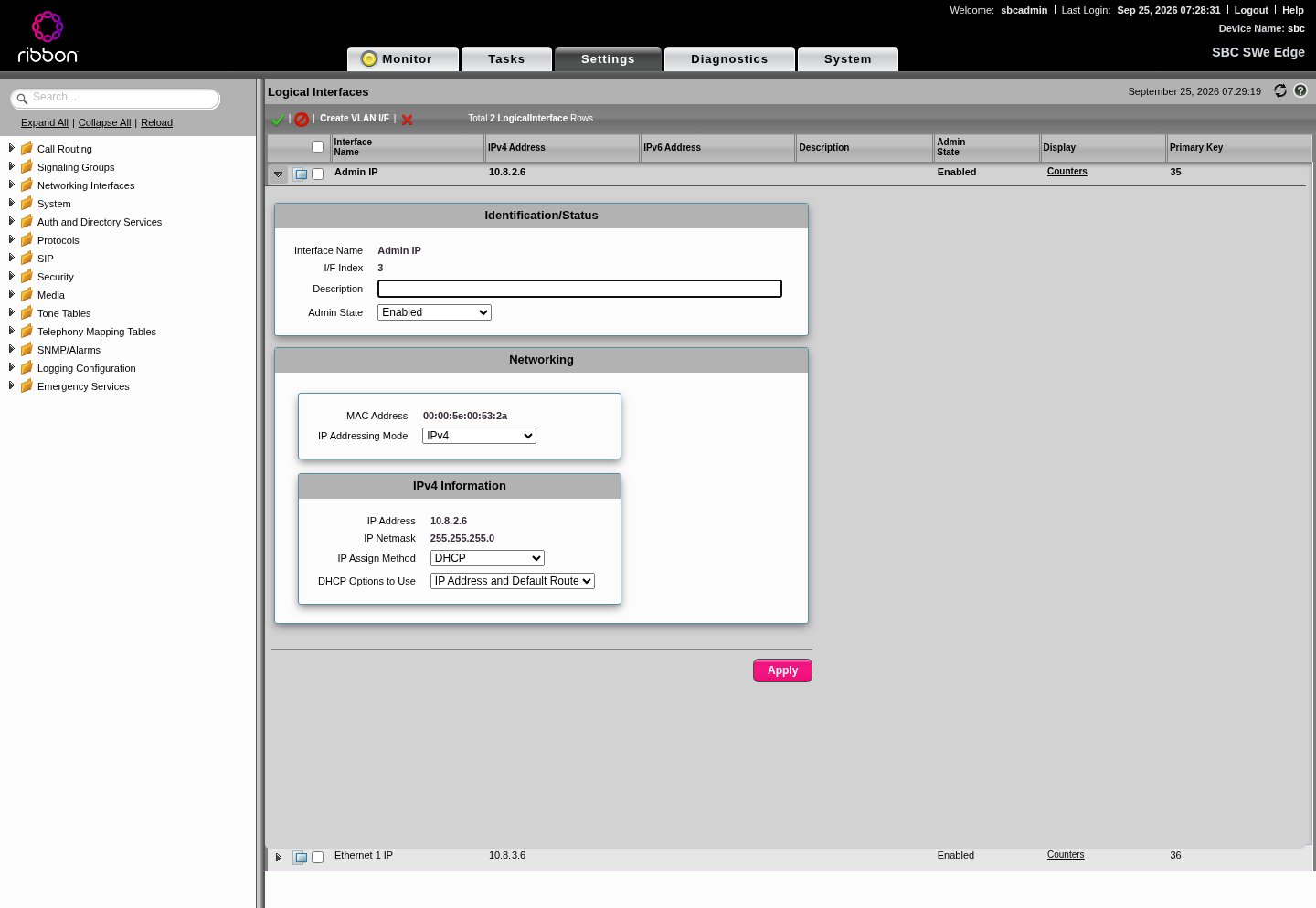
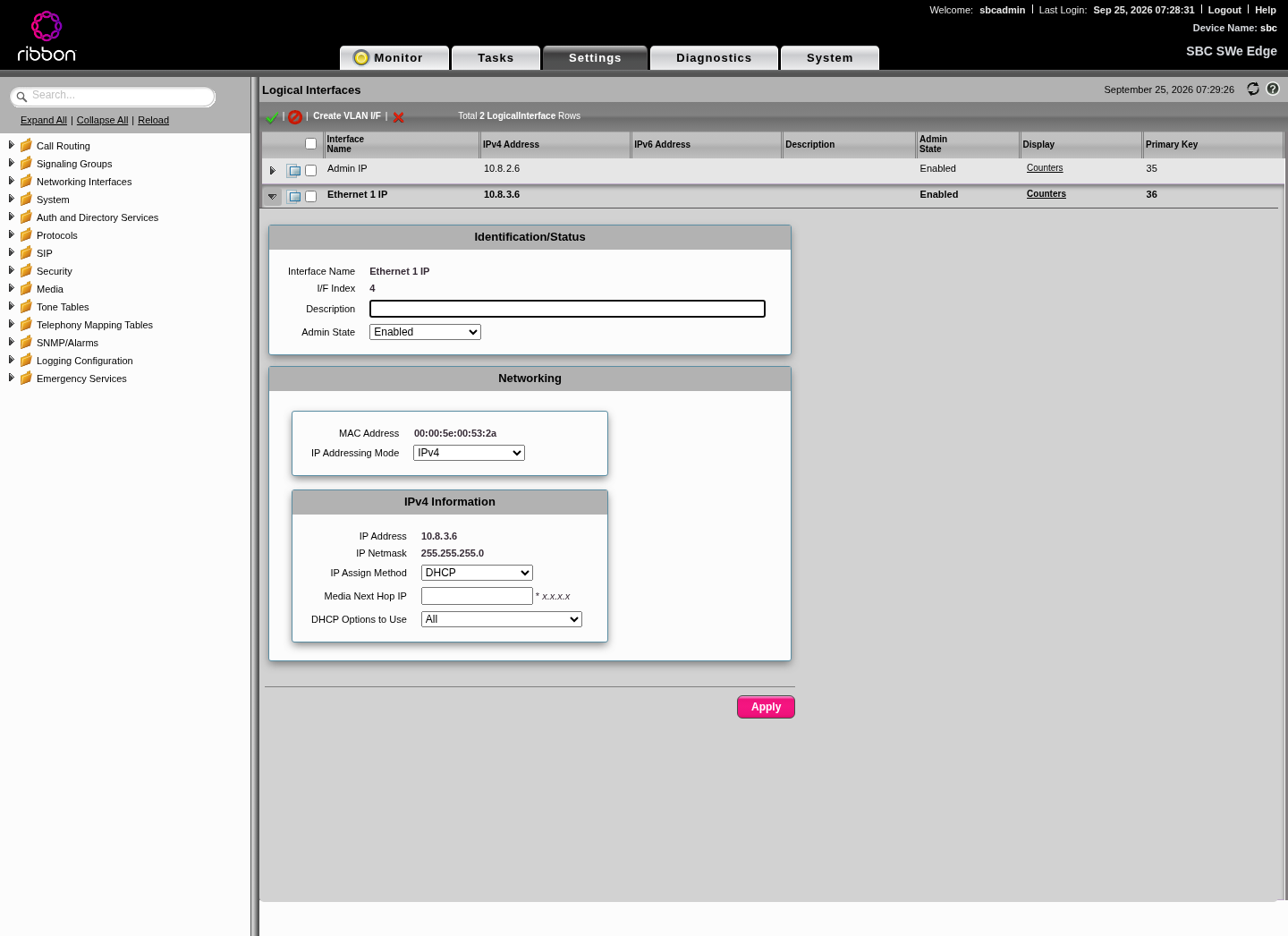
Gotcha: one NIC does not work. Ribbon never carries SIP or media on the management interface (mgt0, shown as "Admin IP"). Signaling groups bind to "Ethernet 1". On a single-NIC VM, "Ethernet 1" doesn't exist, so the SBC silently binds both signaling groups to mgt0. They show as configured, the TLS listeners even answer, but no calls work: Teams says "The trunk never connected" and Twilio gets 32011. The only event is an easy to miss "Successfully Bound To Network Interface ... interface:mgt0, this SG needs to be bounced manually".
Layout we used:
| Item | Mgmt side | Call side (WAN) |
|---|---|---|
| Subnet | 10.8.2.0/24 | 10.8.3.0/24 |
| NIC | primary NIC, becomes Admin IP (mgt0) | second NIC, becomes Ethernet 1 (pkt0) |
| Private IP | 10.8.2.6 | 10.8.3.6 |
| Public IP | 203.0.113.58 (static) | 203.0.113.37 (static) |
| DNS name | sbc-admin.example.com | sbc.example.com |
| NSG | 443 from your admin IP only | SIP and media rules (Step 5) |
Create it roughly like this (placeholders in angle brackets):
RG=<resource-group>; LOC=<region>; VNET=<vnet>

az network vnet create -g $RG -n $VNET -l $LOC --address-prefixes 10.8.0.0/16 \
  --subnet-name sbc-mgmt --subnet-prefixes 10.8.2.0/24
az network vnet subnet create -g $RG --vnet-name $VNET -n sbc-wan --address-prefixes 10.8.3.0/24

az network public-ip create -g $RG -n sbc-admin-pip --sku Standard --allocation-method Static
az network public-ip create -g $RG -n sbc-call-pip  --sku Standard --allocation-method Static

az network nic create -g $RG -n sbc-mgmt-nic --vnet-name $VNET --subnet sbc-mgmt \
  --private-ip-address 10.8.2.6 --public-ip-address sbc-admin-pip --network-security-group sbc-mgmt-nsg
az network nic create -g $RG -n sbc-wan-nic --vnet-name $VNET --subnet sbc-wan \
  --private-ip-address 10.8.3.6 --public-ip-address sbc-call-pip --network-security-group sbc-wan-nsg

az vm create -g $RG -n sbc-01 --size Standard_B2s \
  --image ribboncommunications:ribbon_sbc_swe-lite_vm:ribbon_sbc_swe-lite_vm_release:13.01.00043 \
  --plan-publisher ribboncommunications --plan-product ribbon_sbc_swe-lite_vm \
  --plan-name ribbon_sbc_swe-lite_vm_release \
  --nics sbc-mgmt-nic sbc-wan-nic \
  --admin-username sbcadmin --admin-password '<from your vault>'
If you already built a single-NIC VM (we did), add the second NIC while the VM is deallocated:
az vm deallocate -g $RG -n sbc-01
az vm nic set -g $RG --vm-name sbc-01 --nics sbc-mgmt-nic sbc-wan-nic --primary-nic sbc-mgmt-nic
az vm start -g $RG -n sbc-01
Gotcha: az vm nic add crashed for us with KeyError: 'primary'. az vm nic set with the full list and --primary-nic works.
Gotcha: if you move the call public IP from the old NIC to the new one, the web UI moves too. Use the admin public IP from then on.
After boot, both interfaces show up under Settings > Networking Interfaces > Logical Interfaces, both on DHCP from Azure:
Step 2: DNS
Create two A records:
| Name | Points to | Used by |
|---|---|---|
sbc.example.com | 203.0.113.37 (call IP) | Teams, Twilio, the certificate |
sbc-admin.example.com | 203.0.113.58 (admin IP) | you, for the web UI (optional but handy, and it lets the same cert cover the UI) |
az network dns record-set a add-record -g <dns-rg> -z example.com -n sbc       -a 203.0.113.37
az network dns record-set a add-record -g <dns-rg> -z example.com -n sbc-admin -a 203.0.113.58
Why: Teams identifies the SBC by FQDN, checks it against your verified tenant domains, and checks it against the certificate. The FQDN must resolve to the IP the SBC actually sends from (the call IP).
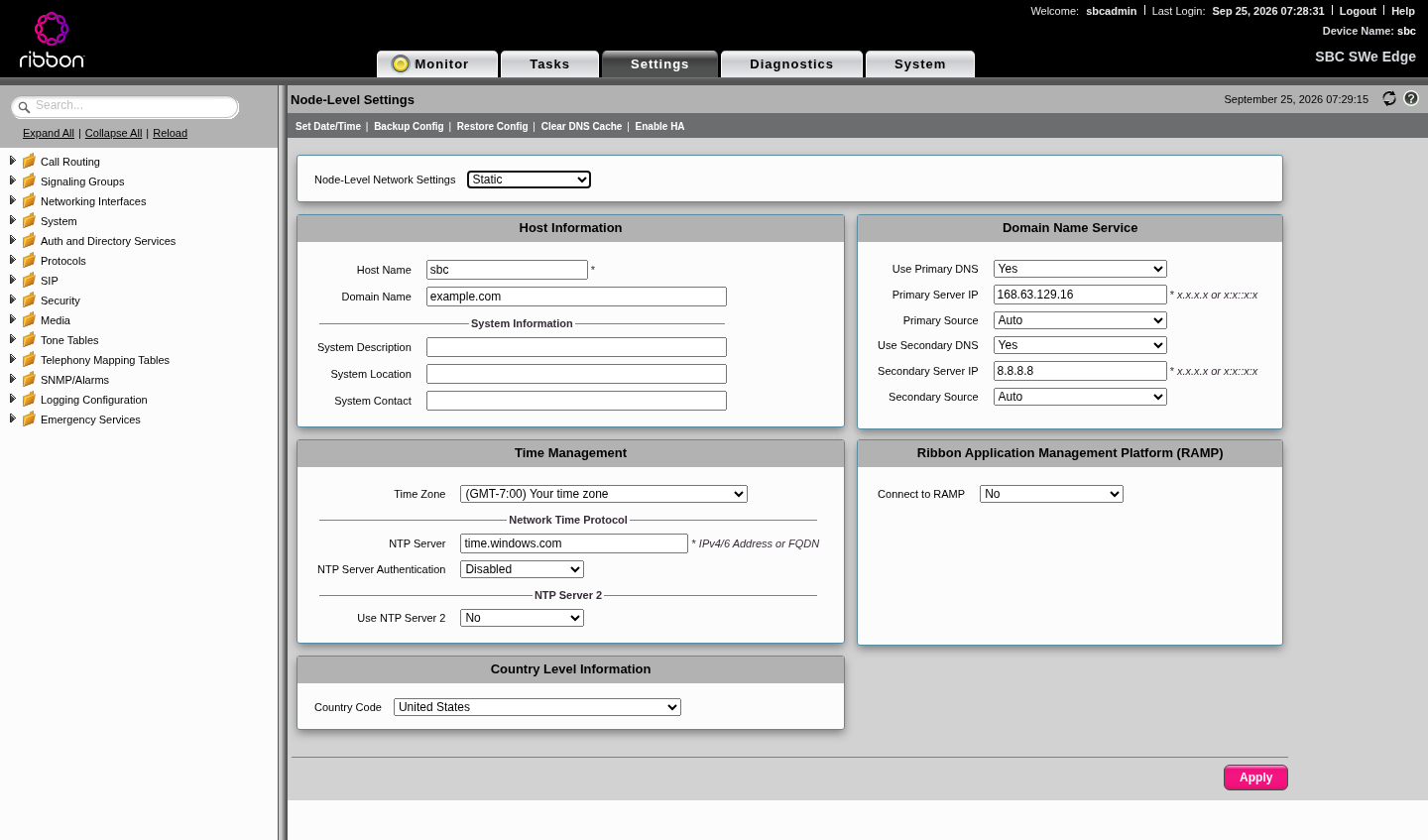
On the SBC, set the host name and domain so the node FQDN matches: Settings > System > Node-Level Settings, Host Name sbc, Domain Name example.com. Set DNS here too (Step 6).
Step 3: Get a public certificate
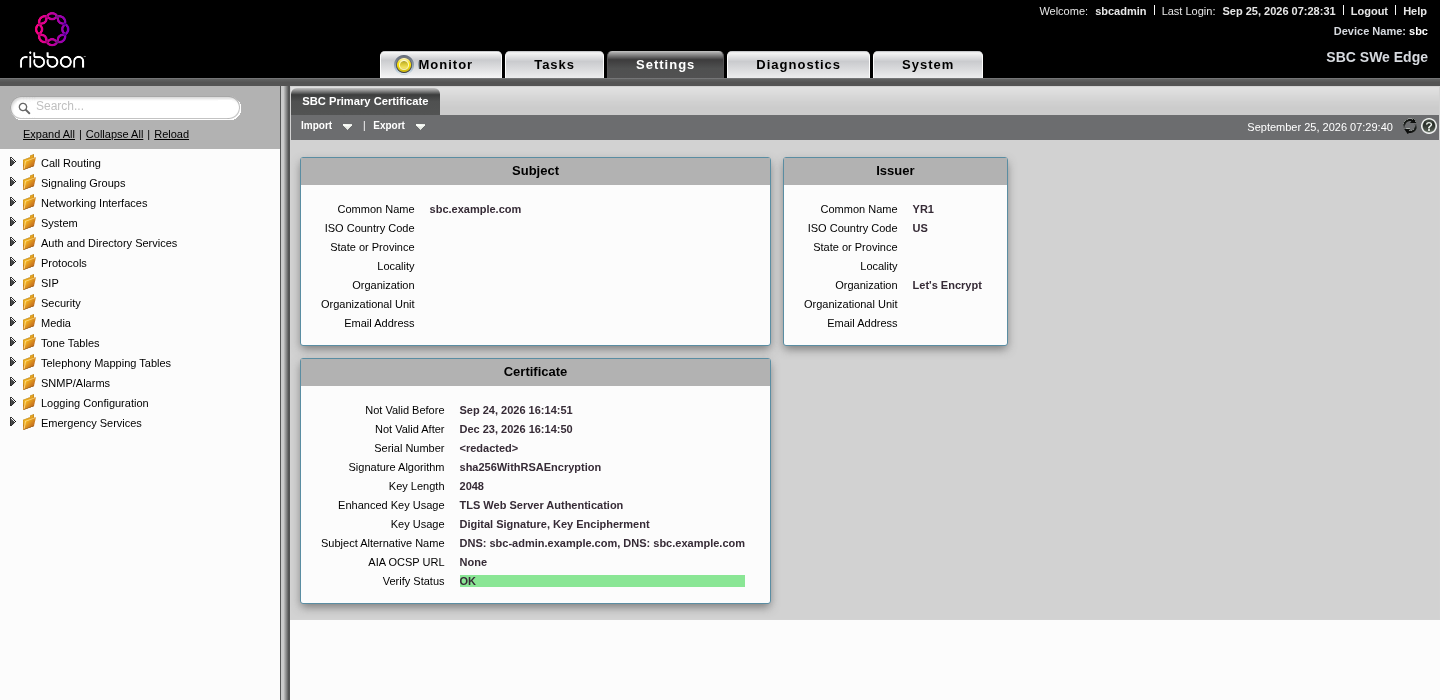
Teams needs a certificate from a CA in the Microsoft Trusted Root Program, with the SBC FQDN in the CN or SAN and the Server Authentication EKU. Let's Encrypt qualifies. We put both names in one cert so the web UI is covered too.
3.1 Issue with certbot and Azure DNS (DNS-01)
DNS-01 means you don't need to open port 80 on the SBC. Two small hook scripts create and remove the challenge TXT record.
auth-hook.sh:
#!/bin/bash
# Called by certbot once per name. CERTBOT_DOMAIN is the name being validated.
ZONE=example.com
RG=<dns-resource-group>
NAME="_acme-challenge.${CERTBOT_DOMAIN%.$ZONE}"
az network dns record-set txt add-record -g "$RG" -z "$ZONE" -n "$NAME" \
  --value="$CERTBOT_VALIDATION" -o none
sleep 30 # give Azure DNS time to publishcleanup-hook.sh:
#!/bin/bash
ZONE=example.com
RG=<dns-resource-group>
NAME="_acme-challenge.${CERTBOT_DOMAIN%.$ZONE}"
az network dns record-set txt delete -g "$RG" -z "$ZONE" -n "$NAME" --yes -o none
Gotcha: validation tokens can start with a -. Written as --value "$CERTBOT_VALIDATION", the Azure CLI reads the token as a new flag and fails. Use --value="$CERTBOT_VALIDATION" (with the equals sign).
Gotcha: with two names on one cert, the hook runs twice. Derive the record name from CERTBOT_DOMAIN (as above), don't hard-code _acme-challenge.sbc.
Run certbot:
certbot certonly --manual --preferred-challenges dns \
  --manual-auth-hook ./auth-hook.sh --manual-cleanup-hook ./cleanup-hook.sh \
  --preferred-chain "ISRG Root X1" \
  -d sbc.example.com -d sbc-admin.example.com \
  --config-dir ./le --work-dir ./le-work --logs-dir ./le-logs
Why --preferred-chain "ISRG Root X1": it pins the chain to the well-known ISRG Root X1, which Microsoft trusts, instead of an alternate chain.
3.2 Import it into the SBC
Web UI: Settings > Security > SBC Certificates > SBC Primary Certificate > Import, choose PKCS12, upload the .p12 and enter its password. (You can also generate a CSR on the SBC under Generate SBC Edge CSR and import the signed cert; Microsoft recommends that route, but it doesn't fit certbot.)
Build the PKCS12 with modern encryption. The SBC rejects the legacy RC2/3DES format with error 15039 ("insecure and legacy"):
openssl pkcs12 -export \
  -in cert.pem -inkey privkey.pem -certfile chain.pem \
  -keypbe AES-256-CBC -certpbe AES-256-CBC -macalg sha256 \
  -out sbc.p12 -passout file:p12pass.txt
REST API (handy for automated renewals): log in, then post the base64 PKCS12 as form fields. Multipart upload does not work (error 15026).
SBC=https://sbc-admin.example.com
curl -sk -c cj -X POST $SBC/rest/login \
  --data-urlencode "Username=<rest-user>" --data-urlencode "Password=<from your vault>"

curl -sk -b cj -X POST "$SBC/rest/certificate/1?action=import12" \
  --data-urlencode "CertFileName=sbc.p12" \
  --data-urlencode "EncryptedPassword=$(cat p12pass.txt)" \
  --data-urlencode "CertFileOperation=1" \
  --data-urlencode "CertFileContent=$(base64 -w0 sbc.p12)"

curl -sk -b cj -X POST $SBC/rest/logout
shred -u sbc.p12 p12pass.txt
The web server restarts for a few seconds after an import.
Gotcha: GET /rest/certificate/1 returns the private key in CertFileContent. Never log or paste that response.
3.3 Renewal
Let's Encrypt certs last 90 days. Put the renewal on a calendar or script it: renew with certbot, rebuild the .p12, re-import. If Let's Encrypt changes its intermediate, import the new intermediate as a trusted CA too (Step 4), so the SBC sends the full chain.
Check the result from outside:
openssl s_client -connect sbc.example.com:5061 -servername sbc.example.com </dev/null | grep -E "s:|i:|Verify return"
# expect: leaf -> Let's Encrypt intermediate -> ISRG Root X1, "Verify return code: 0 (ok)"
Step 4: Trusted CAs on the SBC
The SBC checks the certificates Teams and Twilio present. It can only do that if it trusts their roots. Import these under Settings > Security > SBC Certificates > Trusted CA Certificates:
| Root | Why |
|---|---|
| DigiCert Global Root G2 | Twilio *.pstn.twilio.com chains to it today; Teams is moving to it |
| DigiCert Global Root CA | Teams SIP proxies chain to it today |
| Microsoft RSA Root Certificate Authority 2017 | Microsoft root for Teams |
| Microsoft ECC Root Certificate Authority 2017 | Microsoft root for Teams |
| Microsoft TLS RSA Root G2 | Microsoft's next generation TLS root |
| Microsoft TLS ECC Root G2 | Microsoft's next generation TLS root |
| ISRG Root X1, plus the Let's Encrypt intermediates | Your own chain, so the SBC can present it complete |
| Microsoft Root Certificate Authority 2011 | Not needed any more, but harmless; our 2023 box had it |
Skip Baltimore CyberTrust Root: it expired in May 2025 and Microsoft moved off it. Extra roots do no harm.
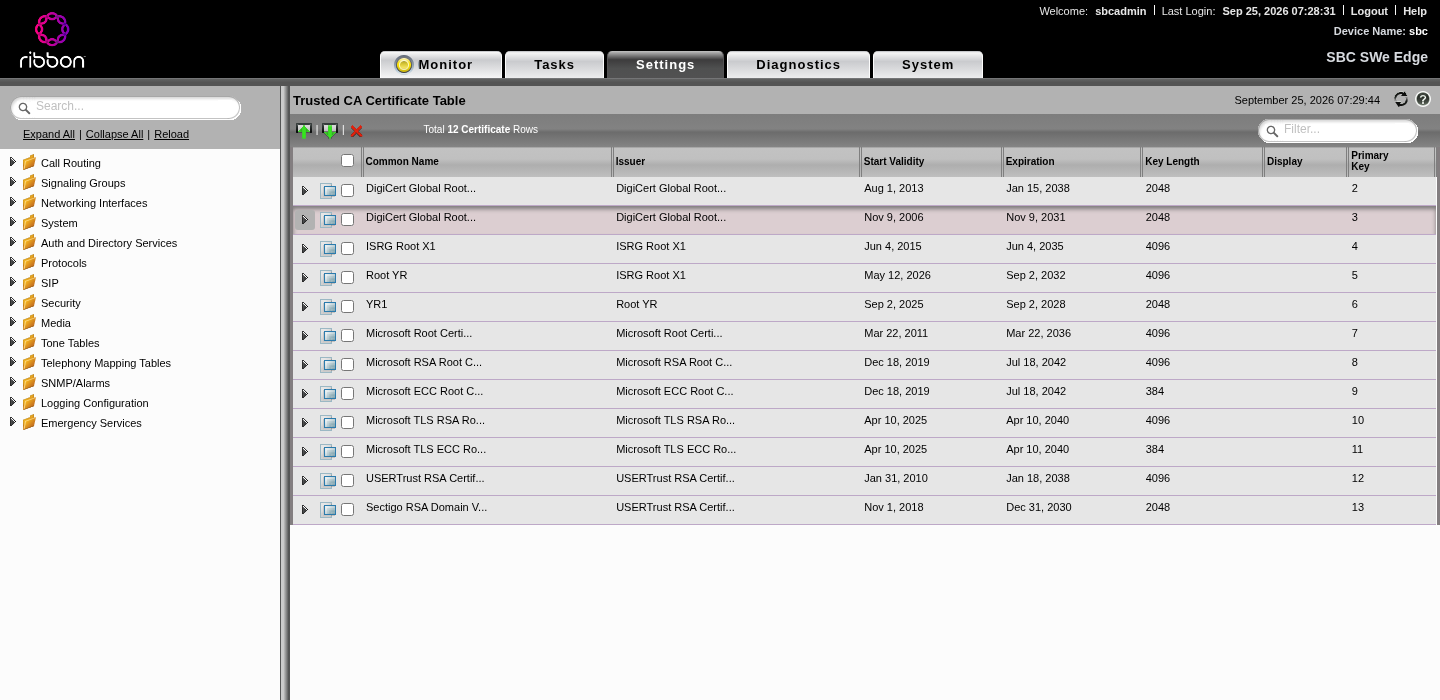
Don't take this list on faith. Roots change. Check what each side presents right now:
openssl s_client -connect sip.pstnhub.microsoft.com:5061 -servername sip.pstnhub.microsoft.com -showcerts </dev/null 2>/dev/null | grep -E "s:|i:"
openssl s_client -connect your-trunk.pstn.twilio.com:5061 -servername your-trunk.pstn.twilio.com -showcerts </dev/null 2>/dev/null | grep -E "s:|i:"
When we checked (September 2026): Teams chained to DigiCert Global Root CA through DigiCert SHA2 Secure Server CA, and Twilio chained to DigiCert Global Root G2 through DigiCert Global G2 TLS RSA SHA256 2020 CA1. Import the last i: line's root if it's missing.
Step 5: Azure NSG rules
On the WAN NIC NSG (call side):
| Rule | Protocol | Source | Destination port | Why |
|---|---|---|---|---|
| Teams signaling | TCP | 52.112.0.0/14, 52.120.0.0/14 | 5061 | Teams SIP proxies connect in with TLS |
| Teams media | UDP | 52.112.0.0/14, 52.120.0.0/14 | your SBC media range (ours 16384 to 21383) | Teams media processors |
| Twilio signaling | TCP | all Twilio signaling ranges (below) | 5062 | Twilio origination over TLS to our Twilio port |
| Twilio media | UDP | 168.86.128.0/18 | your SBC media range | Twilio media |
On the management NIC NSG:
| Rule | Protocol | Source | Destination port |
|---|---|---|---|
| Web UI and REST | TCP | 198.51.100.61/32 (your admin IP) | 443 |
Nothing else inbound on either NIC. Outbound can stay default.
Twilio signaling ranges we allow (from Twilio's IP list, all edges):
54.172.60.0/23   34.203.250.0/23  54.244.51.0/24   54.171.127.192/26
52.215.127.0/24  35.156.191.128/25 3.122.181.0/24  54.65.63.192/26
3.112.80.0/24    54.169.127.128/26 3.1.77.0/24     54.252.254.64/26
3.104.90.0/24    177.71.206.192/26 18.228.249.0/24
Gotcha: allow every Twilio edge, not just the one near you. When one edge has trouble, Twilio retries from another. If that edge's range isn't allowed, the retry fails. With AudioCodes Live Hub earlier we saw this as "Src ip does not match proxyset" on retries. Check Twilio's IP address page for the current list.
Gotcha: use both Microsoft blocks. Microsoft documents 52.112.0.0/14 and 52.120.0.0/14 for signaling and media. Older guides list only 52.112.0.0/14, or 52.122.0.0/15 for the second block. Allow both /14s.
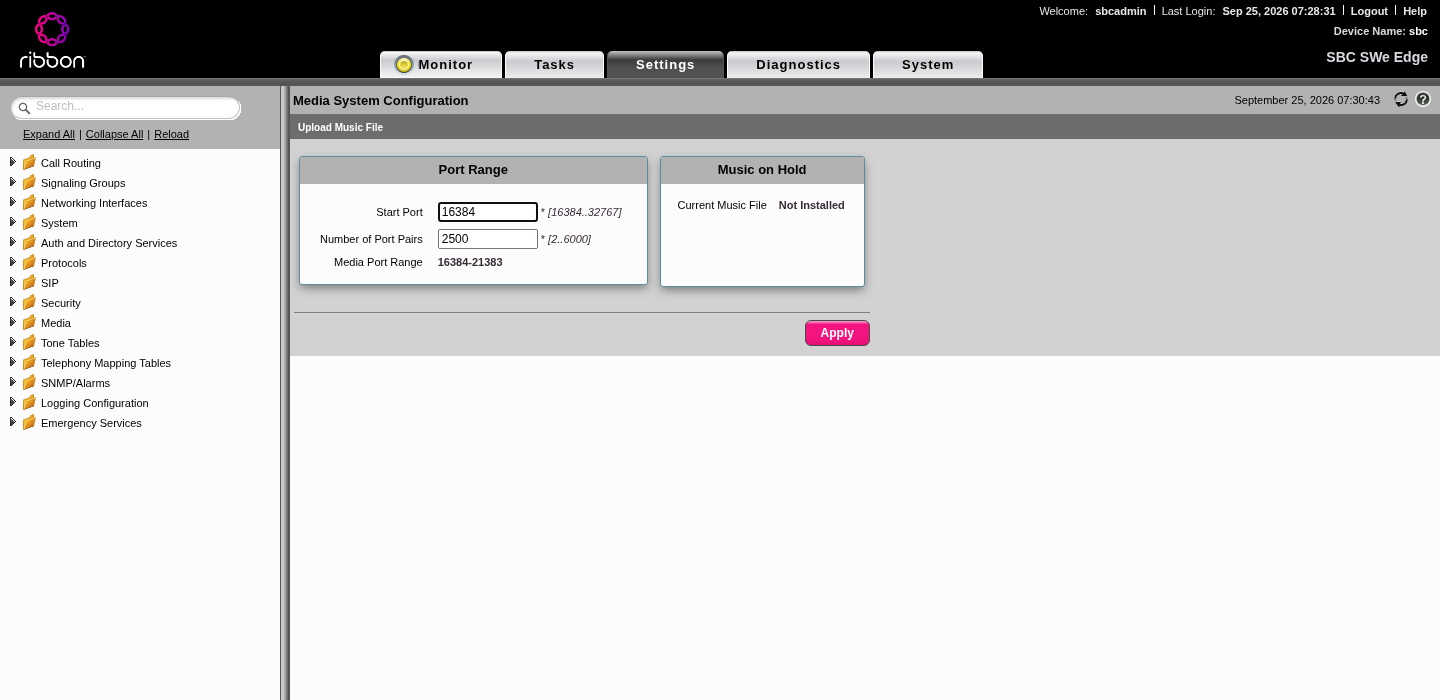
Gotcha: the media range must match. Whatever port range you open for UDP must cover the SBC's media range in Settings > Media > Media System Configuration. Microsoft suggests at least two ports per concurrent call.
Step 6: SBC networking (routes, DNS, NAT)
This is where the Azure layout bites. The SBC now has two interfaces, both on DHCP, and it needs to know which one to use for what.
6.1 Static routes
| # | Destination | Mask | Gateway | Why |
|---|---|---|---|---|
| 1 | 198.51.100.61 (your admin IP) | 255.255.255.255 | 10.8.2.1 (mgmt subnet gateway) | Keeps replies to your browser on mgt0, so the UI keeps working |
| 2 | 0.0.0.0 | 0.0.0.0 | 10.8.3.1 (WAN subnet gateway) | Sends all SIP, media and DNS out through Ethernet 1 |
Add them under Settings > Protocols > IP > Static Routes. Azure always uses the .1 address of a subnet as its gateway.
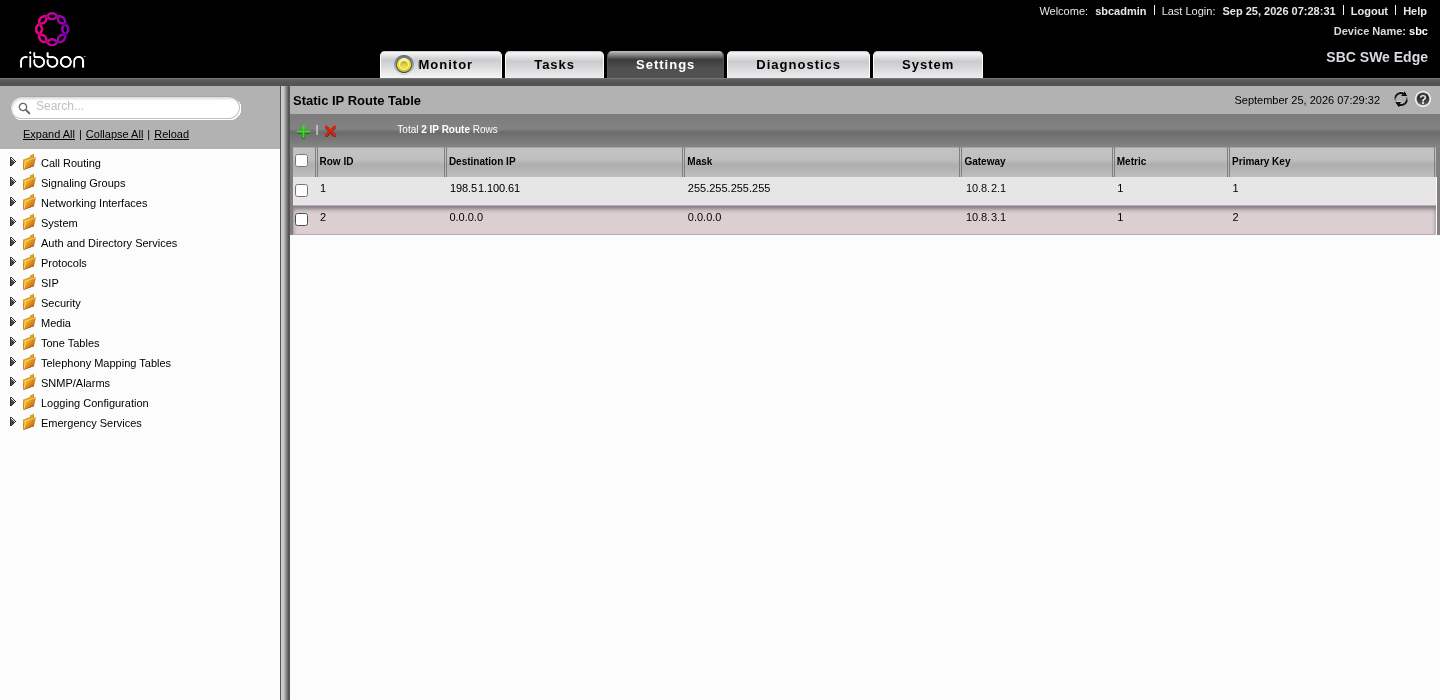
Why not just set the next hop on Ethernet 1? On a DHCP interface the SBC won't let you: setting Media Next Hop IP fails with error 14026. The static default route does the same job.
Why it matters: without route 2, about a third of our OPTIONS pings failed and servers flapped between "Not Responding" and "Became Responsive", because some traffic left through mgt0 with the wrong source address. With it, zero failures.
Check the effective table under Settings > Protocols > IP > Routing Table. The default route must point at Ethernet 1:
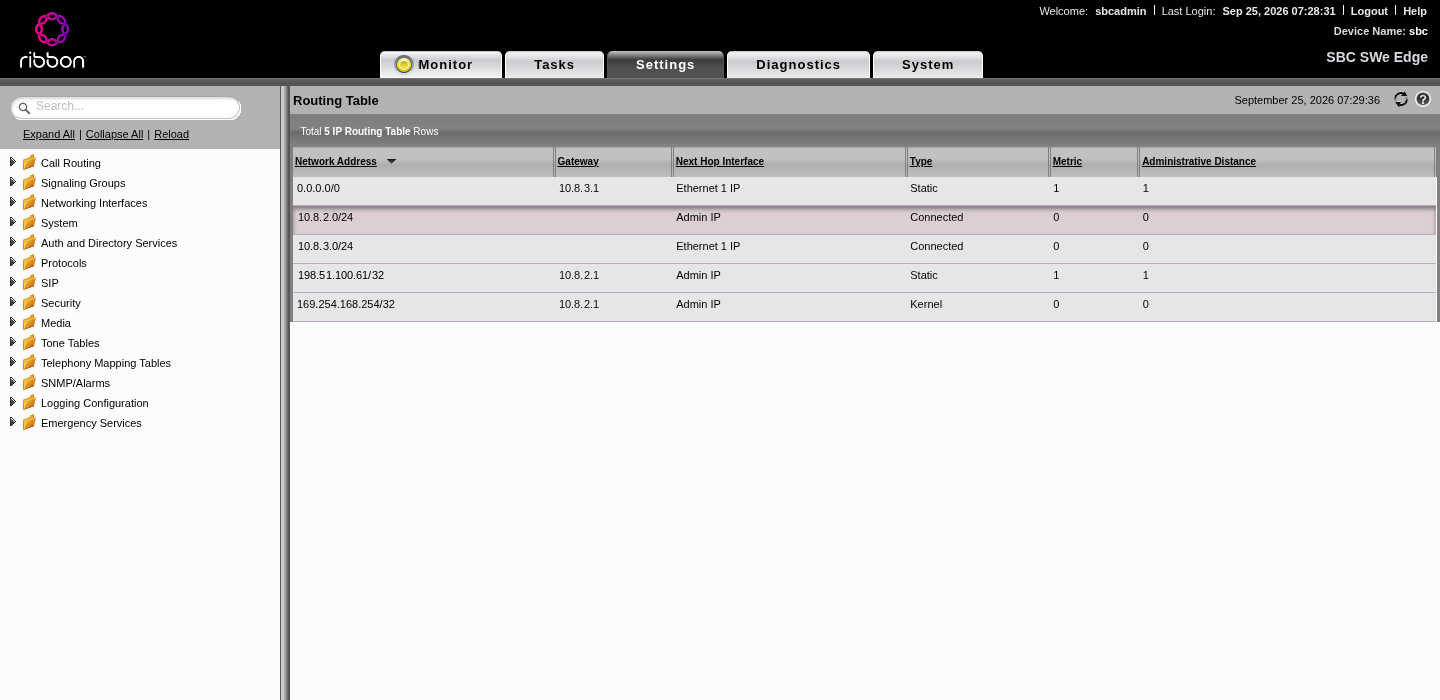
Gotcha: reboot once and check the routing table again. Make sure the default route via Ethernet 1 survives, and that you can still reach the UI.
6.2 DNS
Set the primary DNS server to 168.63.129.16 (Azure's resolver) in Node-Level Settings (screenshot in Step 2). A public resolver as secondary is fine.
6.3 Static NAT on each signaling group
Azure does 1:1 NAT between the public and private IP, so the SBC has to write its public IP into SIP headers and SDP. On each signaling group (Step 7 and 8), under SIP IP Details:
| Field | Value |
|---|---|
| Signaling/Media Private IP | Ethernet 1 IP |
| Outbound NAT Traversal | Static NAT |
| NAT Public IP (Signaling/Media) | 203.0.113.37 |
| ICE Support | Disabled (no media bypass) |
Our 2023 config also set the private media source IP to Ethernet 1; we kept that on both signaling groups (the REST field is PrivateMediaSourceIp).
Gotcha: bounce the signaling groups. After changing a signaling group's interface, the SBC keeps the old binding until the group is disabled and enabled again. In the UI: set Admin State to Disabled, Apply, then Enabled, Apply. Over REST: customAdminState=0, then 1.
Step 7: The Teams side of the SBC
7.1 TLS profile (Teams)
Settings > Security > TLS Profiles, new profile:
| Field | Value | Why |
|---|---|---|
| TLS Protocol | TLS 1.2 to 1.3 | Teams requires TLS 1.2 or later |
| Mutual Authentication | Enabled | Teams presents a client cert; verify it |
| Certificate | SBC Edge Certificate | Your Let's Encrypt cert |
| Handshake Inactivity Timeout | 10 | Same as our working 2023 config |
| Validate Server FQDN | Enabled | When the SBC calls Teams, check the name |
| Validate Client FQDN | Disabled |
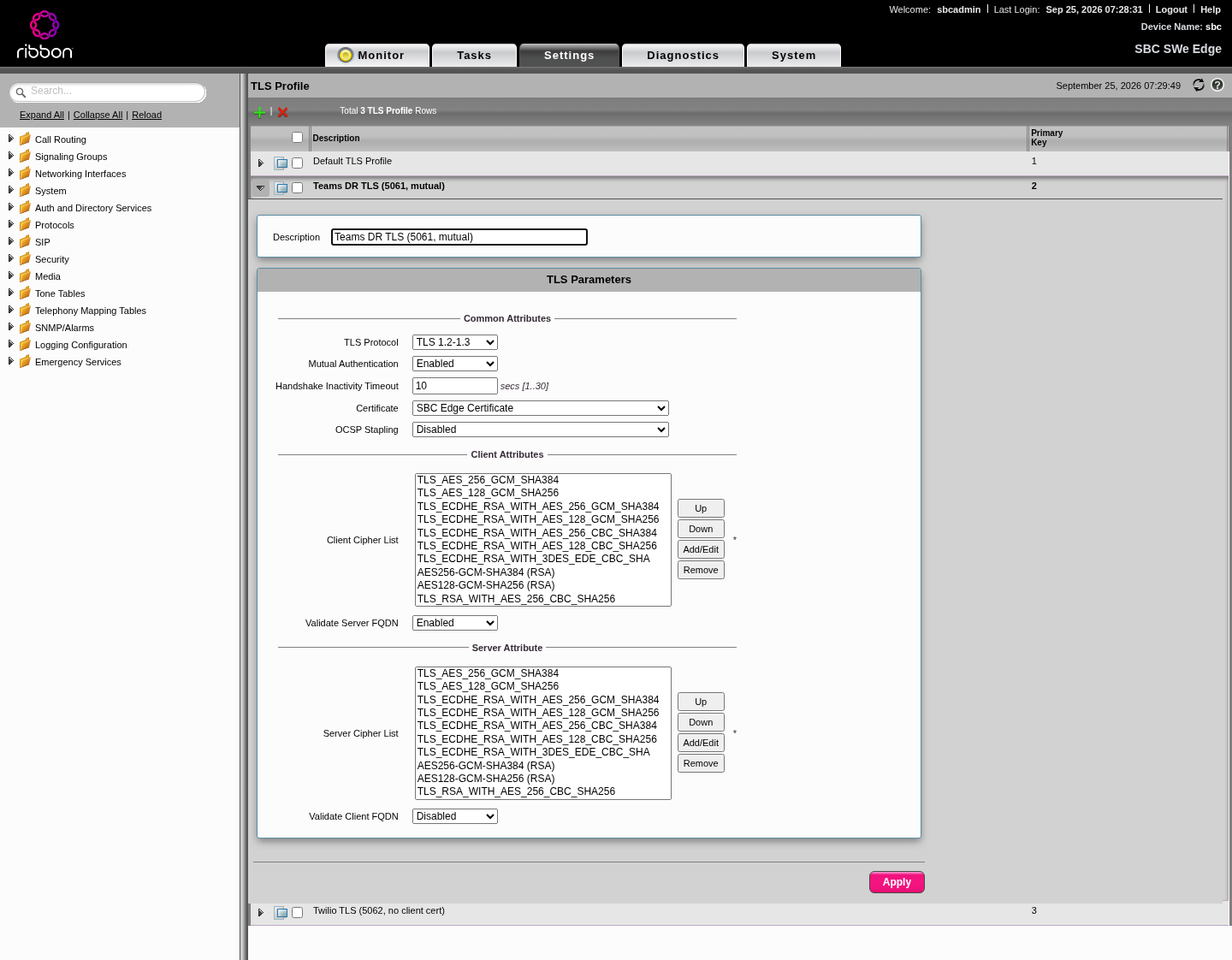
Trim the cipher list. Ribbon's default client and server cipher lists include TLS_ECDHE_RSA_WITH_3DES_EDE_CBC_SHA, as the screenshot shows. 3DES is weak (Sweet32), and neither Teams nor Twilio needs it: Teams Direct Routing negotiates ECDHE with AES. Remove it from both lists, on the Teams profile and the Twilio one.
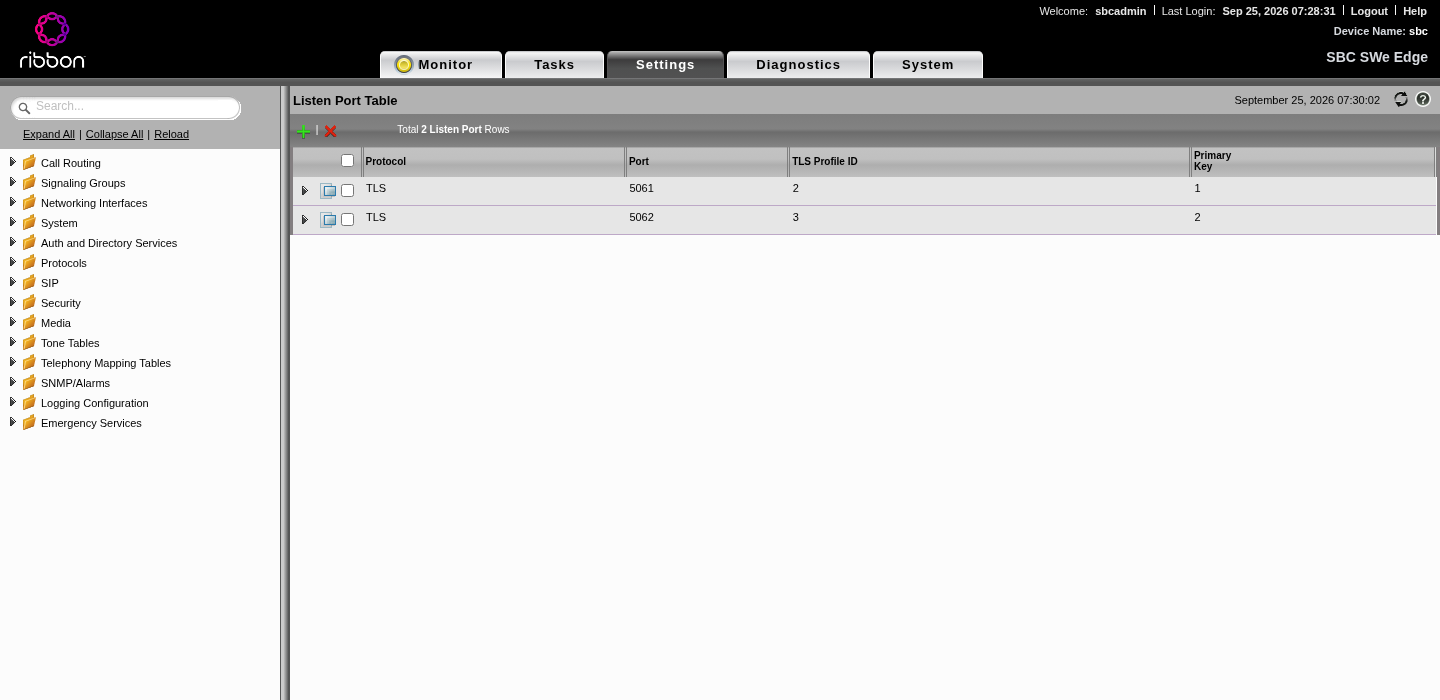
7.2 Listen port
Settings > SIP > Listen Port: TLS 5061 with the Teams TLS profile. (The Twilio port 5062 comes in Step 8.)
7.3 SIP profile (Teams)
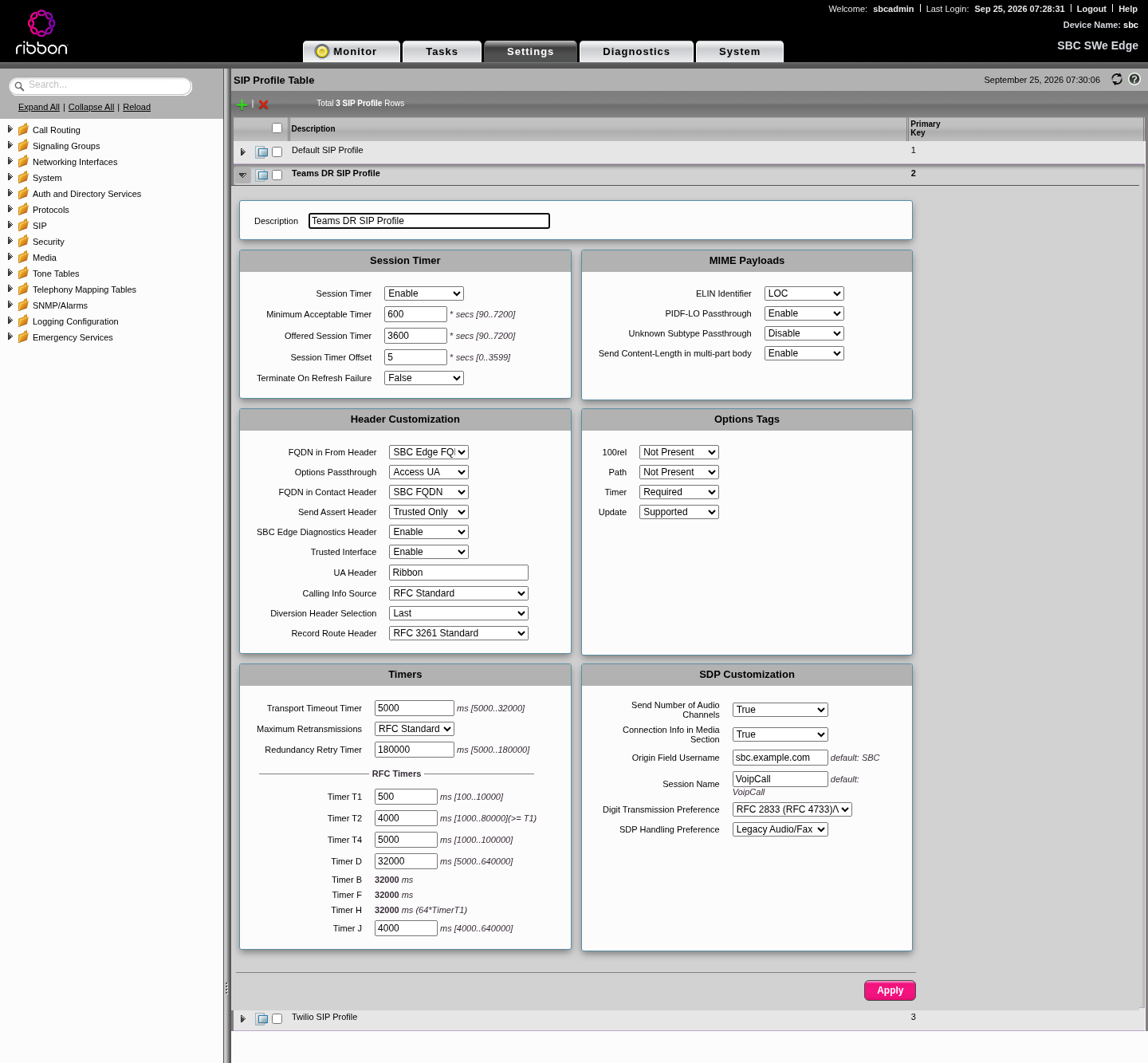
Settings > SIP > SIP Profiles, new profile. These values come from the working 2023 config:
| Field | Value |
|---|---|
| Session Timer | Enable, minimum 600, offered 3600 |
| FQDN in From Header | SBC Edge FQDN |
| FQDN in Contact Header | SBC FQDN |
| Trusted Interface | Enable |
| UA Header | Ribbon |
| Origin Field Username (SDP) | sbc.example.com |
| 100rel | Not Present |
| Path | Not Present |
| Timer | Required |
| Update | Supported |
Why the FQDN settings: Teams matches the SBC by the FQDN in the Contact header of its OPTIONS and INVITEs. If the Contact carries an IP, Teams ignores the SBC and the trunk never connects.
7.4 SIP server table (Teams)
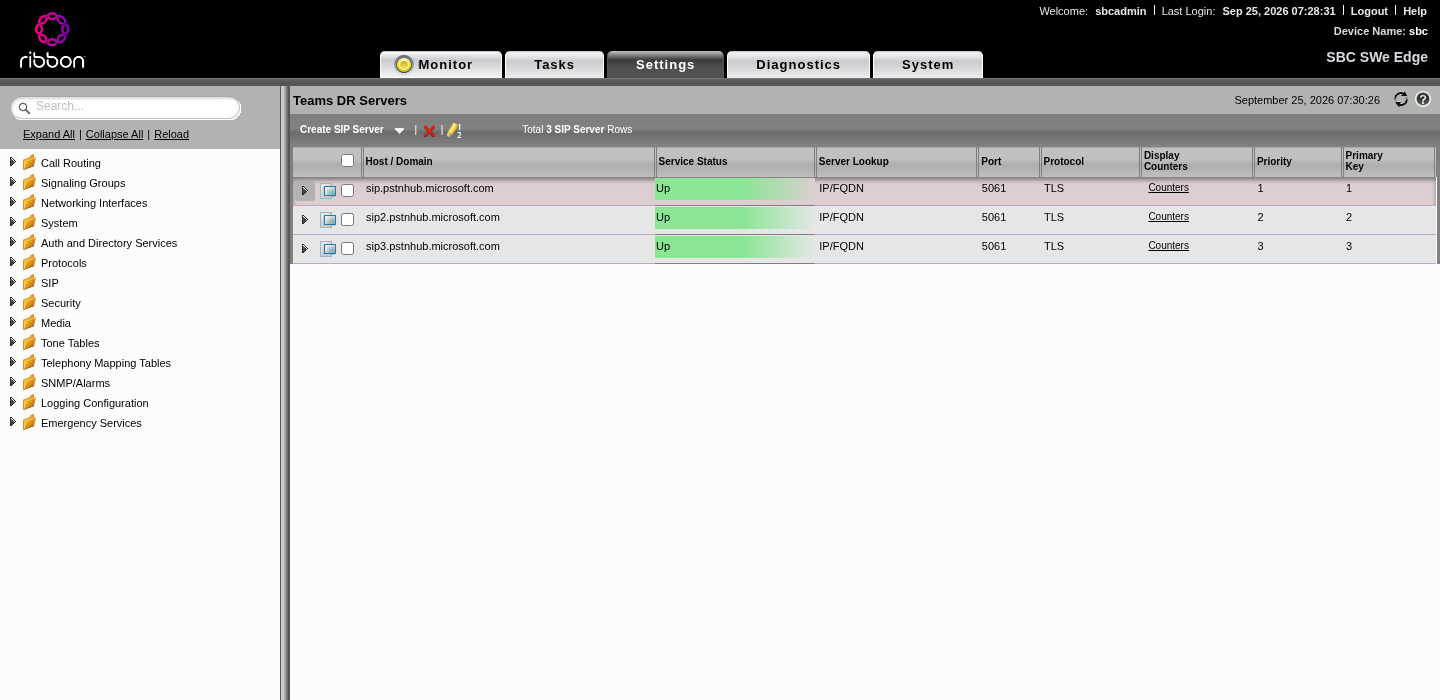
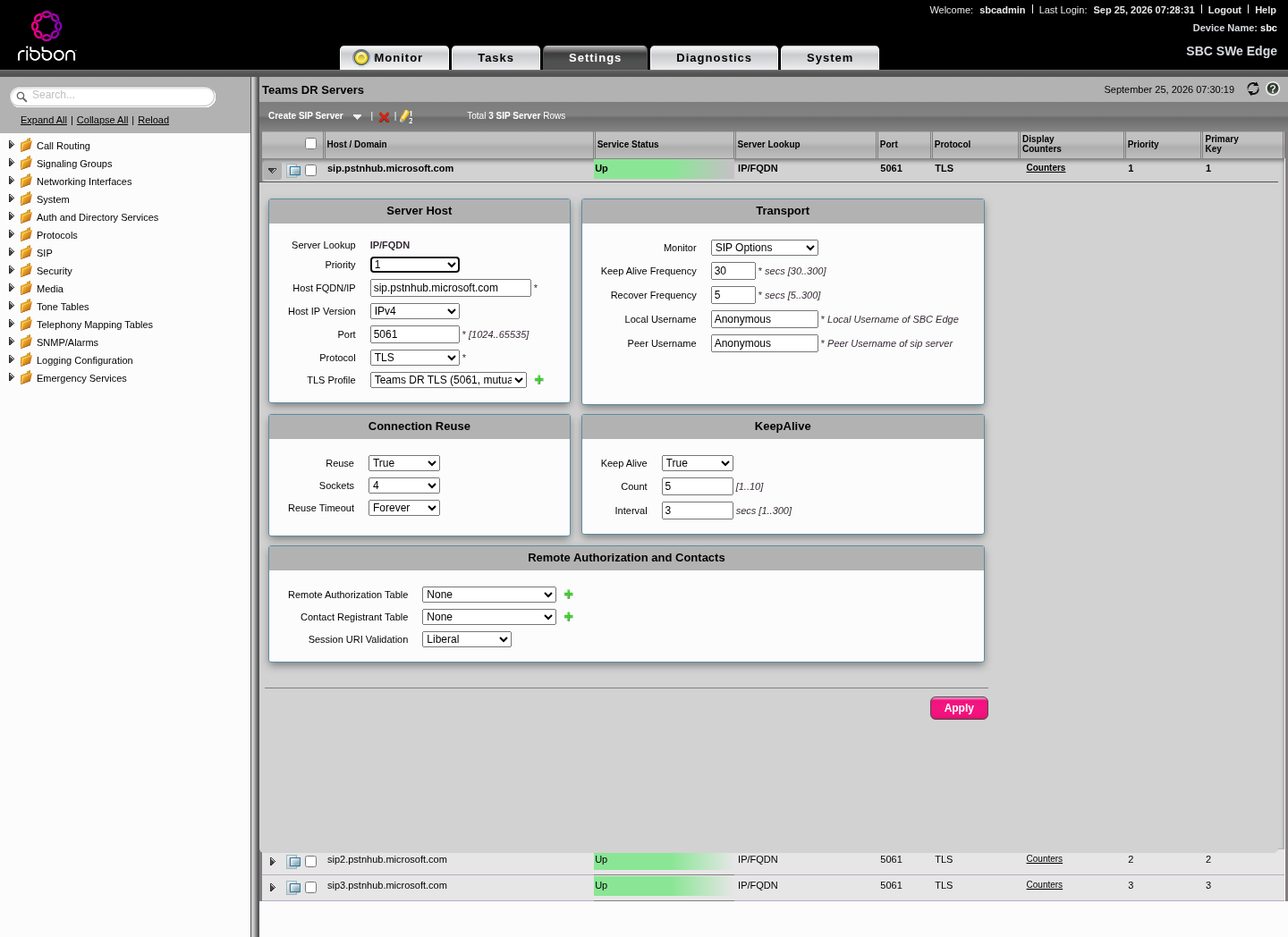
Settings > SIP > SIP Server Tables, new table with three entries:
| Priority | Host | Port | Protocol | TLS profile | Monitor |
|---|---|---|---|---|---|
| 1 | sip.pstnhub.microsoft.com | 5061 | TLS | Teams | SIP Options, keep alive 30 s, recover 5 s |
| 2 | sip2.pstnhub.microsoft.com | 5061 | TLS | Teams | same |
| 3 | sip3.pstnhub.microsoft.com | 5061 | TLS | Teams | same |
Connection reuse: True, 4 sockets, forever.
7.5 SRTP and media list (Teams)
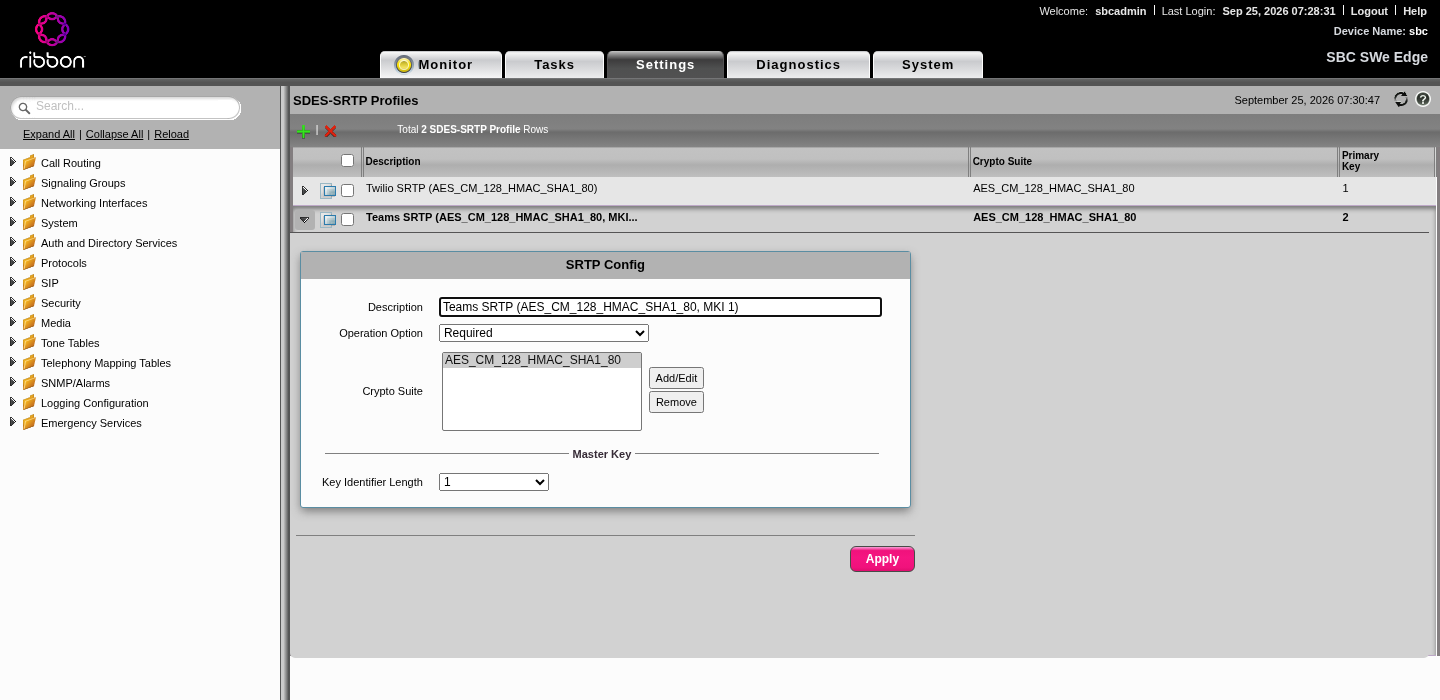
Settings > Media > SDES-SRTP Profiles, new profile:
| Field | Value |
|---|---|
| Operation Option | Required |
| Crypto Suite | AES_CM_128_HMAC_SHA1_80 |
| Key Identifier Length (MKI) | 1 (what the 2023 config used; we also tested 0, no difference) |
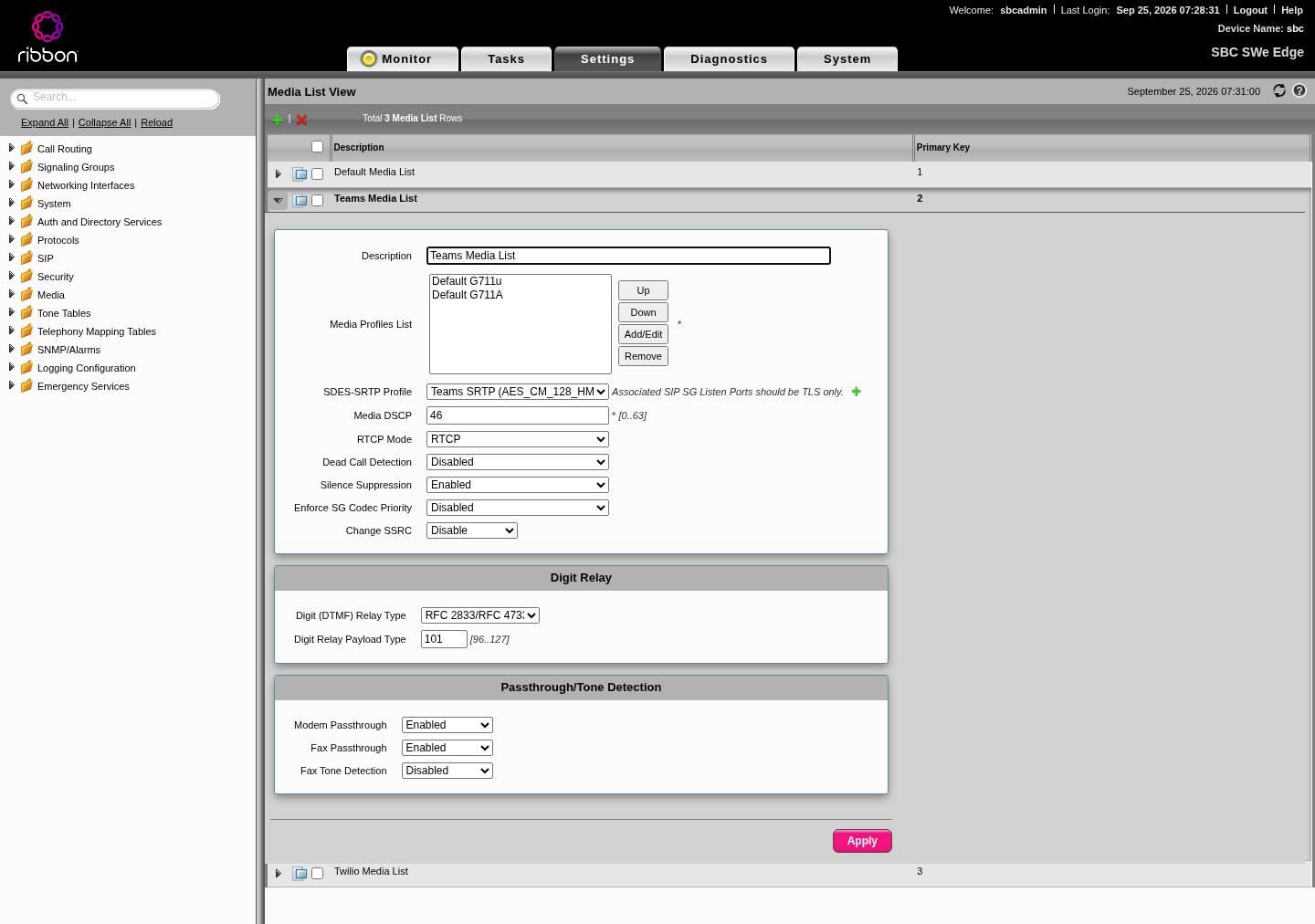
Settings > Media > Media List, new list: G.711u and G.711A, the Teams SRTP profile, DTMF RFC 2833 payload type 101. Both Teams and Twilio speak G.711, so no transcoding is needed. (Teams prefers SILK; the 2023 config led with SILK, but G.711 is supported and avoids a codec conversion.)
7.6 Signaling group (Teams)
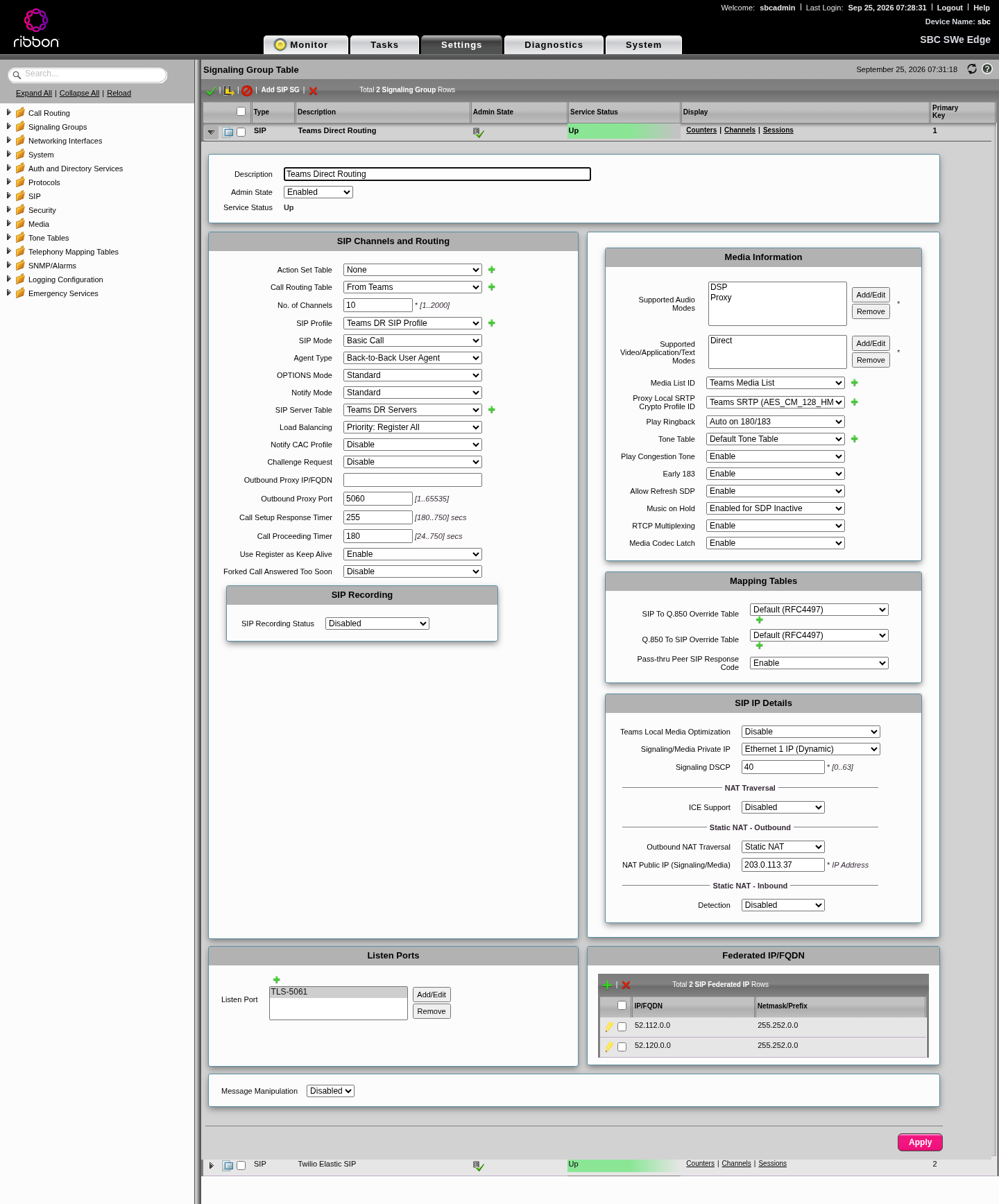
Settings > Signaling Groups > Add SIP SG:
| Section | Field | Value |
|---|---|---|
| Channels and routing | Call Routing Table | From Teams (Step 9) |
| No. of Channels | your licensed session count | |
| SIP Profile | Teams SIP profile | |
| SIP Server Table | Teams servers | |
| Load Balancing | Priority: Register All | |
| Call Setup Response Timer | 255 | |
| Media | Supported Audio Modes | DSP (plus Proxy if licensed) |
| Media List ID | Teams media list | |
| Play Ringback | Auto on 180/183 | |
| Early 183 | Enable | |
| Play Congestion Tone | Enable | |
| RTCP Multiplexing | Enable | |
| Music on Hold | Enabled for SDP Inactive | |
| SIP IP Details | Signaling/Media Private IP | Ethernet 1 IP |
| Static NAT, public IP | 203.0.113.37 | |
| ICE | Disabled | |
| Listen Ports | TLS 5061 | |
| Federated IP/FQDN | 52.112.0.0 / 255.252.0.0 and 52.120.0.0 / 255.252.0.0 |
The federated list is the SBC's own allow list: it only accepts SIP on this group from these ranges.
Step 8: The Twilio side of the SBC
8.1 Why Twilio needs its own port and TLS profile
This is the part that cost us the most time.
- Teams requires mutual TLS on inbound connections, so the Teams TLS profile has Mutual Authentication on.
- Twilio connects without a client certificate. On a mutual TLS port, Twilio's handshake fails.
- On SBC 13.x, two signaling groups can share a port only if they share one TLS profile. Try to give them different profiles and the SBC refuses with error 31043.
So you can't put both on 5061 with different TLS settings. The fix, which is also how the 2023 box was built, is to give Twilio its own port (5062) with its own TLS profile.
8.2 TLS profile (Twilio)
| Field | Value | Why |
|---|---|---|
| TLS Protocol | TLS 1.2 to 1.3 | |
| Mutual Authentication | Disabled | Twilio presents no client cert |
| Certificate | SBC Edge Certificate | Twilio checks your cert when it calls you |
| Verify Peer Server Certificate | Enabled | Check Twilio's cert when you call out |
| Validate Server FQDN | Enabled |
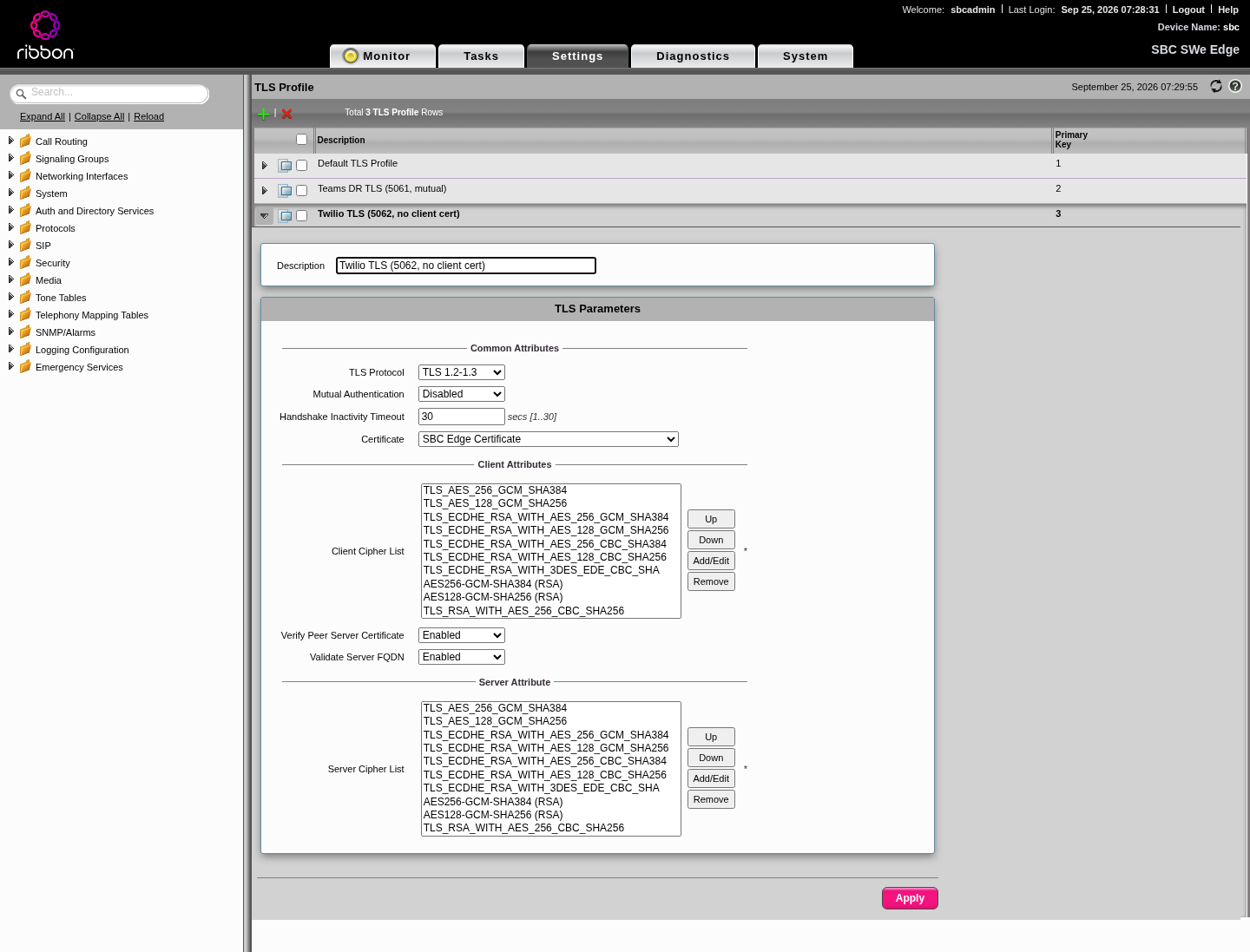
Then add a listen port: TLS 5062 with this profile (screenshot in 7.2).
8.3 SIP profile (Twilio)
Same as the Teams one except:
| Field | Value | Why |
|---|---|---|
| FQDN in From Header | Disable | Twilio doesn't need it |
| FQDN in Contact Header | SBC FQDN | |
| Send Assert Header | Never | Twilio doesn't need P-Asserted-Identity from us |
| Trusted Interface | Disable | Twilio is outside your trust boundary |
| 100rel / Timer / Update | Supported |
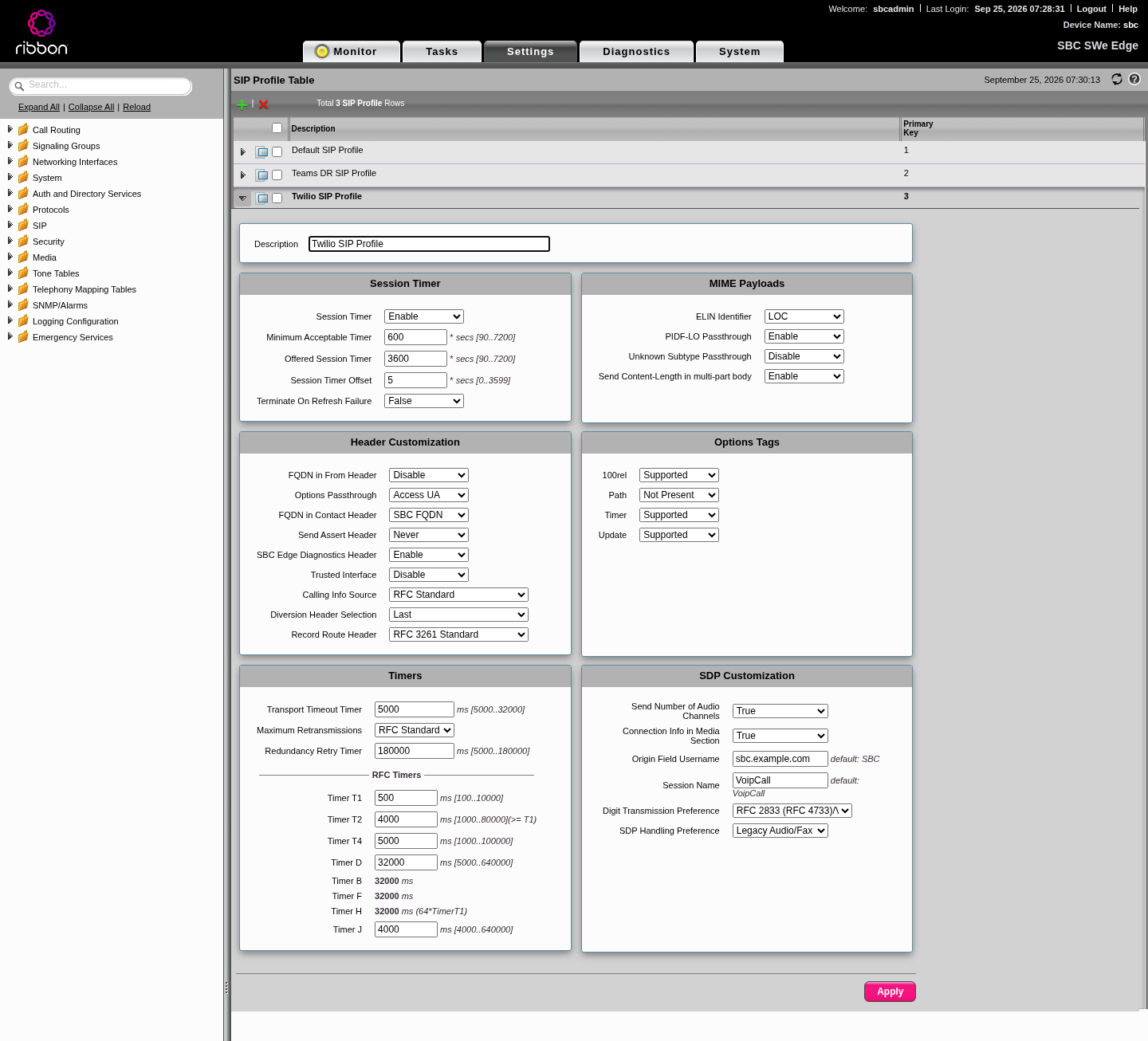
8.4 Digest credentials (Remote Authorization table)
Twilio challenges your outbound calls with digest auth, using the credential list on the trunk. Settings > SIP > Remote Authorization Tables, new table, one entry:
| Field | Value | Why |
|---|---|---|
| Realm | blank | Answer any realm |
| Authentication ID | your credential list username | |
| Password | from your vault | |
| From URI User Match | Regex .* | The default only answers challenges whose From user equals the username, which never happens with +E.164 callers |
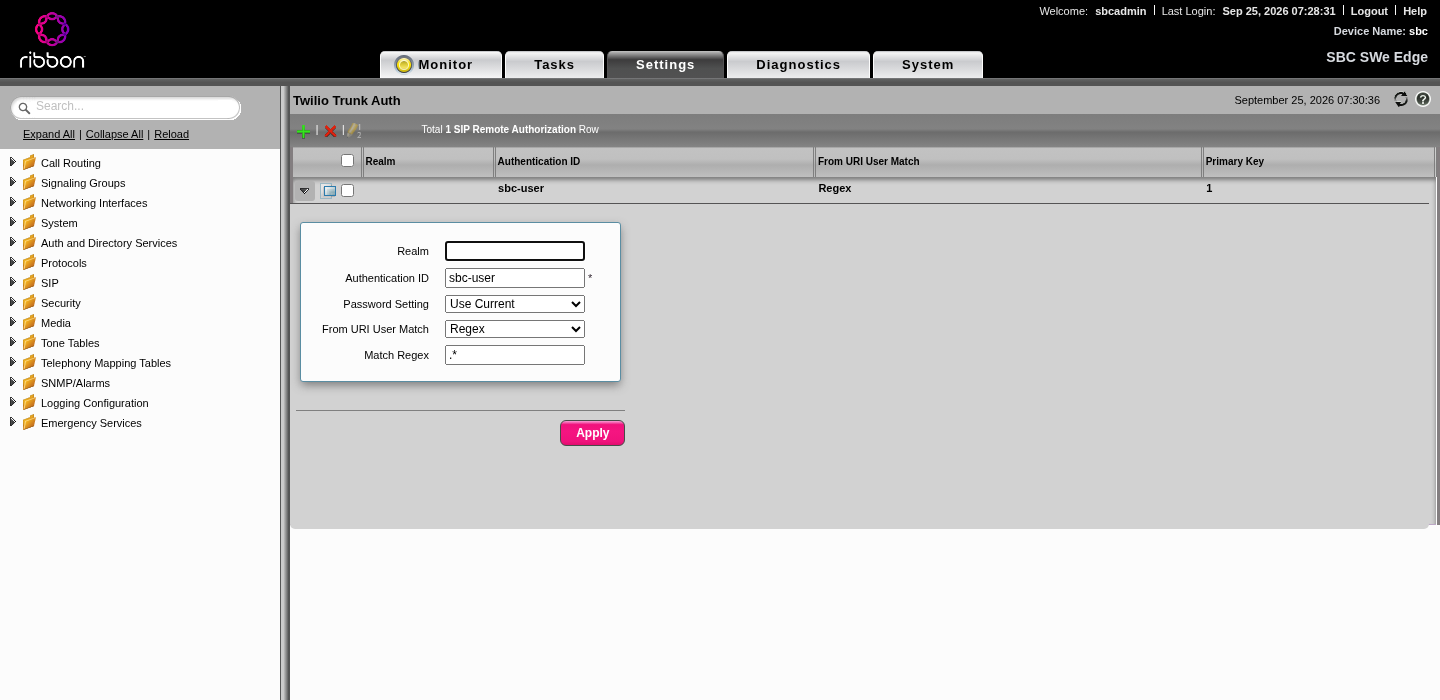
Gotcha: when you rotate the trunk password in Twilio, update this entry at the same time.
8.5 SIP server table (Twilio)
One entry: your-trunk.pstn.twilio.com, port 5061, TLS, the Twilio TLS profile, SIP Options monitoring, and the Remote Authorization table from 8.4.
Note the asymmetry: Twilio calls you on 5062, you call Twilio on 5061.
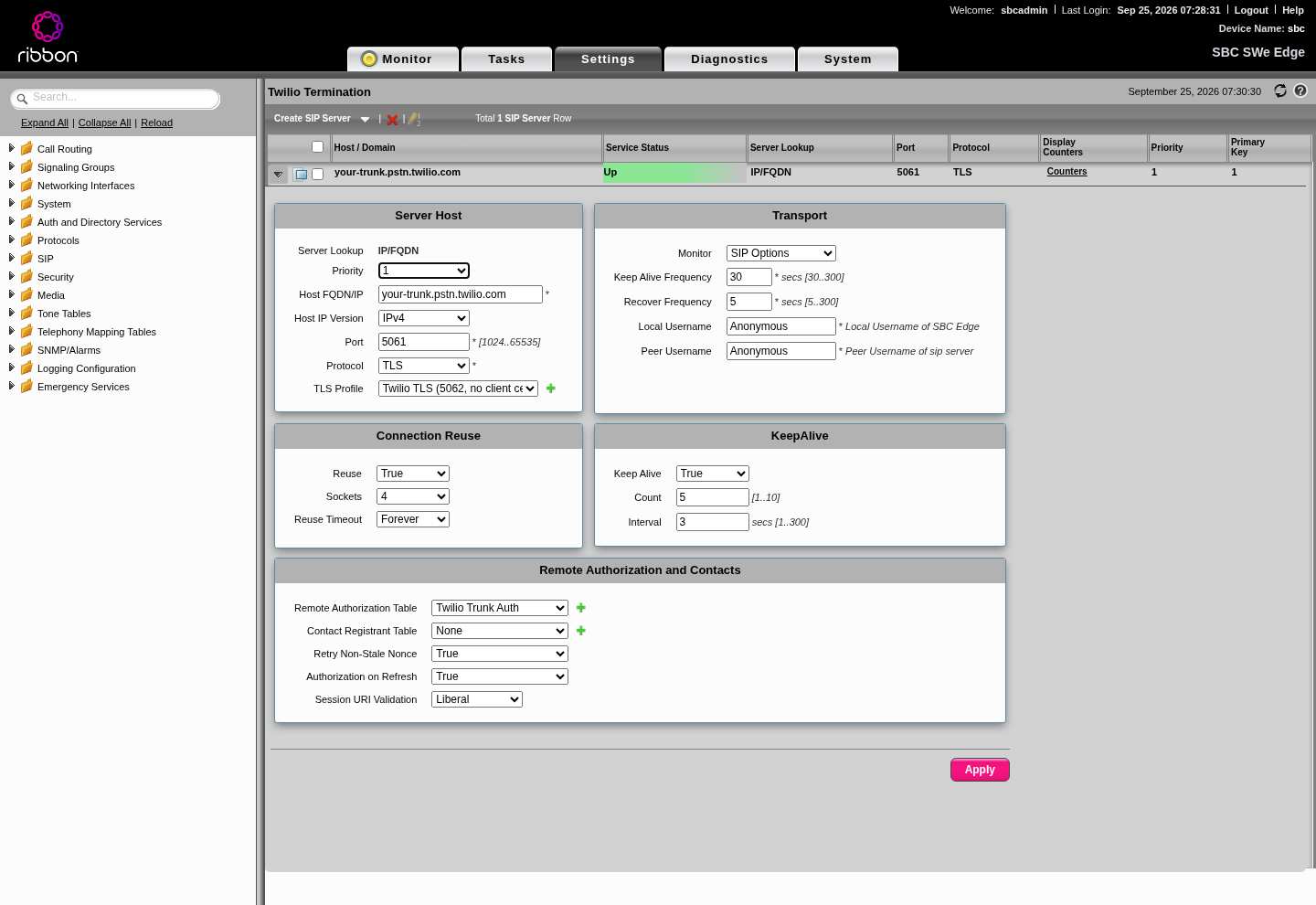
8.6 SRTP and media list (Twilio)
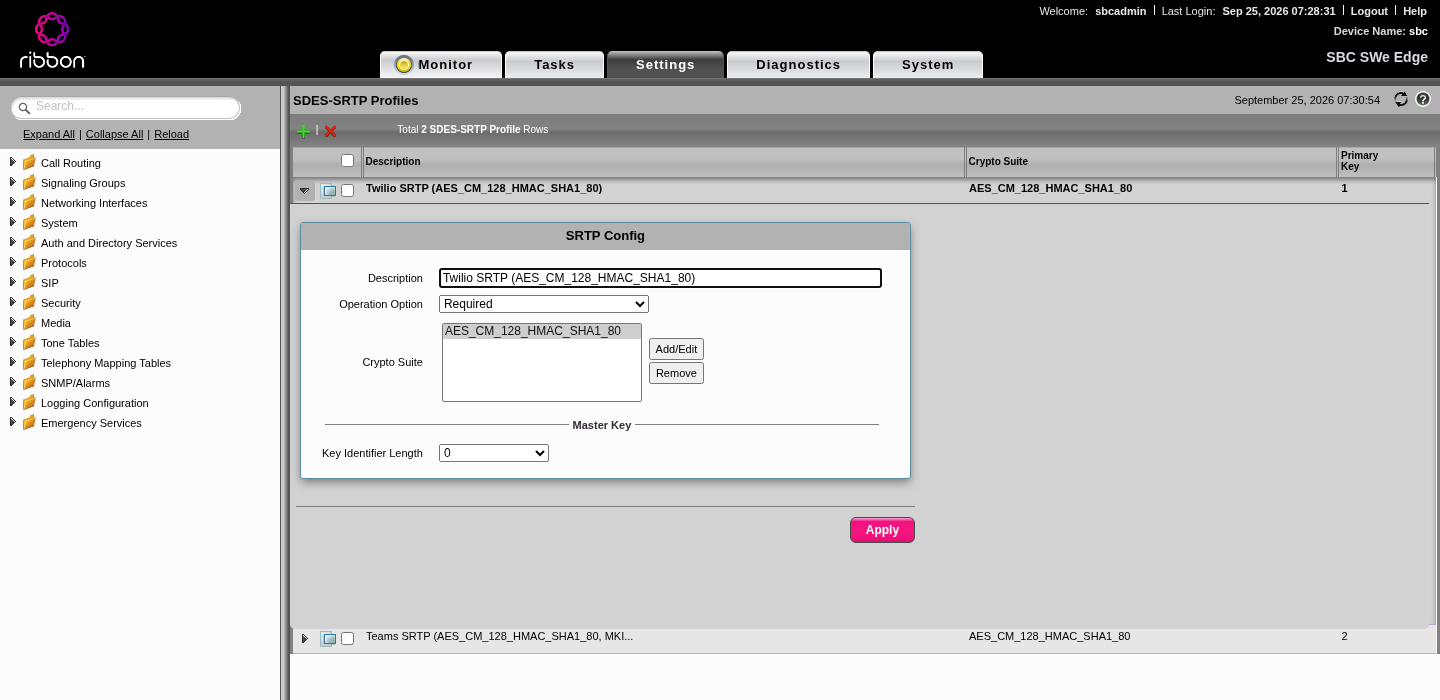
SRTP profile: Required, AES_CM_128_HMAC_SHA1_80, MKI length 0 (Twilio's guide says 0 to disable MKI).
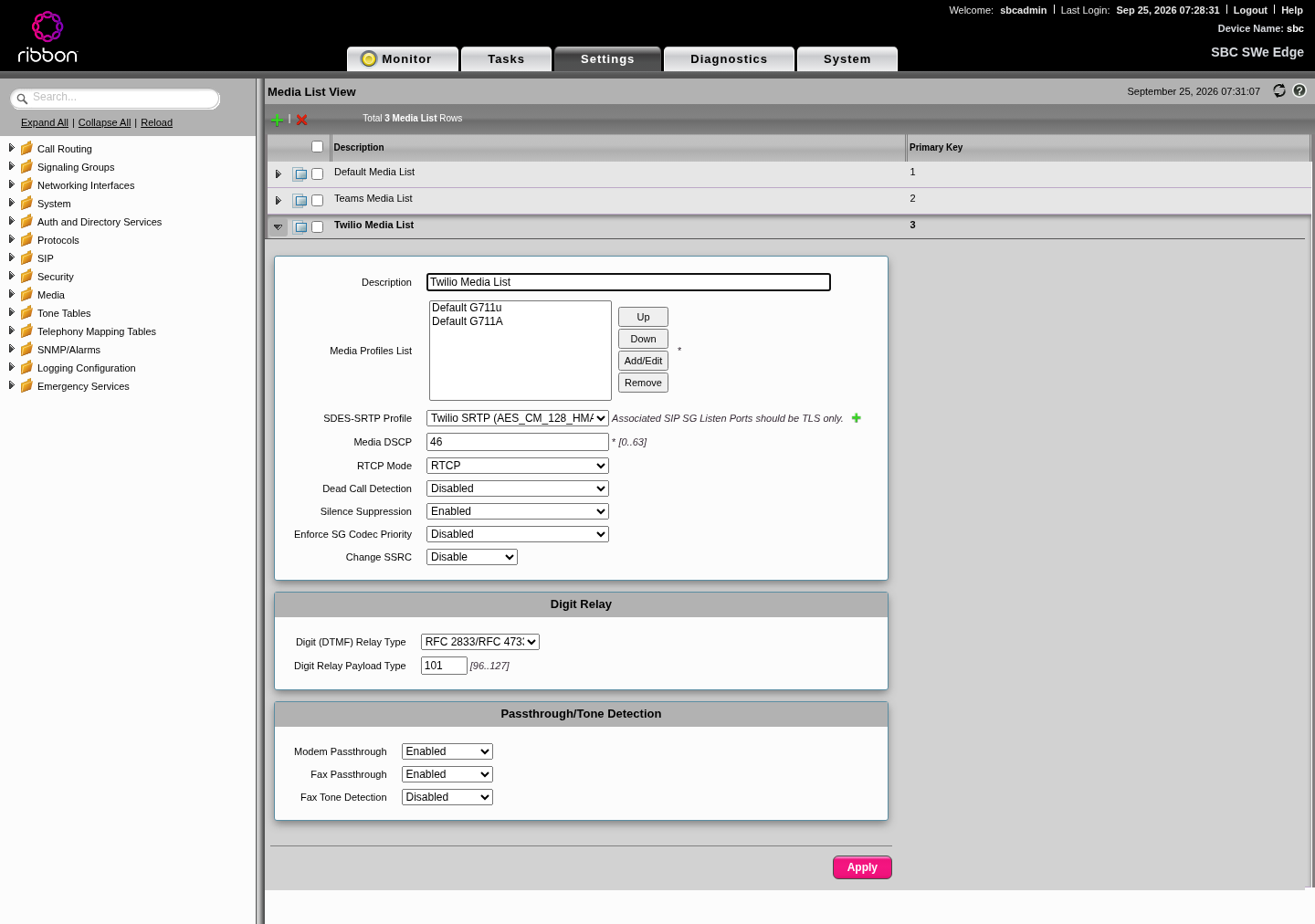
Media list: G.711u and G.711A, the Twilio SRTP profile, RFC 2833 payload type 101.
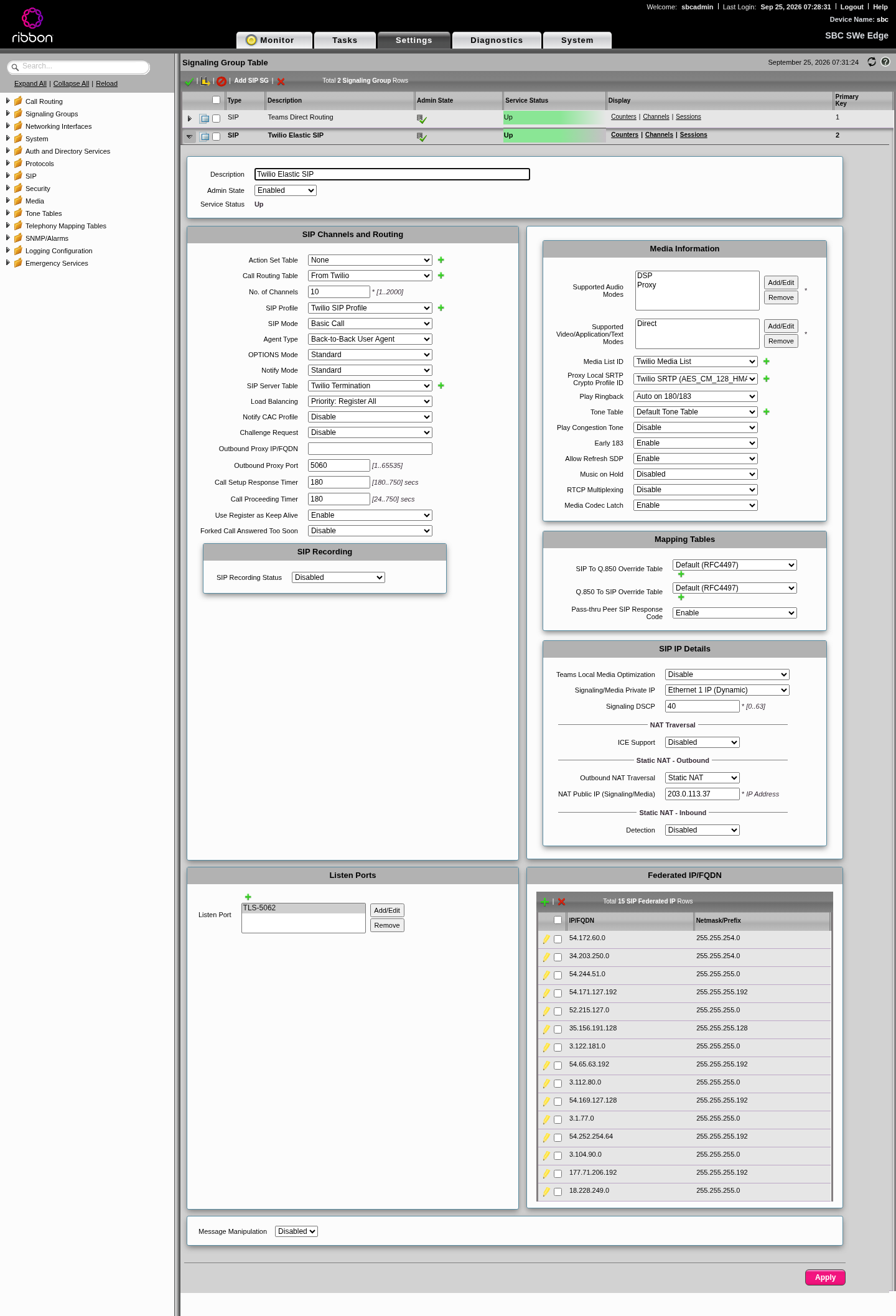
8.7 Signaling group (Twilio)
Like the Teams group, with these differences:
| Field | Value |
|---|---|
| Call Routing Table | From Twilio |
| SIP Profile | Twilio SIP profile |
| SIP Server Table | Twilio |
| Media List | Twilio media list |
| Play Congestion Tone / Music on Hold / RTCP mux | Disable |
| Listen Port | TLS 5062 |
| Federated IP/FQDN | all 15 Twilio signaling ranges from Step 5 |
8.8 On the Twilio side
- Secure Trunking: on (TLS plus SRTP).
- Termination URI:
your-trunk.pstn.twilio.com(this is what the SBC calls). Attach your credential list under termination authentication. - Origination URI:
sip:sbc.example.com:5062;transport=tls(this is where Twilio sends inbound calls). Mind the port. - Numbers: attach your numbers to the trunk.
If you also send calls from Twilio Programmable Voice (a webhook that returns <Dial><Sip>), add ;secure=true so Twilio offers SRTP. Without it, the call arrives with plain RTP and the SBC's "Required" SRTP profile rejects it:
<Response>
  <Dial answerOnBridge="true">
    <Sip>sip:+15550100000@sbc.example.com:5062;transport=tls;secure=true</Sip>
  </Dial>
</Response>
Step 9: Number transformations and call routes
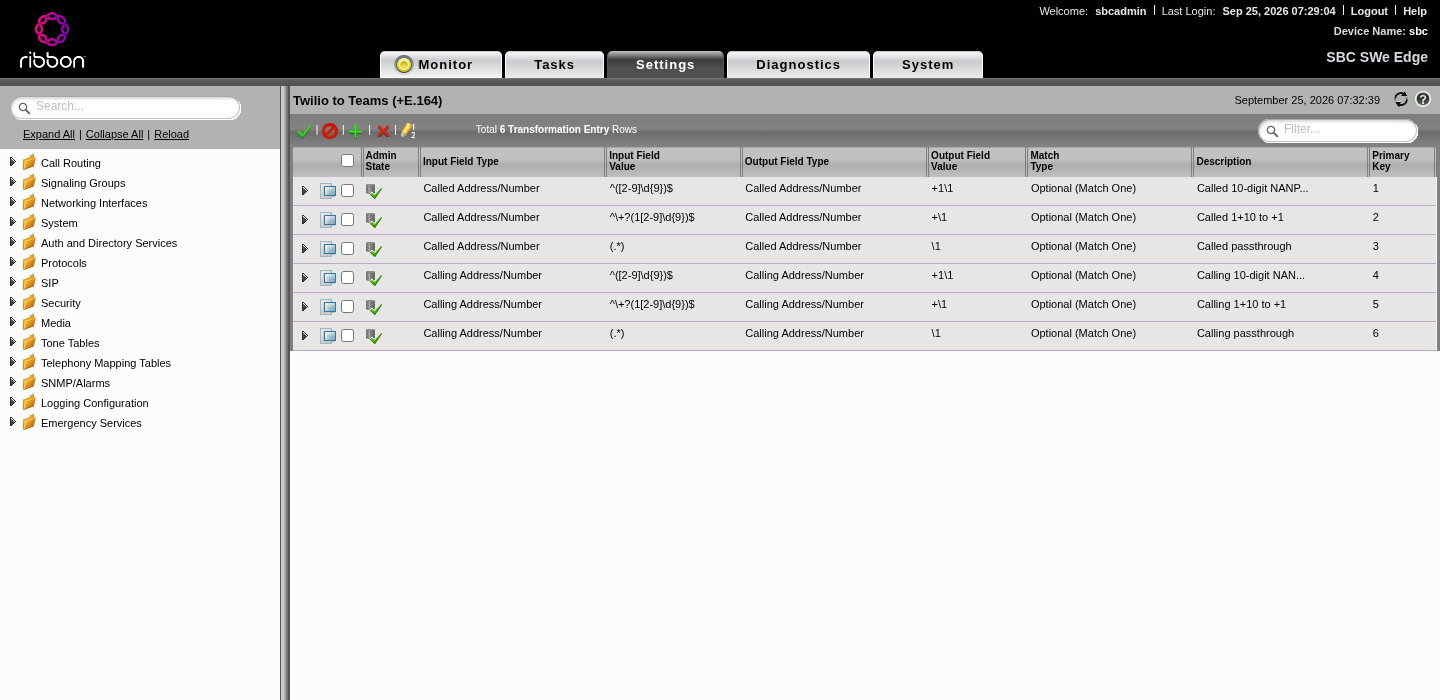
Teams expects numbers in +E.164. Twilio is happy with +E.164 too. So both transformation tables just normalize to +E.164.
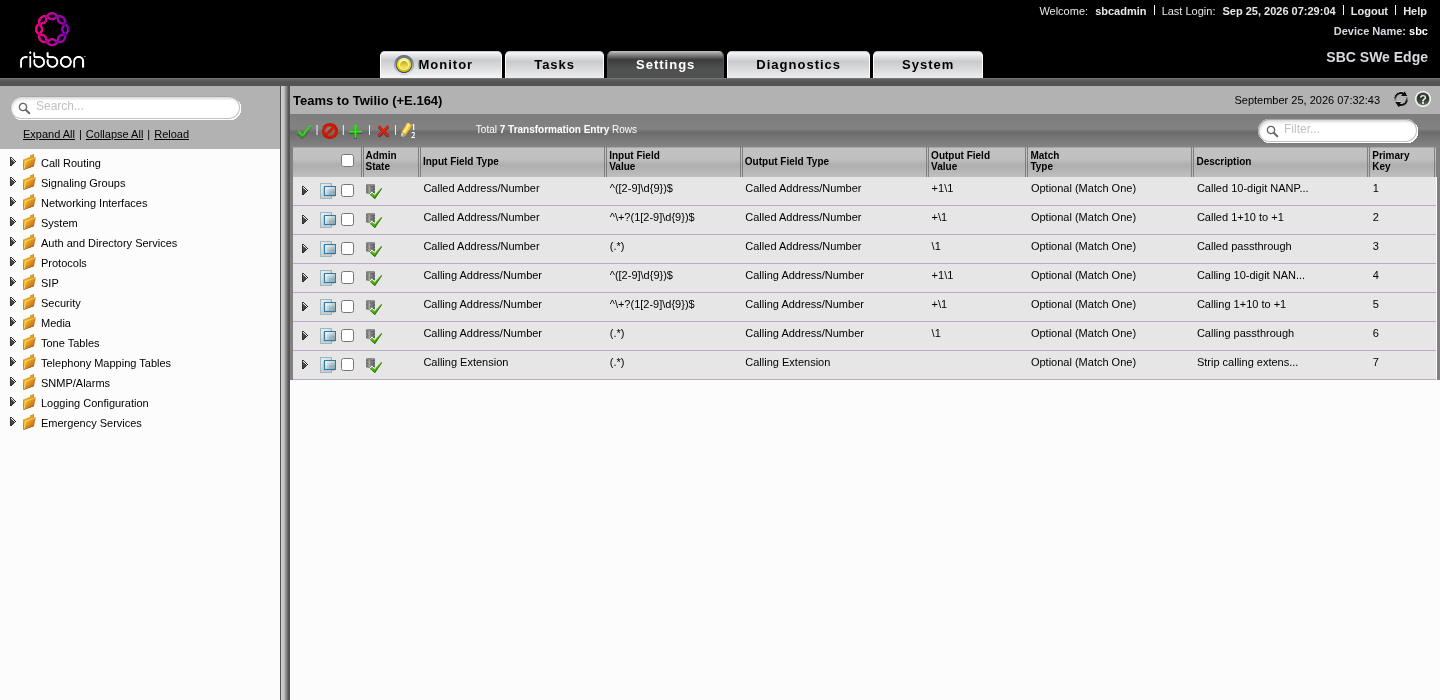
Settings > Call Routing > Transformation, two tables. All entries are Optional (Match One):
| # | Field | Input regex | Output |
|---|---|---|---|
| 1 | Called Address/Number | ^([2-9]\d{9})$ | +1\1 |
| 2 | Called Address/Number | ^\+?(1[2-9]\d{9})$ | +\1 |
| 3 | Called Address/Number | (.*) | \1 (passthrough, e.g. international) |
| 4 | Calling Address/Number | ^([2-9]\d{9})$ | +1\1 |
| 5 | Calling Address/Number | ^\+?(1[2-9]\d{9})$ | +\1 |
| 6 | Calling Address/Number | (.*) | \1 (anonymous etc.) |
| 7 | Calling Extension (Teams to Twilio only) | (.*) | empty (strip ;ext=) |
Settings > Call Routing > Call Routing Table, two tables:
| Table | Used by | Entry | Destination | Transformation | Media |
|---|---|---|---|---|---|
| From Twilio | Twilio SG | all numbers | Teams SG | Twilio to Teams | Teams media list, Audio Stream Mode DSP, transcoding enabled |
| From Teams | Teams SG | all numbers | Twilio SG | Teams to Twilio | Twilio media list, DSP, transcoding enabled |
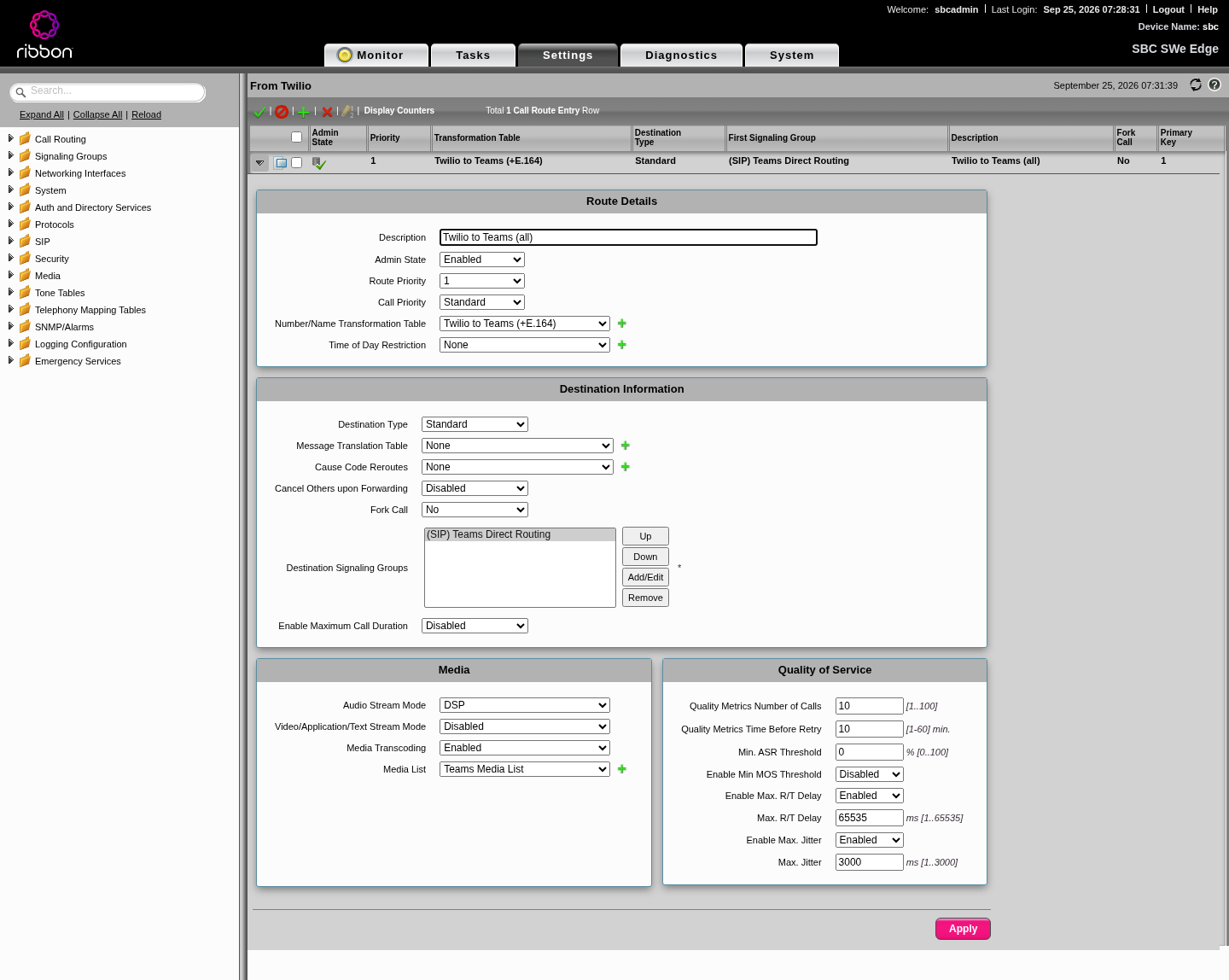
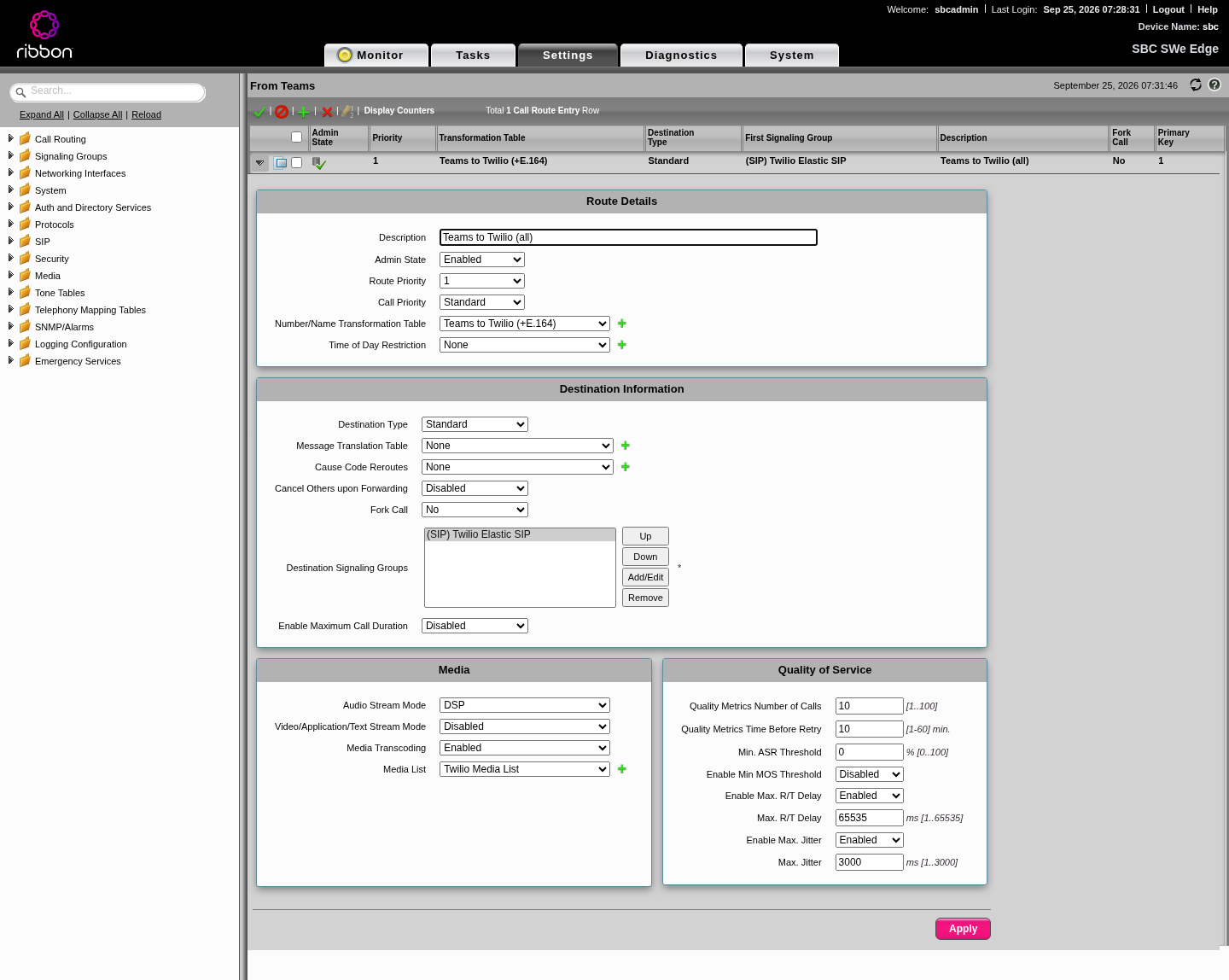
Each signaling group points at the table named after where calls come from.
Step 10: Pair the SBC in Teams
In Teams PowerShell:
Connect-MicrosoftTeams

# 1. Register the SBC. The FQDN must be under a verified tenant domain.
New-CsOnlinePSTNGateway -Fqdn sbc.example.com -SipSignalingPort 5061 `
  -Enabled $true -MaxConcurrentSessions <licensed sessions>

# 2. A PSTN usage, a voice route that uses the SBC, and a policy.
Set-CsOnlinePstnUsage -Identity Global -Usage @{Add="Twilio-US"}
New-CsOnlineVoiceRoute -Identity "Twilio-US-All" -NumberPattern ".*" `
  -OnlinePstnGatewayList sbc.example.com -OnlinePstnUsages "Twilio-US" -Priority 1
New-CsOnlineVoiceRoutingPolicy -Identity "Twilio-US" -OnlinePstnUsages "Twilio-US"

# 3. Give a user a number on Direct Routing and the policy.
Set-CsPhoneNumberAssignment -Identity user@example.com `
  -PhoneNumber +15550100000 -PhoneNumberType DirectRouting
Grant-CsOnlineVoiceRoutingPolicy -Identity user@example.com -PolicyName "Twilio-US"
Then open Teams admin center > Voice > Direct Routing and look at the SBC's health:
| What it says | What it means |
|---|---|
| Active, green | Teams is getting OPTIONS from the SBC and the SBC answers Teams' OPTIONS |
| Inactive. The trunk never connected | The SBC has never opened a TLS connection to Teams. Look at interface binding (Step 1), routes (Step 6), certificates (Steps 3 and 4) and the Contact FQDN (Step 7.3) |
| Warning about OPTIONS | TLS works but OPTIONS go unanswered one way. Usually NSG or the federated IP list |
It can take up to 15 minutes after the SBC is fixed for the status to update.
Step 11: Check health the right way
We lost hours trusting the wrong counters. Here's what to believe:
| Signal | Trust it? | Notes |
|---|---|---|
Signaling group counters rt_OutOptions / rt_In2xxResp | No | They kept climbing while the groups were bound to mgt0 and nothing was actually leaving the box |
| SIP server events "SIP Server Not Responding" / "Became Responsive" | Yes | Flapping means routing or NSG trouble |
| SIP server counters: transactions vs transaction failures | Yes | Failures should stay at 0 |
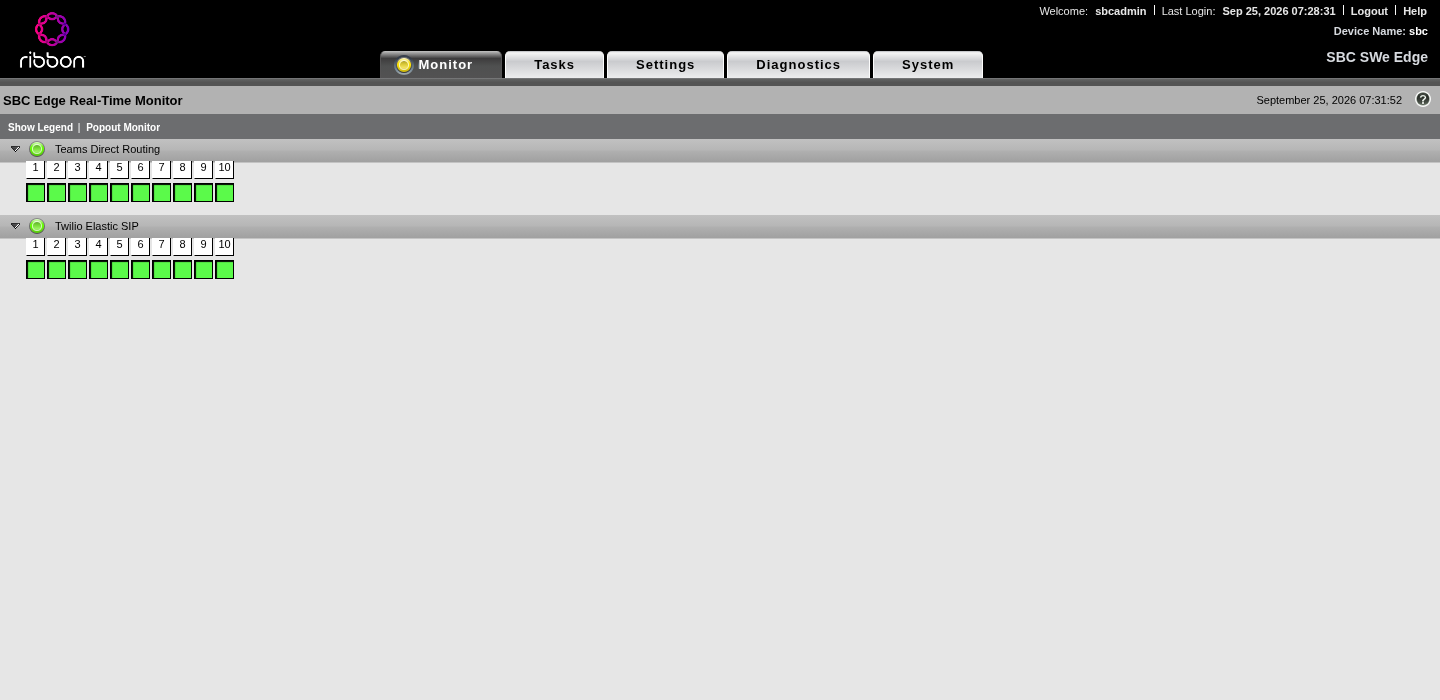
| Monitor tab, signaling groups green, server table "Up" | Yes, as a first check | |
| Teams admin center health | Yes | The only view from Microsoft's side |
| A real test call, both directions | The only real proof |
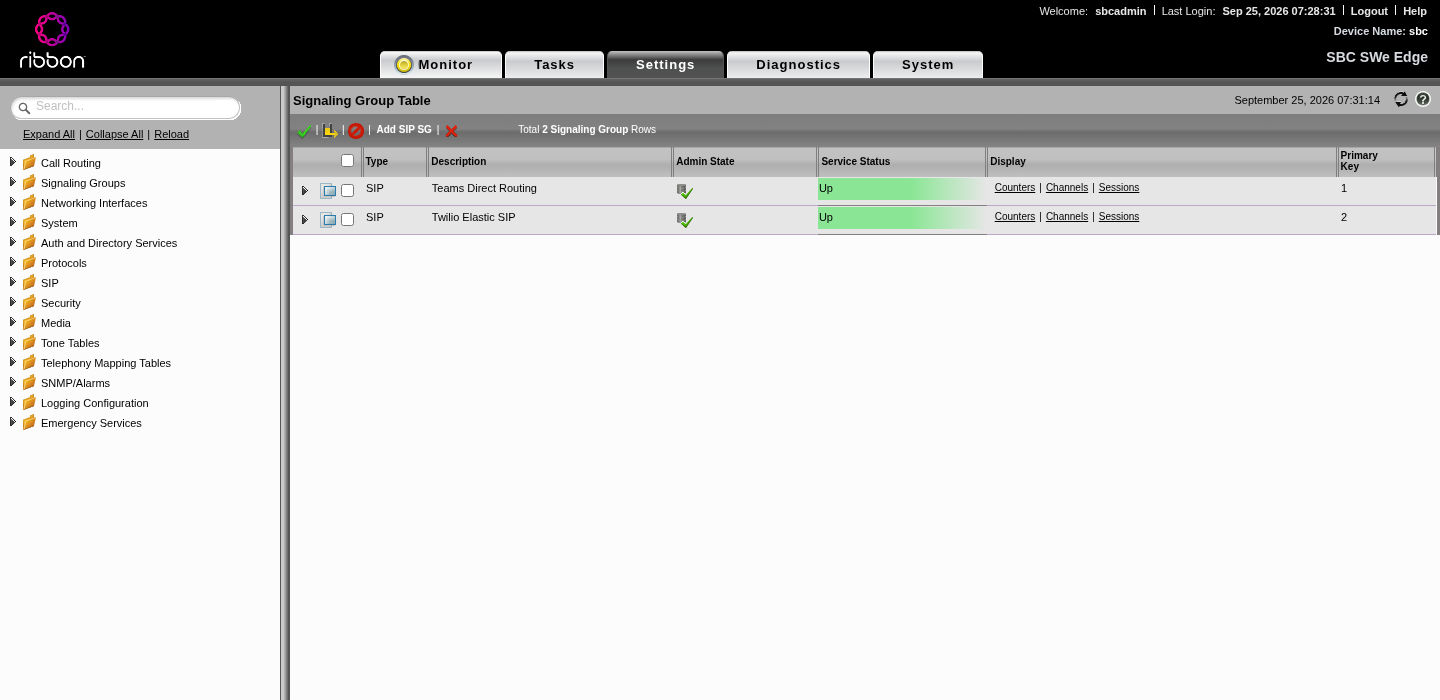
For deeper digging, the SBC can capture packets on Ethernet 1 (Diagnostics tab, or REST /rest/packetcapture?action=startcapture). Remember everything is TLS, so you'll see sizes and timing, not SIP text.
Step 12: Licensing and the known open issue
What the trial gives you
A fresh SWe Lite runs on a 30 day embedded trial license:
| Feature | Trial |
|---|---|
| SIP Signaling Sessions | 5 |
| Enhanced Media Sessions with Transcoding (DSP) | 3 |
| Enhanced Media Sessions without Transcoding | Not licensed |
| Proxy Local SRTP | 0 |
| SIP Registrations | 5 |
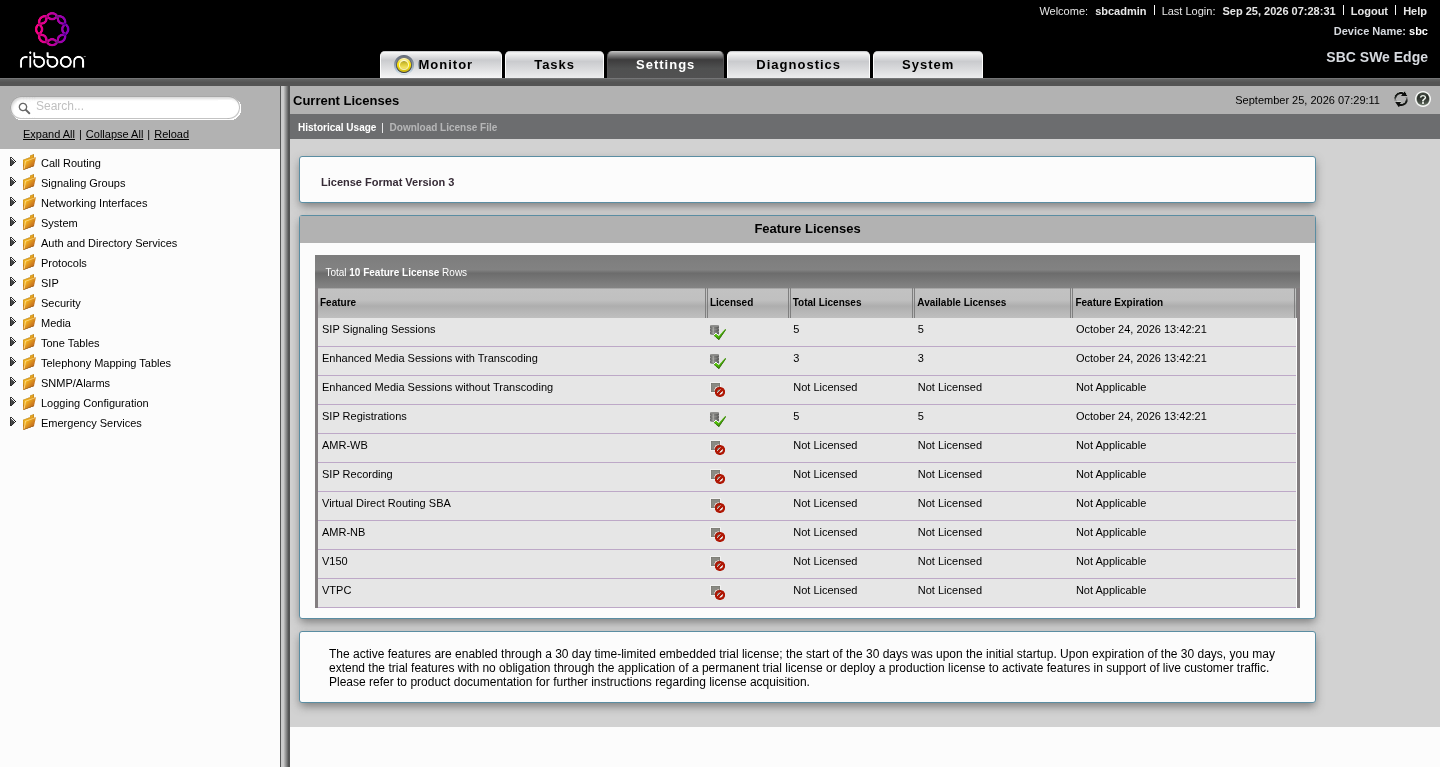
With SRTP on both legs, the SBC has to decrypt and re-encrypt media. With 0 Proxy Local SRTP licensed, every call must use a DSP session, which caps the trial at 3 concurrent calls.
Licenses are locked to the VM
Ribbon SWe Lite licenses are tied to a hardware ID (SweLiteId, shown in the license page as <hardware-id>). If you rebuild the VM, the ID changes and your license stops fitting ("Failed To Apply License: SWe Edge license has incorrect fingerprint"). Ribbon support has to rehost it to the new ID. Ask them to include enough media sessions (DSP, or Proxy Local SRTP) for your SRTP to SRTP call count, not just SIP sessions.
Known open issue
With everything above in place, inbound Twilio calls reach the SBC on 5062 and the SBC replies 100 Trying, then 503 within about 2 ms. Twilio logs error 32011. Packet captures show no INVITE going to Teams. The call is refused inside the SBC before the Teams leg starts.
Things we tried that did not change it: switching media to proxy mode, Teams MKI 1 vs 0, setting the private media source IP, turning off all DSP features on the route, and putting the Teams signaling group on the Twilio SIP profile.
An instant local reject with no outbound INVITE fits a license or resource check, so our lead suspect is the trial's missing media license types for SRTP to SRTP. We're retesting once the rehosted license is applied, and will update this article with the result. If you hit the same 503, check your license page first.
---
Troubleshooting
| Symptom | Where you see it | Cause | Fix |
|---|---|---|---|
| "Inactive. The trunk never connected" | Teams admin center | SBC never opened TLS to Teams: SGs bound to mgt0, no default route via Ethernet 1, bad cert chain, or IP in Contact | Two NICs (Step 1), routes (6.1), certs (3, 4), FQDN in Contact (7.3), bounce SGs |
| SGs configured but bound to mgt0; event "this SG needs to be bounced manually" | SBC alarms/events | Single NIC VM, or interface changed without a bounce | Add the WAN NIC; disable and re-enable each SG |
| Error 14026 | Setting next hop on Ethernet 1 | Interface is on DHCP | Use a static default route via the WAN gateway (6.1) |
| Error 31043 | Adding the second SG to a TLS port | Two SGs on one port with different TLS profiles (13.x) | Separate ports: Teams 5061, Twilio 5062 (Step 8) |
| Error 15039 | Certificate import | Legacy PKCS12 encryption | Rebuild with AES-256-CBC and SHA-256 MAC (3.2) |
| Error 15026 | REST certificate import | Multipart upload | Send base64 in form fields (3.2) |
| Certificate chain errors, Verify Status not OK | SBC certificate page, TLS failures | Missing root or intermediate | Import the roots in Step 4; check chains with openssl s_client |
| Twilio 32011 | Twilio call logs | Twilio couldn't complete the call to your SBC: wrong port in origination URI, NSG, mutual TLS on Twilio's port, or the SBC rejecting | Origination ...:5062;transport=tls, NSG for all Twilio ranges, Twilio TLS profile without mutual auth, check the SBC's response |
| 503 from the SBC right after 100 Trying | Twilio logs, SG "egress calls rejected" counter | SBC refused the call before sending to Teams; in our case suspected license/resources | See Step 12. Check licenses, channel counts, media lists |
| Servers flap "Not Responding" / "Became Responsive" | SBC events | Some traffic leaving through mgt0 | Default route via Ethernet 1 (6.1) |
| Programmable Voice call rejected | SBC | <Dial><Sip> sent plain RTP to a "Required" SRTP profile | Add ;secure=true to the SIP URI |
| "Src ip does not match proxyset" | Earlier on AudioCodes Live Hub, same root cause applies | Twilio retried from an edge that wasn't allowed | Allow every Twilio signaling range (Step 5) |
| "Restricted Dest Number" / "Restricted Source Number" | Earlier on AudioCodes Live Hub | The number wasn't on the hosted SBC's allowed list | On a hosted SBC, add the number; on your own Ribbon, check transformations and routes |
| Web UI unreachable after adding the second NIC | Browser | Default route now points at Ethernet 1, or the public IP moved | Use the admin public IP; add the /32 route to your admin IP via the mgmt gateway (6.1) |
What the official guide covers, and what it doesn't
The Twilio and Ribbon interop guide ("Ribbon SBC Edge SWe Lite R9.0 on AWS Interop with Cisco UCM and Microsoft Teams Direct Routing for Twilio Elastic SIP Trunking") is worth reading. It covers:
- Viewing licenses and importing trusted CA certificates.
- The logical interfaces (Admin IP, Ethernet 1, Ethernet 2) and the concept of static routes.
- The Easy Config wizard for "SIP Trunk to Microsoft Teams", then manual fixes the wizard misses: ringback on 180/183, Early 183, static NAT, OPTIONS monitoring, session timers, Send Assert Header Never and Trusted Interface off on the Twilio profile.
- Moving the Twilio trunk to TLS and SRTP (crypto suite, MKI 0, TLS listen port).
- Transformation tables, call routes, and a Privacy header rule so Teams callers aren't sent to Twilio as anonymous.
- The Twilio console: IP ACL, trunk, termination and origination URIs, numbers.
Where it falls short for Azure and for this exact setup:
| Topic | Guide | What you actually need |
|---|---|---|
| Platform | AWS, with SBC deployment links out to Ribbon docs | Azure image, Gen1 VM sizes, quota and capacity checks |
| Interfaces | Assumes data interfaces exist; its lab uses Ethernet 1 for Twilio and Ethernet 2 for Teams | Says nothing about the fact that mgt0 never carries SIP, or that a single-NIC Azure VM silently breaks everything. You need a second NIC |
| Routing | Explains what a static route is | The specific default route via the WAN gateway, the /32 back to your admin IP, and why you can't set next hop on DHCP (14026) |
| NAT | "Enable Static NAT and map the respective IP addresses" | Which public IP goes where in Azure, and that SGs must be bounced after interface changes |
| Ports and TLS | Twilio on UDP 5060 first, then TLS 5061; Teams via the wizard | 13.x forbids different TLS profiles on one port (31043); Teams needs mutual TLS, Twilio can't do it, so Twilio needs its own port and profile |
| Twilio auth | IP ACL | We used a credential list with digest auth, which needs the Remote Authorization table with a .* From match |
| Certificates | "Import root and intermediates" | Which roots Teams and Twilio chain to today, and how to check |
| Teams side | A link to Ribbon's Teams article | The FQDN requirements, PowerShell pairing and how to read Teams health |
| Health | Monitor tab and test calls | Which counters lie, and which events to trust |
| Licensing | "Acquire cloud SIP sessions" | Trial limits, SRTP media licensing, hardware-ID locking and rehosting |
Checklist
Azure
- Marketplace terms accepted; Gen1 compatible VM size with quota and capacity
- Two subnets (mgmt 10.8.2.0/24, WAN 10.8.3.0/24), two NICs, mgmt NIC primary
- Call public IP on the WAN NIC, separate admin public IP on the mgmt NIC
- NSG (WAN): TCP 5061 from both Microsoft /14s; UDP media range from both Microsoft /14s; TCP 5062 from all Twilio signaling ranges; UDP media range from 168.86.128.0/18
- NSG (mgmt): TCP 443 from your admin IP only
DNS and certificates
sbc.example.compoints to the call IP; domain verified in Microsoft 365- Public cert with the SBC FQDN as SAN, ISRG Root X1 chain, imported as SBC Primary Certificate, Verify Status OK
- Trusted CAs: DigiCert Global Root CA and G2, Microsoft 2017 and G2 roots, ISRG Root X1 and your intermediates
- Renewal reminder set (90 days)
SBC networking
- Ethernet 1 up with the WAN private IP
- Static route 0.0.0.0/0 via the WAN gateway; /32 to your admin IP via the mgmt gateway; survives a reboot
- DNS 168.63.129.16; host name and domain set
- Media port range matches the NSG
Teams leg
- TLS profile: 1.2 to 1.3, mutual auth on; listen port TLS 5061
- SIP profile: FQDN in From and Contact, Timer required
- Server table: sip, sip2, sip3 on TLS 5061 with OPTIONS
- SRTP required, AES_CM_128_HMAC_SHA1_80; G.711 media list
- SG: Ethernet 1, static NAT to the call IP, federated Microsoft ranges, ringback auto 180/183, Early 183, RTCP mux
Twilio leg
- Own TLS profile without mutual auth; listen port TLS 5062
- Server table: your-trunk.pstn.twilio.com TLS 5061, remote auth table with
.*match - SRTP required, MKI 0; G.711 media list
- SG: Ethernet 1, static NAT, federated Twilio ranges
- Twilio trunk: secure trunking, origination
sip:sbc.example.com:5062;transport=tls, credential list, numbers attached - Programmable Voice
<Sip>URIs include;secure=true
Routing and Teams
- Transformation tables to +E.164 both ways; routes From Twilio to Teams and From Teams to Twilio
- SGs bounced after interface changes; both green
New-CsOnlinePSTNGateway, PSTN usage, voice route, voice routing policy, user number assigned- Teams admin center shows the SBC active
Proof
- No "Not Responding" flaps; transaction failures at 0
- License covers your SIP sessions and SRTP to SRTP media sessions, on the current hardware ID
- A real call in both directions, with two-way audio
Outgrown your technology?
Tell me what's going on. I read every message personally and usually reply within a day.